
Ambient Weather WS-5000 vs WeatherFlow Tempest: Which Weather-Station Setup Fits Your Home?
Choose the WS-5000 if you want its included display tablet and separate array/rain-cup kit, and can mount and reach both outdoor parts. It can also send data to an Ambient Weather Network dashboard when Wi-Fi is enabled. Choose Tempest if you prefer a no-dedicated-display setup with app/browser access through its 2.4 GHz hub and can site its single outdoor sensor. The available manufacturer materials do not establish a weather-accuracy or maintenance-burden winner.
Published by Pickoryx · Published 2026-10-22
Source checked 2026-10-22 10:51 UTC
Products compared
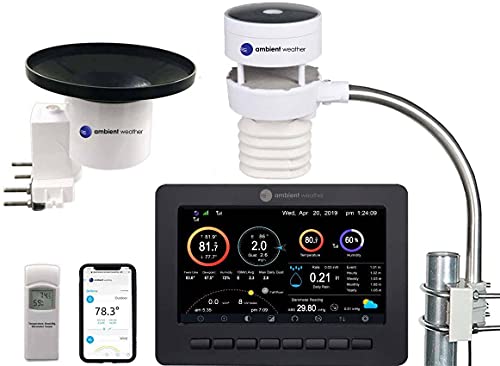
Product A · ASIN B087V6N5WZ
Ambient Weather WS-5000
Last observed offer
$449.99
Per listed package.
Offer eligibility must be confirmed on Amazon.
Checked 2026-10-26 22:24 UTC. Price and availability may change.
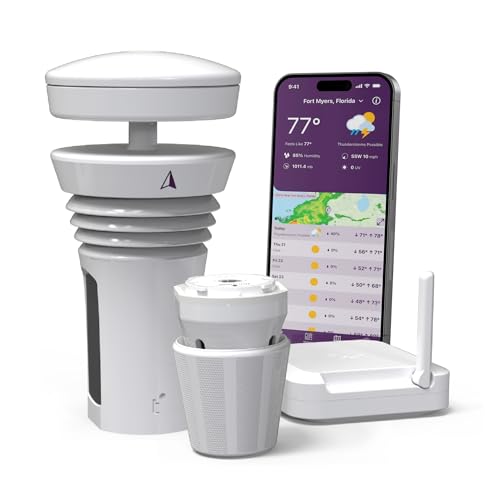
Product B · ASIN B0868WY7NY
WeatherFlow Tempest Weather Station
Last observed offer
$349.00
Per listed package.
Offer eligibility must be confirmed on Amazon.
Checked 2026-10-26 22:24 UTC. Price and availability may change.
Pickoryx may earn a commission from qualifying purchases through the paid Amazon links on this page, at no added cost to you.
The buying question
Which setup better fits the outdoor mounting options and the way you want to view station data?
The WS-5000 includes a local display and separate outdoor components, and it can also send data to an Ambient Weather Network dashboard when Wi-Fi is enabled. Tempest uses one outdoor sensor with included flat-base and pole-mount options, plus a hub for app or browser access.
Quick verdict
Choose Ambient Weather WS-5000 if
- You want an included local display and may turn station Wi-Fi off, understanding that new readings then stop uploading to Ambient Weather Network. The sources do not establish whether previously uploaded dashboard data remains accessible in that state.
- Your yard or mounting plan can accommodate and keep accessible the separate ultrasonic array and rain gauge, including the rain cup's documented cleaning interval.
Choose WeatherFlow Tempest Weather Station if
- You prefer not to have a dedicated display and plan to use Tempest's app or browser through its 2.4 GHz-connected hub. The WS-5000 also supports an Ambient Weather Network dashboard when Wi-Fi is enabled.
- You can place the single sensor in a sunny, open, stable location and provide the hub's required 2.4 GHz Wi-Fi connection.
When the recommendation changes
- If an included local screen matters, the WS-5000 has one and can also send data to Ambient Weather Network when Wi-Fi is enabled. If you prefer a no-display setup and will use Tempest's app/browser through its 2.4 GHz hub, Tempest fits that routine; the WS-5000 also has an online dashboard.
- If your mounting site cannot satisfy the selected maker's placement guidance or allow access for the WS-5000 rain-cup cleaning, reassess the site before choosing either system.
The differences that matter
Sensor Placement And Maintenance
Ambient Weather WS-5000
The WS-5000 package has a display tablet, ultrasonic array, separate rain gauge, and indoor transmitter. Its manual gives separate setup and mounting steps, recommends easy access, and says to clean the rain gauge every few months.[1, 2]
WeatherFlow Tempest Weather Station
The Tempest package lists one outdoor sensor plus an included flat base and pole mount. The maker recommends an open, sunny, level, stable, accessible site; the current setup and siting pages do not state a routine cleaning or battery-change interval for this listing.[3, 4]
What this changes: Choose around the physical location you can provide: WS-5000 needs room and access for two separate outdoor components, including the rain cup that its manual says to clean; Tempest uses one outdoor sensor with two included mounting options but still needs a suitable sunlit, stable location. The checked Tempest pages do not establish a lower maintenance burden.[2, 3, 4]
Console And Data Workflow
Ambient Weather WS-5000
The WS-5000 includes a powered display tablet that synchronizes with indoor and outdoor transmitters and shows readings. Its maker also says the station can connect to Ambient Weather Network for a customizable online dashboard; the manual documents a setting to turn Wi-Fi off.[2, 1]
What this changes: The WS-5000 pairs an included local screen with an optional network-dashboard path when Wi-Fi is enabled. Tempest is the no-dedicated-display option, with app/browser viewing through its 2.4 GHz-connected hub. Choose according to whether the local screen or a no-screen setup fits your routine; these setup differences do not establish accuracy or forecast quality.[2, 3, 5]
Best for your routine
A buyer who wants an included at-home display and may turn station Wi-Fi off, with new AWN uploads paused while it is off.
Best fit: Ambient Weather WS-5000
Based on listed features, not comparative testing.
The WS-5000 display is a local viewing option. Turning station Wi-Fi off stops new readings from uploading to Ambient Weather Network; the sources do not establish whether previously uploaded dashboard data remains accessible. This is a screen-first choice, not evidence about offline accuracy or forecasts.
A buyer who prefers no dedicated display and plans to use Tempest's app/browser through the 2.4 GHz-connected hub.
Best fit: WeatherFlow Tempest Weather Station
Based on listed features, not comparative testing.
Tempest supports app/browser data access through its hub, while the WS-5000 also supports an Ambient Weather Network dashboard when Wi-Fi is enabled. This scenario favors the no-display setup, not exclusive remote access or measured weather performance.
Value and trade-offs
One or both observed offers have eligibility conditions, so no unrestricted price difference is shown.
Compare current exact-model offers against the display, included sensor layout, mounting needs and data-viewing routine you will actually use; no fixed premium is assumed here.
There is not enough price history here to recommend buying now or waiting; compare current exact-model offers and check the seller, condition, included hardware and return terms before ordering.
Limitations
- No hands-on comparison or controlled accuracy, forecast, range, or reliability testing was conducted; maker specifications and setup guidance do not establish which station measures weather better.
- The manufacturer page includes a T26 image and says the battery is replaceable on Tempest 26 models. This comparison does not extend that model-specific statement to every Tempest unit.
- The current Tempest setup and siting pages checked here do not provide a routine cleaning or battery-change schedule for this listing. That is not proof of a lower or absent maintenance burden.
- The WS-5000 manual gives conflicting battery-replacement intervals in its Site Survey and Array Maintenance sections, so this comparison does not recommend a battery interval. It says to clean the rain gauge every few months; follow the current instructions for the selected unit.
Questions shoppers ask
Does the WS-5000 include a screen?
Yes. The WS-5000 kit includes a powered display tablet that synchronizes with the indoor and outdoor transmitters. Its maker also says the station can connect to Ambient Weather Network for an online dashboard. Tempest's current product page says it has no dedicated display and points users to its app or browser.
What outdoor space and access should I plan for?
The WS-5000 uses a separate ultrasonic array and rain gauge; its manual recommends accessible placement and says to clean the rain gauge every few months. Tempest uses one outdoor sensor, and the maker recommends an open, sunny, stable site. Check the actual mounting spots before buying; neither setup guide proves a measurement winner.
Can I use Tempest without 2.4 GHz Wi-Fi?
The maker says Tempest's included hub requires 2.4 GHz Wi-Fi for continuous uploading and anytime data access. The WS-5000 also offers an Ambient Weather Network dashboard when station Wi-Fi is enabled. With WS-5000 Wi-Fi off, new station readings stop uploading and the included display remains a local viewing option; the available sources do not establish whether previously uploaded dashboard data remains accessible. Confirm your network can support the Tempest hub if you choose Tempest.
Methodology and sources
Compared the selected WS-5000 kit's parts, placement and care instructions with the current Tempest product listing, quick-start steps and siting guidance. No weather measurements were compared.
AI assistance was used to organize the manufacturer specifications and explain which setup may fit a buyer's stated needs. Pickoryx did not test either station.
View 5 sources
- 1.Ambient Weather WS-5000 Ultrasonic Smart Weather StationAmbient Weather · Official specifications · Source checked 2026-10-22 10:51 UTC
Evidence used on this page
- Product overview, SKU WS-5000; Ambient Weather Network/dashboard; TFT display; complete kit; Wi-Fi option: The exact WS-5000 listing identifies SKU WS-5000, states the station can connect to Ambient Weather Network for a customizable online dashboard, describes the included desktop TFT display and separate array/rain cup/indoor sensor, and describes Wi-Fi transmission as an optional setting. AWN+ is an enhanced one-month trial for new users; no promotional accuracy or superiority language is used.
- 2.WS-5000 Wi-Fi Ultrasonic Solar Powered Wireless Weather Station User Manual, version 1.3Ambient Weather · Official specifications · Source checked 2026-10-22 10:51 UTC
Evidence used on this page
- Version 1.3; printed p.7 Site Survey; printed pp.42–44 Weather Server; printed p.76 §10.1 Array Maintenance; display and Wi-Fi settings: The exact WS-5000 version 1.3 manual identifies separate kit components, display operation and a Wi-Fi-off setting, and supports a rain-gauge cleaning interval of every few months. It gives conflicting battery-replacement intervals: 2–3 years in Site Survey (printed p.7) and 1–2 years in §10.1 Array Maintenance (printed p.76). This comparison does not select or recommend either interval.
- 3.Tempest Weather StationWeatherFlow Tempest · Official specifications · Source checked 2026-10-22 10:36 UTC
Evidence used on this page
- In the Box; Wi-Fi; data access FAQ: The current US Tempest product page lists a sensor, Wi-Fi Hub, flat base and pole mount in the box, says the hub requires 2.4 GHz Wi-Fi for continuous upload/anytime access, and says data can be viewed in the app or browser with no dedicated display. The page includes a T26 image and a battery statement limited to T26 models; this comparison does not extend T26-specific claims to other Tempest units.
- 4.Siting & Installation for TempestWeatherFlow Support · Official support · Source checked 2026-10-22 10:36 UTC
Evidence used on this page
- Siting recommendations; types of installations; orientation and alignment; vibration warning: The Tempest support guide recommends an accessible, open, sunny placement, generally 6–8 feet above ground, upright and level; it describes the included flat base and pole mount and warns that vibration can affect the haptic rain sensor. These are siting instructions, not comparative accuracy evidence or a routine maintenance schedule.
- 5.Tempest Quick Start GuideWeatherFlow Support · Official support · Source checked 2026-10-22 10:36 UTC
Evidence used on this page
- Setup steps and additional tips: The guide says initial setup uses the Tempest app with Bluetooth enabled on a mobile device and a 2.4 GHz Wi-Fi network; the included hub connects to 2.4 GHz Wi-Fi. It describes the included flat base and screw/keyhole mount and says a standard camera mount is not included.