
Anker 351 A9192 vs Kasa HS300
Choose Anker 351 A9192 for twelve AC sockets and a conventional master switch. Choose Kasa HS300 for six independently controlled outlets with scheduling and energy monitoring. Match the body shape to your space, and keep the combined load within the same published 15 A / 1875 W limit.
Published by Pickoryx · Published 2026-10-05
Source checked 2026-10-05 19:57 UTC
Products compared
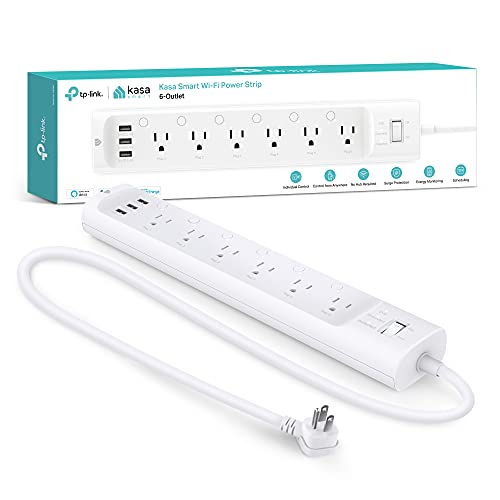
Product A · ASIN B07G95FFN3
Kasa HS300 (White, US)
Last observed offer
$49.99
Per listed package.
Offer eligibility must be confirmed on Amazon.
Checked 2026-10-19 18:52 UTC. Price and availability may change.

Product B · ASIN B09SG2Q23M
Anker 351 A9192 (Black, 5 ft)
Last observed offer
$28.99
Per listed package.
Offer eligibility must be confirmed on Amazon.
Checked 2026-10-19 15:16 UTC. Price and availability may change.
Pickoryx may earn a commission from qualifying purchases through the paid Amazon links on this page, at no added cost to you.
The buying question
Do you need more physical plug positions, or separate control and energy visibility for connected devices?
Anker provides twelve sockets and a master switch in a shorter, wider strip. Kasa provides six independently controlled sockets and energy monitoring in a longer, narrower strip, with a Wi-Fi and app setup.
Quick verdict
Choose Kasa HS300 (White, US) if
- You want to control or schedule one connected device separately from the others.
- You want connected-device energy visibility and can set up Kasa on secured 2.4 GHz Wi-Fi.
Choose Anker 351 A9192 (Black, 5 ft) if
- You need more than six direct AC connections within the strip’s total rating.
- You prefer a physical master switch and a shorter, wider layout.
When the recommendation changes
- Your adapter bodies or available mounting area do not fit the published layout.
- You need independent outlet automation rather than a single master switch.
- The combined load exceeds either strip’s rating; more sockets do not solve that problem.
The differences that matter
Outlet Control And Energy Visibility
Kasa HS300 (White, US)
Six AC outlets can be controlled and scheduled individually through Kasa, with energy monitoring for connected devices. The app setup uses a secured 2.4 GHz Wi-Fi network.[1, 2]
Anker 351 A9192 (Black, 5 ft)
A conventional strip with one physical On/Off switch for the strip and indicator lights. The complete guide shows plug-in operation with that switch, without individual outlet controls or an energy-use interface.[5]
What this changes: Choose HS300 when you need to schedule or check a connected device separately. Choose Anker when physical switching and outlet expansion are sufficient; its twelve sockets do not add smart-control functions.[1, 2, 5]
Plug Layout And Mounting
What this changes: HS300 suits a longer, narrower placement area and up to six direct AC connections. Anker supplies more socket positions in a shorter, wider body. Measure your adapters and cable exits too; socket count does not guarantee every bulky plug will fit together.[1, 2, 4, 5]
Best for your routine
Scheduling and checking selected connected devices
Best fit: Kasa HS300 (White, US)
Based on listed features, not comparative testing.
HS300 supplies separate outlet control and energy monitoring. Allow for its six-socket limit and app/network setup; monitoring alone does not promise lower bills.
More plug positions with conventional switching
Best fit: Anker 351 A9192 (Black, 5 ft)
Based on listed features, not comparative testing.
Anker provides twelve socket positions and one master switch. Confirm that adapter shapes fit and that the total load stays within the rating.
Value and trade-offs
One or both observed offers have eligibility conditions, so no unrestricted price difference is shown.
If HS300 costs more, separate outlet control, scheduling and energy visibility are the reasons to consider the difference. If you will only use a master switch, Anker’s connection layout may be the more useful fit. Neither monitoring nor a higher price establishes energy savings or better surge protection.
There is not enough verified price history here to recommend buying now or waiting.
Limitations
- Pickoryx has not tested these strips. No surge-performance, safety-superiority, energy-savings or reliability winner is established.
- HS300 USB total-power figures differ between available records, and the selected retail hardware revision is unverified. USB charging power is not used to choose a winner here.
- Actual adapter clearance and mounting hardware must be checked for your equipment and the supplied revision. Published body dimensions do not include attached plugs.
- No claim is made about remote-control behavior during an internet or power outage, or support for additional smart-home platforms.
Questions shoppers ask
Can I attach either strip under a desk?
Do not assume that from the presence of mounting slots. Anker advertises wall mounting. The HS300 US V1 guide allows desktop placement and wall mounting, but explicitly cautions against mounting on a desk or similar furnishing surface. Follow the instructions for the exact hardware supplied instead of reusing another revision’s template.
Does Anker’s twelve-outlet layout allow a larger total load?
No. Both US specifications give a 15 A / 1875 W total limit. Extra sockets do not provide a separate full power allowance for each device. TP-Link also instructs you to connect HS300 directly to a grounded outlet, so do not plug one of these strips into the other.
Methodology and sources
Compared the outlet-control workflow, socket arrangement, published body dimensions and installation constraints. USB power discrepancies and revision-specific mounting details were kept out of comparative advantages.
AI assisted with source comparison and drafting.
View 5 sources
- 1.Kasa HS300 US product specificationsTP-Link / Kasa Smart · Official specifications · Source checked 2026-10-05 19:53 UTC
Evidence used on this page
- Features; Independent Control; communication, dimensions and total-load specifications: Six AC outlets can be independently controlled and scheduled in Kasa, with connected-device energy monitoring. The US page gives secured 2.4 GHz Wi-Fi requirements, enclosure dimensions and a total 15 A / 1875 W load limit.
- 2.HS300 US V1 User Guide, 1910012957 REV1.0.1TP-Link · Official specifications · Source checked 2026-10-05 19:57 UTC
Evidence used on this page
- Printed pp. 2–4: controls and wall placement; pp. 5–8: app setup and operation; p. 14: furniture-mounting caution: The V1 guide shows independent outlet controls, a single-row layout, wall mounting and app setup. It permits resting on a desk but cautions against mounting to a desk or similar furnishing. Revision-specific hole spacing and USB ratings are not transferred to an unidentified revision.
- 3.Common questions about HS300TP-Link · Official specifications · Source checked 2026-10-05 19:55 UTC
Evidence used on this page
- HS300 applicability; first question on connection to another strip/UPS; circuit-breaker question: The manufacturer requires HS300 to connect directly to a grounded outlet and states that 15 A is its maximum combined load. Other broad safety statements on the page are not used to rank protection.
- 4.Anker 351 Power Strip A9192, USAnker · Official specifications · Source checked 2026-10-05 16:13 UTC
Evidence used on this page
- Exact A9192 model; 12 outlets; Easy Wall Mounting; published enclosure dimensions: The A9192 US page identifies twelve AC outlets and wall mounting, with a shorter, wider body than the published HS300 enclosure. Plug clearance still depends on the attached adapters.
- 5.Anker 351 Power Strip User Guide A9192Anker · Official specifications · Source checked 2026-10-05 16:16 UTC
Evidence used on this page
- Complete two-page guide: Overview, Using Your Power Strip and Specifications: The guide shows a conventional master On/Off switch, status lights, twelve AC sockets arranged across three columns, and plug-in operation. It specifies 125 V AC, 60 Hz, 15 A and 1875 W total AC output.