
Logitech MX Master 3S vs Apple Magic Mouse USB-C: Which One Fits Your Desk?
The MX Master 3S is the more directly documented fit for dedicated physical scrolling controls and switching among as many as three paired computers. Magic Mouse offers a simpler touch-surface interaction and an included USB-C cable for Mac pairing and charging. Choose by the controls and charging routine you prefer; the cited sources do not establish a performance winner.
Published by Pickoryx · Published 2026-10-03
Source checked 2026-10-03 23:27 UTC
Products compared
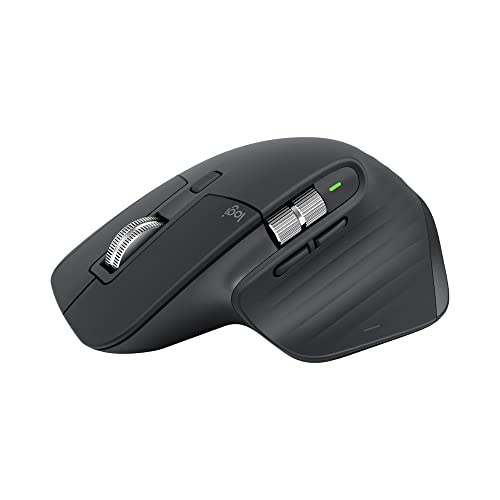
Product A · ASIN B0B11LJ69K
Logitech MX Master 3S Graphite with Logi Bolt receiver
Last observed offer
$118.99
Per listed package.
Offer eligibility must be confirmed on Amazon.
Checked 2026-10-19 15:47 UTC. Price and availability may change.

Product B · ASIN B0DL72PK1P
Apple Magic Mouse USB-C, White
Last observed offer
$79.00
Per listed package.
Offer eligibility must be confirmed on Amazon.
Checked 2026-10-19 19:10 UTC. Price and availability may change.
Pickoryx may earn a commission from qualifying purchases through the paid Amazon links on this page, at no added cost to you.
The buying question
Do you prefer physical scroll controls and multi-computer switching, or a touch surface and Apple’s USB-C pairing and charging routine?
The MX Master 3S documents dedicated wheel controls and switching among up to three computers; Magic Mouse uses a Multi-Touch surface and pairs with a Mac by connecting its included USB-C cable.
Quick verdict
Choose Logitech MX Master 3S Graphite with Logi Bolt receiver if
- You want a MagSpeed wheel with automatic or manual mode changes and a thumb wheel for side-to-side scrolling.
- You need an expressly documented mouse workflow for pairing and switching among up to three computers.
Choose Apple Magic Mouse USB-C, White if
- You prefer swiping between pages and scrolling documents on a Multi-Touch surface.
- You want the included woven USB-C cable to pair and charge the mouse through a compatible Mac USB-C port.
When the recommendation changes
- If horizontal scrolling, wheel-mode changes, or switching among multiple computers is central, the Logitech control and Easy-Switch workflow becomes more relevant.
- If you prefer swipe and document-scroll gestures on a touch surface and want to pair and charge through a Mac USB-C port, the Apple workflow becomes more relevant.
The differences that matter
Pointer Interaction And Control Workflow
Logitech MX Master 3S Graphite with Logi Bolt receiver
MagSpeed automatically shifts between line-by-line and free-spin scrolling, with a button for manual mode changes; a thumb wheel scrolls side to side. Logi Options+ enables gesture-button actions and further thumb-wheel customization.[1]
Apple Magic Mouse USB-C, White
The Multi-Touch surface supports simple gestures such as swiping between web pages and scrolling documents.[2]
What this changes: This is a preference between dedicated physical wheel controls and surface gestures, rather than a measured accuracy or speed result.[1, 2]
Charging And Multi Device Routine
Logitech MX Master 3S Graphite with Logi Bolt receiver
The MX Master 3S guide documents the included Logi Bolt receiver or direct Bluetooth pairing, Easy-Switch pairing with up to three computers, and USB-C charging with the provided cable.[1]
Apple Magic Mouse USB-C, White
Apple says Magic Mouse pairs automatically with a Mac and includes a woven USB-C cable used to pair and charge through a Mac USB-C port; the product page lists Bluetooth and USB-C.[2]
What this changes: The Logitech guide gives a specific multi-computer switching path; Apple’s page gives a Mac USB-C pairing and charging path. Pick the documented workflow that fits your hosts and ports; Apple’s page does not establish that other multi-host workflows are absent.[1, 2]
Best for your routine
Physical wheel-based scrolling and frequent host switching
Best fit: Logitech MX Master 3S Graphite with Logi Bolt receiver
Based on listed features, not comparative testing.
Logitech documents MagSpeed mode changes, a thumb wheel and Easy-Switch among up to three computers.
Touch-surface gestures and Mac USB-C setup
Best fit: Apple Magic Mouse USB-C, White
Based on listed features, not comparative testing.
Apple documents Multi-Touch gestures plus pairing and charging with its included USB-C cable connected to a compatible Mac.
Value and trade-offs
One or both observed offers have eligibility conditions, so no unrestricted price difference is shown.
Compare current checkout offers against the controls, host-switching routine, cable needs and host compatibility you will actually use.
Current offers do not establish a price history; compare checkout prices and included package contents before choosing.
Limitations
- The comparison is based on current manufacturer support and product-page descriptions; there was no hands-on test of comfort, tracking, click noise, battery life or real-world performance.
- Logitech says battery duration varies with use; its up-to-70-day statement and Apple’s about-a-month-or-more statement are manufacturer estimates under different conditions and are not a head-to-head runtime test.
- Logi Options+ is required for documented Logitech gesture-button behavior and for some customization; check supported operating systems and host compatibility before purchase.
- Apple lists Mac with macOS 15.1 or later and iPad with iPadOS 18.1 or later on this product page. Confirm your exact device and OS before buying.
- The comparison does not claim that Magic Mouse lacks multi-host behavior; Apple’s product page describes automatic pairing with a Mac but does not specify a comparable multi-computer switching workflow.
Questions shoppers ask
Which mouse has a dedicated thumb wheel for horizontal scrolling?
The MX Master 3S support guide describes its thumb wheel for side-to-side scrolling. Apple describes gestures on the Magic Mouse Multi-Touch surface instead.
What is included for charging and pairing?
Logitech’s MX Master 3S setup guide describes an included Logi Bolt receiver and Bluetooth setup; its charging section refers to the provided charging cable and USB-C charging port. Apple lists a woven USB-C Charge Cable in the box and says it can pair and charge when connected to a Mac USB-C port.
Methodology and sources
Compared the Logitech MX Master 3S setup and feature guidance with Apple’s exact white USB-C Magic Mouse product page. The comparison focuses on pointer interaction plus connection, charging and host-switching workflow.
AI assisted source review and drafting. Product behavior claims are based on cited manufacturer documentation; no hands-on testing was performed.
View 2 sources
- 1.Getting Started - MX Master 3SLogitech Support · Official support · Source checked 2026-10-03 23:27 UTC
Evidence used on this page
- Detailed Setup and Pair to a Second Computer with Easy-Switch (lines 48-71); MagSpeed, thumb wheel and gesture button (lines 90-137); Battery (lines 196-205).: The model-specific MX Master 3S support page describes included Logi Bolt receiver or Bluetooth setup, Easy-Switch pairing with up to three computers, MagSpeed scroll modes, the thumb wheel, Options+ requirements for gestures/customization and USB-C charging with the provided cable. Battery duration is described as usage-dependent.
- 2.Magic Mouse (USB-C) - White Multi-Touch SurfaceApple · Official specifications · Source checked 2026-10-03 23:27 UTC
Evidence used on this page
- Overview, What’s in the Box, Connections and Expansion, and System Requirements (lines 51-91).: The exact MXK53AM/A product page describes the white USB-C Magic Mouse, Multi-Touch gestures, Bluetooth and USB-C, automatic Mac pairing, an included woven USB-C charge cable, about-a-month-or-more battery estimate, and stated Mac/iPadOS requirements.