
Apple Pencil Pro (MX2D3AM/A) vs Apple Pencil (USB-C) (MUWA3AM/A): check iPad fit and how you work
Start with Apple’s compatibility list for your exact iPad. Apple lists Apple Pencil (USB-C) for several earlier iPad generations beyond the current Pro list; both lists include selected newer models. If both work with your iPad, choose by workflow: Pro documents squeeze, barrel-roll and haptic controls plus magnetic pairing and charging, while USB-C pairs and charges through a cable and attaches magnetically for storage. These are published feature differences, not measured drawing results.
Published by Pickoryx · Published 2026-10-17
Source checked 2026-10-17 08:15 UTC
Products compared

Product A · ASIN B0D3J71RM7
Apple Pencil Pro (MX2D3AM/A)
Last observed offer
$99.00 List Price: $129.00
Per listed package.
Offer eligibility must be confirmed on Amazon.
Checked 2026-10-19 17:43 UTC. Price and availability may change.
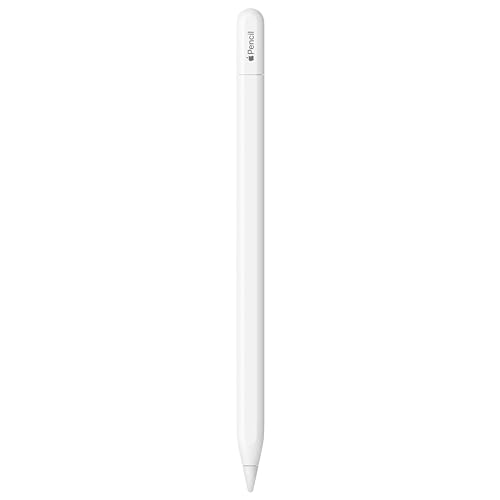
Product B · ASIN B0CL7J12YK
Apple Pencil (USB-C) (MUWA3AM/A)
Last observed offer
$69.00 List Price: $79.00
Per listed package.
Offer eligibility must be confirmed on Amazon.
Checked 2026-10-19 17:43 UTC. Price and availability may change.
Pickoryx may earn a commission from qualifying purchases through the paid Amazon links on this page, at no added cost to you.
The buying question
Does your exact iPad support the Pencil you are considering, and do Pro’s documented controls and magnetic charging or the USB-C model’s cable-based pairing and charging better fit your workflow?
Apple Pencil Pro has a shorter current compatibility list and documented squeeze, barrel-roll and haptic controls with magnetic pairing and charging. Apple Pencil (USB-C) is listed for additional earlier iPad generations and pairs and charges through a USB-C cable while attaching magnetically for storage.
Quick verdict
Choose Apple Pencil Pro (MX2D3AM/A) if
- Your exact iPad and iPadOS version are on Apple’s Pro compatibility list, and you want the listed squeeze, barrel-roll or haptic controls.
- Magnetic pairing and charging on the iPad are important to your setup.
Choose Apple Pencil (USB-C) (MUWA3AM/A) if
- Your exact iPad is on Apple’s USB-C compatibility list, including an earlier generation that is not listed for Pro.
- You prefer pairing and charging through a USB-C Charge Cable and magnetic attachment for storage.
When the recommendation changes
- Your iPad model is on one Apple compatibility list but not the other.
- You value Pro’s specifically documented squeeze, barrel-roll and haptic controls or prefer its magnetic charging workflow.
The differences that matter
Ipad Compatibility Matrix
Apple Pencil Pro (MX2D3AM/A)
Apple lists Apple Pencil Pro for iPad Pro 11-inch and 13-inch (M4 or M5), iPad Air 11-inch and 13-inch (M2, M3 or M4), and iPad mini (A17 Pro), with iPadOS 17.5 or later.[1, 3]
Apple Pencil (USB-C) (MUWA3AM/A)
Apple lists Apple Pencil (USB-C) for iPad Pro 11-inch (1st–4th generation, M4 or M5) and 12.9-inch (3rd–6th generation), iPad Air (4th or 5th generation) and 11-inch or 13-inch (M2, M3 or M4), iPad (10th generation or A16), and iPad mini (6th generation or A17 Pro), with iPadOS 17.1.1 or later.[2, 3]
What this changes: Check the exact iPad model and installed iPadOS against Apple’s list before choosing. The USB-C list includes several earlier iPad generations that do not appear on the Pro list; the current lists overlap on selected newer models.[3]
Creative Controls And Pairing Charging Workflow
Apple Pencil Pro (MX2D3AM/A)
Apple documents squeeze-to-open a tool palette, barrel roll to control shaped pen and brush tools, haptic confirmation for squeeze or double tap, a double-tap tool switch, Find My, and magnetic attachment, pairing and charging.[1]
Apple Pencil (USB-C) (MUWA3AM/A)
Apple describes Apple Pencil (USB-C) for notes, sketching, document markup and journaling; it pairs and charges through a USB-C Charge Cable and attaches magnetically to the iPad for storage.[2]
What this changes: Choose based on whether Pro’s specifically documented creative controls and magnetic charging routine are useful to you, or the USB-C model’s cable-based pairing/charging and magnetic storage routine better fits your setup. Apple’s listed features are not a test of drawing quality.[1, 2]
Value and trade-offs
One or both observed offers have eligibility conditions, so no unrestricted price difference is shown.
Price was not assessed; choose by your iPad compatibility and preferred Pencil workflow.
Price history was not assessed, so there is insufficient evidence for a buy-now or wait recommendation.
Limitations
- Compatibility can vary with the exact iPad model and software. Check Apple’s current list before buying; a family name such as iPad Pro or iPad Air is not enough to establish compatibility.
- This comparison uses Apple’s feature descriptions and compatibility information. No hands-on drawing, latency, pressure-response, comfort, battery-life or reliability testing was performed.
- Prices and current offers were not assessed.
Questions shoppers ask
Will Apple Pencil Pro work with every iPad Pro or iPad Air?
No. Apple lists specific generations and chip families for each Pencil. Check your iPad’s exact model in Apple’s compatibility guide; the USB-C and Pro lists differ.
How do the pairing and charging routines differ?
Apple says Apple Pencil Pro attaches, pairs and charges magnetically on the side of a compatible iPad. Apple Pencil (USB-C) pairs and charges through a USB-C Charge Cable and attaches magnetically for storage.
Methodology and sources
Compared Apple’s named iPad compatibility lists and minimum iPadOS versions, then compared only the controls and pairing/charging routines Apple explicitly describes for the two assigned models.
Automated research assistance organized source-backed compatibility and feature information into conditional buying guidance; no hands-on testing was performed.
View 3 sources
- 1.Apple Pencil ProApple · Official specifications · Source checked 2026-10-17 08:15 UTC
Evidence used on this page
- Product Information, Overview, Tech Specs and Compatibility; exact part MX2D3AM/A in URL; UPC shown as 195949573040: Apple’s current US product page describes squeeze, barrel roll, haptic feedback, double tap, Find My and magnetic attachment, pairing and charging, and lists compatible iPad models. It identifies the assigned model by its MX2D3AM/A product URL.
- 2.Apple Pencil (USB-C)Apple · Official specifications · Source checked 2026-10-17 08:15 UTC
Evidence used on this page
- Product Information, Overview, Tech Specs and Compatibility; exact part MUWA3AM/A in URL; UPC shown as 195949133626: Apple’s current US product page describes supported note, sketch, markup and journaling uses; pairing and charging through a USB-C Charge Cable; magnetic attachment for storage; and named compatible iPads. It identifies the assigned model by its MUWA3AM/A product URL.
- 3.Apple Pencil compatibilityApple Support · Official support · Source checked 2026-10-17 08:15 UTC
Evidence used on this page
- Apple Pencil Pro and Apple Pencil (USB-C) sections; support page published March 10, 2026: Apple Support states each model’s supported iPads and minimum iPadOS version, using “only with these iPad models” language. This is the primary source for the exact compatibility comparison.