
ASUS VA24DQ vs VA24DQSB: Which Desk Setup Fits Your Workflow?
The VA24DQSB is the better feature fit when you need height, swivel, portrait pivot, or USB ports at the display. The VA24DQ keeps the stand to tilt and omits USB 2.0 ports, so it fits a fixed setup with peripherals connected elsewhere. These are specification-based choices, not comfort or performance test results.
Published by Pickoryx · Published 2026-10-02
Source checked 2026-10-02 08:54 UTC
Products compared
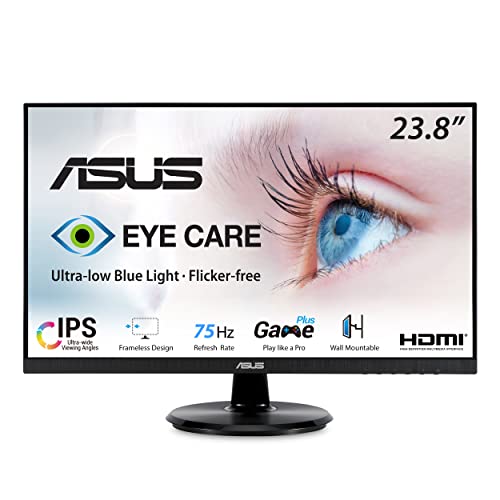
Product A · ASIN B08C5MGFXQ
ASUS VA24DQ 23.8-inch Full HD Monitor
Last observed offer
$124.00 List Price: $139.00
Per listed package.
Offer eligibility must be confirmed on Amazon.
Checked 2026-10-19 16:22 UTC. Price and availability may change.

Product B · ASIN B09F9WVYTY
ASUS VA24DQSB 23.8-inch Full HD Monitor
Last observed offer
$135.45
Per listed package.
Offer eligibility must be confirmed on Amazon.
Checked 2026-10-19 07:47 UTC. Price and availability may change.
Pickoryx may earn a commission from qualifying purchases through the paid Amazon links on this page, at no added cost to you.
The buying question
Is tilt adjustment enough, or would height, swivel, portrait rotation, and a USB peripheral hub change how you use the monitor?
VA24DQ provides a tilt-only stand and no USB 2.0 ports; VA24DQSB adds a more adjustable stand and a USB hub that needs a separate upstream connection to the computer.
Quick verdict
Choose ASUS VA24DQ 23.8-inch Full HD Monitor if
- You only need to tilt the screen and do not need monitor-based USB ports.
- Your keyboard, mouse, or storage already connects to the computer or a separate hub.
Choose ASUS VA24DQSB 23.8-inch Full HD Monitor if
- You need the monitor stand’s listed height, swivel, or portrait-pivot adjustments.
- You want two USB-A peripheral ports at the monitor and can connect its Type-B upstream cable to the computer.
When the recommendation changes
- If your desk setup changes height or orientation often, VA24DQSB’s listed stand range matters more; if it stays fixed and USB devices already connect elsewhere, VA24DQ may cover the documented needs.
The differences that matter
Stand Adjustment Workflow
What this changes: VA24DQSB supports more display-position changes; VA24DQ fits a fixed position where tilt is enough. ASUS manual editions disagree on the VA24DQ maximum upward tilt, so the comparison relies on the uncontested absence of swivel, pivot, and height adjustment rather than that exact angle. Specifications do not establish comfort or stability.[3, 2, 4]
Peripheral Connection Workflow
ASUS VA24DQ 23.8-inch Full HD Monitor
VA24DQ: no USB 2.0 ports listed in its specifications.[3]
What this changes: VA24DQSB can host USB peripherals at the display after the upstream link is connected; VA24DQ buyers can keep those devices connected to the computer or another hub.[3, 2, 4]
Best for your routine
A workspace where the user needs to raise, swivel, or rotate the monitor for portrait reading.
Best fit: ASUS VA24DQSB 23.8-inch Full HD Monitor
Based on listed features, not comparative testing.
ASUS lists height, swivel, and pivot adjustment on VA24DQSB, while the VA24DQ stand is tilt-only. This is a fit to a stated movement need, not a claim that the stand is more comfortable.
A desk where peripherals should connect at the monitor rather than at the computer.
Best fit: ASUS VA24DQSB 23.8-inch Full HD Monitor
Based on listed features, not comparative testing.
VA24DQSB provides a two-port USB 2.0 downstream hub when its upstream cable is connected; VA24DQ has no USB 2.0 ports in ASUS’s exact-model table.
A fixed landscape desk that needs only tilt and already has a preferred computer-side USB connection.
Best fit: ASUS VA24DQ 23.8-inch Full HD Monitor
Based on listed features, not comparative testing.
VA24DQ documents the needed tilt range without the extra stand movements or monitor USB ports; this recommendation does not assume it costs less.
Value and trade-offs
One or both observed offers have eligibility conditions, so no unrestricted price difference is shown.
Compare live exact-model offers and pay for the stand movements or USB hub only if they fit your setup; this comparison does not bake in a price premium.
No current price or history was checked, so compare the current exact-model offers before deciding when to buy.
Limitations
- No hands-on comparison assessed stand stability, comfort, image quality, or real-world USB speed; the choices above follow ASUS specifications.
- VA24DQSB’s hub requires the upstream Type-B-to-computer connection before its downstream USB ports work. The VA24D Series manual lists the USB cable as optional, so confirm the exact offer if you need that cable.
- VA24DQSB’s USB hub is a separate USB 2.0 peripheral path: connect its Type-B upstream port to the computer, while HDMI, DisplayPort, or VGA carries the display signal. ASUS does not describe this as USB-C laptop charging.
- ASUS manuals give two maximum upward-tilt figures for VA24DQ: +20° in the VA24DQ PDF and +23° in the VA24DQSB-series PDF. The shared facts that its stand is tilt-only and lacks height adjustment, swivel, and pivot are not in conflict.
Questions shoppers ask
Can VA24DQSB’s USB ports work without a cable to the computer?
No. ASUS says to connect the monitor USB Type-B upstream port to a computer USB Type-A port to enable the monitor’s USB ports. It is separate from the HDMI, DisplayPort, or VGA display connection.
Can the VA24DQ stand pivot into portrait orientation?
ASUS lists the VA24DQ stand as tilt-only and lists no pivot adjustment. VA24DQSB’s stand pivots ±90° after lifting the monitor to its highest position and tilting it to its maximum angle.
Methodology and sources
Compared each assigned model’s documented stand movements and USB peripheral connection path. The VA24DQSB hub’s upstream-cable requirement is included in the recommendation; monitor-side USB is kept distinct from the video inputs.
Automated tools helped locate and organize ASUS product documentation and draft this comparison. No hands-on testing was performed.
View 4 sources
- 1.VA24DQ | Monitors | ASUS USAASUS · Official specifications · Source checked 2026-10-02 08:54 UTC
Evidence used on this page
- Exact U.S. VA24DQ product page, model heading and product overview; confirms the assigned VA24DQ model and its 23.8-inch Full HD product class.: ASUS USA page for the exact VA24DQ model; used for exact-model identity and product context.
- 2.VA24DQSB | Monitors | ASUS USAASUS · Official specifications · Source checked 2026-10-02 08:54 UTC
Evidence used on this page
- Exact U.S. VA24DQSB page identifies the 23.8-inch model and lists an HDMI/DisplayPort/D-sub plus USB hub connection set. It lists the stand at +35° to -5° tilt, ±180° swivel, ±90° pivot, and 130 mm height adjustment; page sections “Extensive Connectivity” and “Height Adjustment/Swivel/Tilt/Pivot.”: ASUS USA model page confirms VA24DQSB identity, USB hub, and its listed stand movements.
- 3.ASUS VA24D Series LCD Monitor User Guide (VA24DQ edition)ASUS · Official support · Source checked 2026-10-02 08:54 UTC
Evidence used on this page
- Exact VA24DQ manual: section 2.3 p.17 lists VA24DQ tilt +20° to -5°; section 3.2 p.29 says USB 2.0 port “VA24DQ: No,” pivot/swivel/height adjustment “VA24DQ: No.” Model-specific distinctions appear in the series table.: ASUS manual directly enumerates VA24DQ stand and USB limits rather than inferring them from omitted product-page text.
- 4.ASUS VA24D Series LCD Monitor User Guide (VA24DQSB-series edition; includes VA24DQ table entries)ASUS · Official support · Source checked 2026-10-02 08:54 UTC
Evidence used on this page
- VA24D series manual explicitly names both relevant models: VA24DQSB/VA24DQSBY sections p.17 list VA24DQSB tilt +35° to -5°, ±180° swivel after stop-screw removal, 130 mm height adjustment and 90° portrait pivot; p.20 explains USB 2.0 upstream Type-B to computer Type-A and downstream use; p.32 lists one upstream and two downstream ports. The same p.32 model table lists VA24DQ as tilt -5° to +23° and no USB 2.0 port, pivot, swivel, or height adjustment.: ASUS series manual directly enumerates the assigned VA24DQSB stand and hub and the VA24DQ feature limits; the separate VA24DQ manual edition differs on its upward tilt limit.