
Beats Solo Buds vs Beats Flex: Which Daily Routine Fits?
Choose Beats Flex for separate playback-volume and voice-assistant controls and a direct plug-in charging routine. Choose Beats Solo Buds if you prefer separate earbuds and accept both the volume-versus-assistant button setting and charging through a case connected to power.
Published by Pickoryx · Published 2026-10-07
Source checked 2026-10-07 22:16 UTC
Products compared

Product A · ASIN B0D3J85SX4
Beats Solo Buds (Matte Black)
Last observed offer
$69.95 List Price: $79.99
Per listed package.
Offer eligibility must be confirmed on Amazon.
Checked 2026-10-19 10:45 UTC. Price and availability may change.
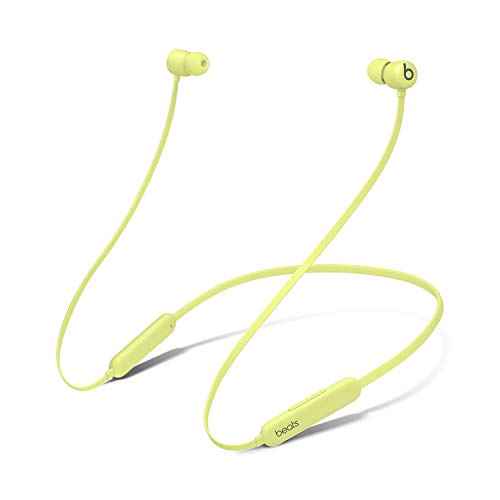
Product B · ASIN B08L6ZPV7T
Beats Flex (Yuzu Yellow)
Last observed offer
$49.99 List Price: $69.95
Per listed package.
Offer eligibility must be confirmed on Amazon.
Checked 2026-10-19 10:45 UTC. Price and availability may change.
Pickoryx may earn a commission from qualifying purchases through the paid Amazon links on this page, at no added cost to you.
The buying question
Which control layout and charging routine better fit how you listen?
Solo Buds remove the connecting cable but share one hold gesture between volume and assistant access; Flex keeps separate controls and charges directly.
Quick verdict
Choose Beats Solo Buds (Matte Black) if
- You want controls on separate earbuds and can choose between volume and assistant for the hold gesture.
Choose Beats Flex (Yuzu Yellow) if
- You use playback volume and button-invoked assistant access frequently.
- You prefer charging the earphones directly with the supplied cable.
When the recommendation changes
- You frequently use the voice assistant and also want volume buttons without changing their assignment.
- You do not already own the USB-C cable and suitable power source needed for Solo Buds.
- Your phone or software does not expose the documented control settings.
The differences that matter
Playback Volume And Voice Control Workflow
What this changes: Choose Flex if you want playback-volume buttons and button-invoked assistant access together. Choose Solo Buds if separate earbuds matter more and you accept choosing what their hold gesture does. Assistant availability depends on the connected device and setup.[1, 3, 4, 2, 5]
Charging Connection And Required Accessories
Beats Solo Buds (Matte Black)
Seat Solo Buds in their case and connect the case to external USB-C power. Neither the charging cable nor the power adapter is included.[1]
Beats Flex (Yuzu Yellow)
Connect a USB-C cable to Flex for charging. Beats includes the cable, but not a power adapter.[2]
What this changes: Flex suits a direct plug-in routine. Solo Buds require keeping the case available as part of the charging setup, plus supplying a cable. For either purchase, check that you already have a suitable power source.[1, 2]
Best for your routine
Playback-volume buttons plus assistant access
Best fit: Beats Flex (Yuzu Yellow)
Based on listed features, not comparative testing.
Flex separates these controls; you must be comfortable with its cable-linked layout. Set up a supported assistant on the connected device first.
Separate earbuds with on-ear control
Best fit: Beats Solo Buds (Matte Black)
Based on listed features, not comparative testing.
Solo Buds avoid the connecting cable. The compromise is choosing the hold action and keeping the case available for charging.
Value and trade-offs
One or both observed offers have eligibility conditions, so no unrestricted price difference is shown.
Compare the current offers together with any cable or power adapter you need. Pay extra only for the layout you will actually prefer using.
There is insufficient price history here for a purchase-timing recommendation.
Limitations
- This compares controls and charging, not measured sound, microphone quality, runtime, comfort or durability. Pickoryx did not test either pair.
- Assistant features depend on device, software, language and region; set up Siri on a compatible Apple device or the supported default assistant on Android.
- Apple’s detailed control menus captured here are documented for Apple OS 27 or later and the Beats app on Android. Beats’ model FAQs separately describe iOS settings and the Android app; older software may show different menus.
- Manufacturer box contents describe the standard package. Confirm the selected seller’s exact Matte Black Solo Buds or Yuzu Yellow Flex package.
Questions shoppers ask
How do I assign Solo Buds volume controls?
With the earbuds worn and connected, open their settings on a supported iPhone or iPad, or their screen in the Beats app on Android. Under Press and Hold, enable Volume Control and choose which side increases volume; the other side decreases it. This replaces the button’s assistant action.
Can I use the Flex rocker to change phone-call volume?
Apple directs call-volume changes to the connected Apple or Android device. The separate rocker advantage described here concerns playback volume.
Methodology and sources
Compared the exact Solo Buds and Flex models by control assignment, charging steps and included charging accessories.
AI-assisted research organized the documented controls and charging requirements.
View 5 sources
- 1.Beats Solo Buds SupportApple / Beats · Official support · Source checked 2026-10-07 22:09 UTC
Evidence used on this page
- Charging and music-control FAQs, lines 44–59: The earbuds charge while seated in their case with external USB-C power. Cable and adapter are sold separately. Volume reassignment replaces the voice-assistant action.
- 2.Beats Flex SupportApple / Beats · Official support · Source checked 2026-10-07 22:09 UTC
Evidence used on this page
- Charging FAQ, lines 58–63; controls, lines 73–95: USB-C cable included; adapter excluded. A separate volume rocker and multifunction button handle playback and assistant access.
- 3.Beats Solo BudsApple / Beats · Official support · Source checked 2026-10-07 22:09 UTC
Evidence used on this page
- Product name, Controls and In the Box, lines 33, 103–111: True-wireless earbuds with one multifunction button per earbud and a carrying case.
- 4.Change Beats press-and-hold settingsApple / Beats · Official support · Source checked 2026-10-07 22:15 UTC
Evidence used on this page
- Volume-control sections, lines 138–189: Wear and connect the earbuds before changing settings. Apple devices use Settings; Android uses the Beats app. Volume mode assigns opposite actions and displaces assistant access. The captured guide identifies Apple OS 27 or later and the Beats app on Android.
- 5.Use your Beats FlexApple / Beats · Official support · Source checked 2026-10-07 22:16 UTC
Evidence used on this page
- Volume, calls and Siri, lines 126–164: Separate playback-volume controls; call volume uses the connected device. Siri requires setup and region/language availability. Captured guide identifies Apple OS 27 or later and Beats app on Android.