
Blink Wired Doorbell 2K+ vs Ring Wired Doorbell 2K: Which Setup Fits Your Home?
For a buyer who wants an explicitly documented local clip-storage option, Blink is the clearer fit: its Wired Doorbell 2K+ FAQ names compatible Sync Module hardware and USB or microSD storage. Ring’s Wired Doorbell 2K page documents subscription-backed cloud rewatch. For indoor sound, neither rings an existing mechanical chime; plan for a compatible separate alert device or voice assistant with either one.
Published by Pickoryx · Published 2026-10-19
Source checked 2026-10-19 19:04 UTC
Products compared

Product A · ASIN B0G62LKVGT
Blink Wired Doorbell 2K+
Last observed offer
$49.99
Per listed package.
Offer eligibility must be confirmed on Amazon.
Checked 2026-10-19 19:13 UTC. Price and availability may change.
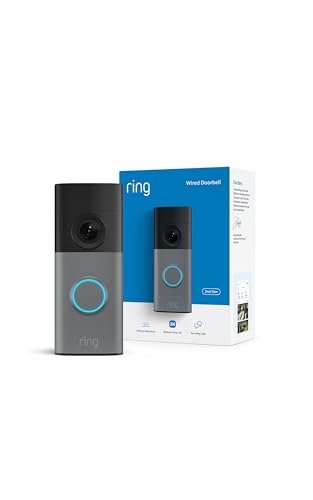
Product B · ASIN B0FJJ66YZ1
Ring Wired Doorbell 2K
Last observed offer
$79.99
Per listed package.
Offer eligibility must be confirmed on Amazon.
Checked 2026-10-19 19:13 UTC. Price and availability may change.
Pickoryx may earn a commission from qualifying purchases through the paid Amazon links on this page, at no added cost to you.
The buying question
Which of these wired 2K doorbells better fits the household’s preferred clip-storage path and indoor alert setup?
Blink documents an optional local-storage route alongside its cloud plan; Ring documents subscription-backed cloud rewatch. Both models disable an existing mechanical chime, so buyers also need to plan for a separate indoor-alert device or compatible voice assistant.
Quick verdict
Choose Blink Wired Doorbell 2K+ if
- You want the option to save clips locally through a compatible Blink Sync Module and USB drive or Sync Module XR with microSD.
- You already use, or want to add, a compatible Blink Mini, Blink Chime, or Alexa device for indoor announcements.
Choose Ring Wired Doorbell 2K if
- You prefer Ring’s app and accessory setup and expect to use Ring Protect to rewatch recorded events.
- You are comfortable replacing the old mechanical-chime sound with a Ring Chime accessory or compatible Alexa alert.
When the recommendation changes
- If keeping the existing mechanical chime active is required, neither of these wired models fits that requirement.
- If local recording is mandatory, the Ring materials reviewed here do not establish a local-storage path for this model; verify that requirement before buying.
- Check the doorbell transformer against the exact current installation requirements; Blink’s FAQ and technical-specification page disagree on the minimum US voltage.
The differences that matter
Recording Storage And Subscription Path
Blink Wired Doorbell 2K+
Blink documents local storage when this doorbell is connected to a compatible Sync Module using a USB drive, or a Sync Module XR using a microSD card. Blink Plus provides up to 60-day cloud storage in the US.[1]
Ring Wired Doorbell 2K
Ring documents recorded-event rewatch through a compatible Ring Protect subscription, with up to 180 days of video history on the Wired Doorbell 2K page. The materials reviewed do not establish whether this exact model has a local-storage alternative.[3]
What this changes: Choose based on the recording path you intend to use: Blink’s official FAQ names optional local-storage hardware, while Ring’s product page describes cloud history through Ring Protect. The Ring source does not prove that local storage is unavailable, so verify it separately if it is a deciding requirement.[1, 3]
Wired Install And In Home Alert Workflow
Blink Wired Doorbell 2K+
Blink says the Wired Doorbell 2K+ does not ring an in-home mechanical chime; its bypass cable redirects power and disables that chime. It lists Blink Mini, Blink Chime, or compatible Alexa devices, sold separately, for chime notifications. The FAQ says 10–24V AC for US installations while the technical-specification page says 12–24V AC.[1, 2]
What this changes: For both models, plan to bypass the existing mechanical chime and use phone notifications or a compatible separate indoor alert. Blink names its Mini/Chime/Alexa options; Ring lists a Chime accessory and supports Alexa. Match the choice to devices you already use, and confirm the transformer requirements before installation.[1, 2, 4, 5, 3]
Best for your routine
A buyer who wants a documented local clip-storage option
Best fit: Blink Wired Doorbell 2K+
Based on listed features, not comparative testing.
Blink’s official FAQ explicitly names local storage through compatible Sync Module hardware. This is a published configuration option, not a claim that it is cheaper or better in real use.
A household already committed to Ring app and accessories and planning to use Ring Protect for saved event rewatch
Best fit: Ring Wired Doorbell 2K
Based on listed features, not comparative testing.
Ring’s Wired Doorbell 2K product page documents subscription-backed cloud history, and the current product page lists a Ring Chime accessory. The fit depends on wanting that Ring workflow; it is not a measured camera-performance advantage.
Value and trade-offs
One or both observed offers have eligibility conditions, so no unrestricted price difference is shown.
If one is more expensive when you shop, weigh whether its documented storage and indoor-alert path matches your setup. No price premium or total plan cost is established here.
No dated price observations are included, so this article does not assess purchase timing.
Limitations
- Blink’s US FAQ lists 10–24V AC, while Blink’s technical-specification page lists 12–24V AC. Treat the minimum as unresolved and check the latest instructions for the exact installation before relying on a transformer reading.
- Ring’s official material reviewed here documents subscription-backed cloud rewatch; it does not establish whether the Wired Doorbell 2K has another local-storage route. Do not treat the omission as proof that no route exists.
- Both models are documented as incompatible with existing in-home mechanical chimes. Their separate indoor-alert choices and compatibility should be checked against the household’s devices.
- No hands-on installation or controlled comparison was performed. The sources establish published features and setup requirements, not image quality, detection accuracy, notification speed, reliability, or security superiority.
- Prices, plan terms, and accessory listings can change. No current offer price or long-term plan-cost calculation is included.
Questions shoppers ask
Will either doorbell ring my existing mechanical chime?
No. Blink says the Wired Doorbell 2K+ does not support an in-home mechanical chime and its bypass cable disables that chime. Ring’s Wired Doorbell 2K FAQ also says it does not support mechanical chimes. Plan for phone notifications or a compatible separate indoor-alert device.
Does Blink need a Sync Module to work?
Blink says the Wired Doorbell 2K+ connects directly to Wi-Fi and does not require a Sync Module for basic operation. A compatible Sync Module or Sync Module XR is needed for the local-storage path described in Blink’s FAQ.
Does Ring require a subscription?
Ring’s Wired Doorbell 2K page says a compatible Ring subscription is required for its listed recorded-event rewatch and video-history features. This comparison does not claim that every Ring function requires a plan.
Methodology and sources
This comparison focuses on the published storage and indoor-alert/wiring workflows for Blink Wired Doorbell 2K+ and Ring Wired Doorbell 2K. It describes Ring Wired Doorbell 2K, not Ring Wired Doorbell 2K Plus or older Ring models. Conflicting Blink voltage statements remain visible.
Automated tools helped locate and organize public product documentation; no device was installed, operated, or tested.
View 5 sources
- 1.Blink Wired Doorbell 2K+ FAQBlink Support · Official specifications · Source checked 2026-10-19 19:04 UTC
Evidence used on this page
- “What video storage options are supported?”; “Is a Sync Module required?”; “Does Wired Doorbell 2K+ ring my existing in-home chime?”; “Which power source does Wired Doorbell 2K+ require?”: Names local storage with Sync Module USB or Sync Module XR microSD, up to 60-day US cloud storage with Blink Plus, says a Sync Module is not required for basic Wi-Fi connection, and says the wired model does not ring the existing mechanical chime. The FAQ lists 10–24V AC for US/CA/MX, which conflicts with the technical-specification page’s 12–24V AC figure.
- 2.Blink Wired Doorbell 2K+ Technical SpecificationsBlink Support · Official specifications · Source checked 2026-10-19 19:04 UTC
Evidence used on this page
- “Power,” “Model number(s),” and “What’s in the box”: Lists BDM00500U for US/Canada/Mexico; wired-only 12–24V AC in the US; and a bypass cable in the box. Its 12V lower bound conflicts with the Blink FAQ’s 10V figure.
- 3.Wired Doorbell 2K — Doorbell Camera | RingRing · Official specifications · Source checked 2026-10-19 19:04 UTC
Evidence used on this page
- Product title and 2nd Gen/2026 generation description; “Ring Protect Plans”; “Compatible accessories”; “Frequently Asked Questions”: Names the current Wired Doorbell 2K; describes subscription-backed rewatch and up to 180 days of video history; lists a Chime (3rd Gen) as a compatible accessory; and says the Wired Doorbell 2K does not support mechanical chimes.
- 4.Wired Doorbell 2KRing Help · Official support · Source checked 2026-10-19 19:04 UTC
Evidence used on this page
- “Tech Specs” and “Frequently Asked Questions”: Exact Wired Doorbell 2K product page; gives hardwired 12–24VAC, 10–40VA, 2.4GHz Wi-Fi and package contents; its FAQ says this model does not support mechanical chimes.
- 5.Installing Wired Doorbell 2KRing Help · Official support · Source checked 2026-10-19 19:04 UTC
Evidence used on this page
- “Doorbell installation,” steps 1–5; use the Wired Doorbell 2K user manual linked on the page for detailed instructions: Installation instructions for the named Wired Doorbell 2K show a bypass cable connected at the existing chime and say to consult a licensed electrician if uncomfortable or inexperienced with wiring.