
BOOX Go 7 Black Case Bundle vs Amazon Kindle Paperwhite 16GB (2024 model) – Black
Do Android app and file-format flexibility plus physical page-turn buttons matter more than Kindle account syncing and the Paperwhite's stronger documented protection against accidental water exposure?
Products compared

ASIN B0GX9BBJ6J
BOOX Go 7 Black Case Bundle
You need to install a reading app outside the Kindle ecosystem or want the Go 7's listed document formats, and you have checked that the app or file workflow suits your books.
Last observed offer
$269.99
List Price: $310.98
- Confirm offer eligibility on Amazon
Size: 7 inches
Price checked
Observed condition: new. Coupon and subscription requirements unverified.
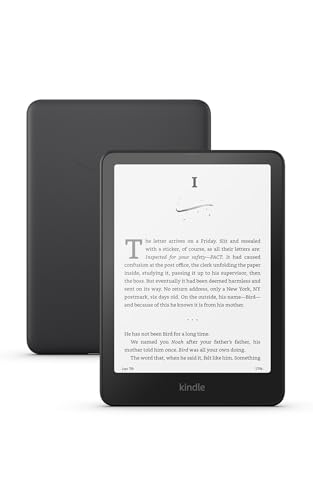
ASIN B0CFPJYX7P
Amazon Kindle Paperwhite 16GB (2024 model) – Black
Your library and reading-position sync are centered on your Amazon account, and you want the 2024 16GB Kindle device workflow.
Last observed offer
$199.99
- Confirm offer eligibility on Amazon
Price checked
Observed condition: new. Coupon and subscription requirements unverified.
Prices are per listed package. Pickoryx may earn a commission from qualifying purchases through the paid Amazon links on this page, at no added cost to you.
Published by Pickoryx · Published 2026-10-21 · Source checked 2026-10-21 19:08 UTC
The main trade-off
The Go 7 lists Android 13, Google Play, third-party apps and page-turn buttons, but BOOX says it is not waterproof. The Paperwhite is a 2024 Kindle device with touchscreen input, Amazon-documented Kindle sync and an IPX8 rating, but it is not intended for underwater use or intentional immersion.
Quick verdict
Pick the BOOX Go 7 for documented Android/third-party-app and file-format flexibility or physical page-turn buttons, provided you can keep it dry. Pick the 2024 Kindle Paperwhite for a Kindle-centered workflow and its IPX8 rating for limited accidental water exposure. Kindle's Android app can also be installed on Android 10 or later, so a Kindle library alone does not rule out the Go 7; confirm your other apps and their E Ink behavior before choosing it.
Choose BOOX Go 7 Black Case Bundle if
- You need to install a reading app outside the Kindle ecosystem or want the Go 7's listed document formats, and you have checked that the app or file workflow suits your books.
- You prefer hardware page-turn buttons and mostly read in dry settings.
Choose Amazon Kindle Paperwhite 16GB (2024 model) – Black if
- Your library and reading-position sync are centered on your Amazon account, and you want the 2024 16GB Kindle device workflow.
- You want an IPX8-rated reader for brief accidental water exposure under Amazon's conditions, while avoiding intentional immersion.
When the recommendation changes
- If the Go 7's app or file-format support does not cover your actual books, or the app's controls do not behave as you need on E Ink, the app-flexibility case weakens; verify the exact service before buying.
- If you need planned immersion or underwater use, neither manufacturer supports that use: BOOX says the Go 7 is not waterproof and Amazon says the Paperwhite is not intended for underwater use or intentional immersion.
The differences that matter
| Decision point | BOOX Go 7 Black Case Bundle | Amazon Kindle Paperwhite 16GB (2024 model) – Black |
|---|---|---|
| Ebook Apps And Sync Workflow | The Go 7 is listed with Android 13 and built-in Google Play; Amazon says its Kindle Android app runs on Android 10 or later, so an Android app-install path exists. BOOX also lists third-party-app support and 26 digital formats including 20 document formats.[1, 4] | Amazon identifies the 2024 12th-generation 16GB Paperwhite as a Kindle e-reader. Amazon says reading position, notes and highlights can sync across Kindle apps and devices linked to the same account when online.[2, 5] |
What this changes: The Go 7 is the documented route for trying non-Kindle Android reading apps and opening its listed document formats. It can also run Kindle's Android app at the operating-system level, so Kindle-library access is not exclusive to the Paperwhite. Amazon documents cross-device sync for Kindle apps/devices, but neither source establishes how a particular third-party app behaves on this E Ink screen or syncs with other services; verify that app, file and account workflow before buying.[1, 2, 5, 4] The better fit depends on your priorities | ||
| Reading Controls And Environment | BOOX lists page-turn buttons on the Go 7. Its water-repellent design covers daily spills, splashes and light rain, but BOOX explicitly says the device is not waterproof and is not intended to be submerged.[1] | Amazon lists touchscreen input for the 2024 Paperwhite and an IPX8 rating. Its product guide says the device can withstand brief accidental immersion under certain conditions, but is not intended for underwater use or intentional immersion.[2, 3] |
What this changes: Choose the Go 7 if physical page controls matter and you can keep it out of immersion. Choose the Paperwhite if its IPX8 label and the manual's limited accidental-exposure guidance address your setting better. The Paperwhite's guidance is not a promise that planned bath, pool or underwater use is safe; damage may compromise its water protection.[1, 2, 3] The better fit depends on your priorities | ||
Best for your routine
Readers who need an Android reading app beyond Kindle or one of the Go 7's listed document formats.
Best fit: BOOX Go 7 Black Case Bundle
Based on listed features, not comparative testing.
BOOX lists Android 13, Google Play, third-party apps and the Go 7's supported document formats. Check that the exact app and format work for your collection on E Ink before relying on them.
Readers who prioritize an IPX8-rated Kindle device for limited accidental water exposure over non-Kindle app flexibility.
Best fit: Amazon Kindle Paperwhite 16GB (2024 model) – Black
Based on listed features, not comparative testing.
Amazon identifies the 2024 Paperwhite as IPX8-rated and describes only brief accidental immersion under conditions; it is not intended for underwater use or intentional immersion.
Value and trade-offs
One or both observed offers have eligibility conditions, so no unrestricted price difference is shown.
Compare today's exact black case-bundle offer with the 16GB black Paperwhite offer. The value difference depends on whether Android apps and physical page buttons or Kindle-focused syncing and its water rating matter more to you; verify that the listing still matches the selected model and bundle.
The available record provides only one recent observation for each offer, which is insufficient to describe either offer's price history.
Limitations
- No hands-on test or controlled comparison of app behavior, page-turn mapping, speed, comfort or battery life was performed.
- Google Play availability does not show that every app is optimized for E Ink or that it syncs with another service; check the exact app, account and file requirements.
- The Kindle Android app is supported on Android 10 or later, but that does not guarantee every Kindle title or account feature will behave identically on a BOOX reader.
- The Paperwhite's water protection is subject to Amazon's conditions; it is not intended for underwater use or intentional immersion. BOOX explicitly says Go 7 is not waterproof.
Questions shoppers ask
Can I use the Kindle app on the BOOX Go 7?
Amazon says Kindle for Android runs on Android 10 or later, and BOOX lists Go 7 with Android 13 and Google Play. That supports an app-install path, but it does not verify every book, account feature or E Ink behavior. Confirm the titles and app workflow you depend on before buying.
Can I use either reader for intentional underwater reading?
No. BOOX says Go 7 is not waterproof and is not intended to be submerged. Amazon says the Paperwhite is not intended for underwater use or intentional immersion, even though it is IPX8-rated for brief accidental exposure under certain conditions.
Methodology and sources
Compared the monochrome Go 7 device with the 2024 12th-generation 16GB Paperwhite on app and sync workflows, listed page controls, and manufacturer water guidance. This is a documented-feature comparison, not a speed, comfort or battery test.
Automation organized the public product and support information; the facts used here were checked against the cited pages. Pickoryx did not conduct a hands-on test.
View 5 sources
- 1.BOOX Go 7 Series — Go 7 specifications and water-repellent noteBOOX · Official specifications · Source checked 2026-10-21 19:08 UTC
Evidence used on this page
- Go 7 (monochrome) specifications and Software/Other sections; water-repellent footnote [3]: The Go 7 model column lists Android 13, built-in Google Play, third-party apps, document formats, page-turn buttons and water-repellent guidance. BOOX says the device is not waterproof and is not intended to be submerged. The page distinguishes the monochrome Go 7 from Go Color 7 (Gen II).
- 2.Identify Your Kindle E-ReaderAmazon Kindle Support · Official support · Source checked 2026-10-21 19:08 UTC
Evidence used on this page
- Kindle Paperwhite (12th Generation): touchscreen, IPX8, 16GB and released 2024: Amazon identifies the 12th-generation Paperwhite released in 2024 with a touchscreen, IPX8 waterproof rating, and 16GB internal storage. Signature Edition and Kids are listed separately.
- 3.Safety and Compliance Information for Kindle Paperwhite (12th Generation)Amazon Kindle Support · Official support · Source checked 2026-10-21 19:08 UTC
Evidence used on this page
- Paperwhite section, model SA568B; Protection Against Water: The Paperwhite section explicitly identifies model SA568B and states it can withstand brief accidental immersion under certain conditions, but is not intended for underwater use or intentional immersion. It warns that drops or damage may compromise water protection and excludes several liquid/pressure exposures.
- 4.Install or Update the Kindle App on AndroidAmazon Kindle Support · Official support · Source checked 2026-10-21 19:08 UTC
Evidence used on this page
- Android OS requirement and app-store install steps: Amazon says the Kindle Android app runs on Android OS 10.0 or higher and provides the app-store install/update steps. This is app-level guidance, not confirmation of identical E Ink behavior on every Android reader.
- 5.Update Your Sync Settings for KindleAmazon Kindle Support · Official support · Source checked 2026-10-21 19:08 UTC
Evidence used on this page
- Sync behavior across Kindle apps and e-readers; internet connection and settings: Amazon says reading position, notes and highlights sync across Kindle apps and devices linked to the account when online. It separately lists settings for Android apps and Kindle e-readers; this does not establish sync for non-Kindle reading apps.