
Bose Companion 2 Series III vs Edifier R1280T: Which Fits Your Desk Setup?
For a computer plus another wired audio source, the Edifier R1280T has the clearest documented two-pair RCA setup, though its manual says simultaneous sources both play and selection requires lowering or turning off the unused source. The Bose Companion 2 Series III guide covers a computer connection and another device at the right speaker, while Bose support documents automatic speaker muting when headphones are connected. Choose by your wiring and control routine, not by an untested sound-quality claim.
Published by Pickoryx · Published 2026-10-19
Source checked 2026-10-19 18:17 UTC
Products compared
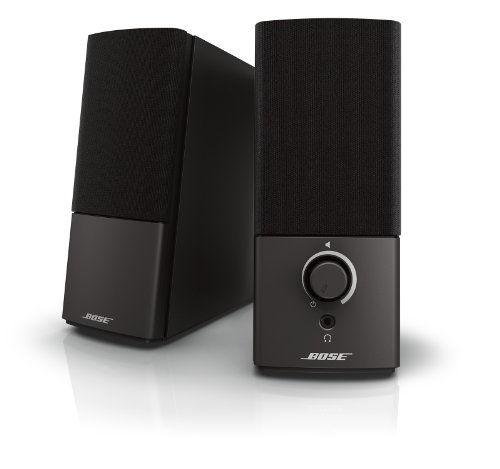
Product A · ASIN B098825YYZ
Bose Companion 2 Series III Multimedia Speaker System
Last observed offer
$199.61
Per listed package.
Offer eligibility must be confirmed on Amazon.
Checked 2026-10-19 15:45 UTC. Price and availability may change.

Product B · ASIN B016P9HJIA
Edifier R1280T Powered Bookshelf Speakers
Last observed offer
$117.99 List Price: $149.99
Per listed package.
Checked 2026-10-19 12:45 UTC. Price and availability may change.
Pickoryx may earn a commission from qualifying purchases through the paid Amazon links on this page, at no added cost to you.
The buying question
Should you choose the Bose Companion 2 Series III or Edifier R1280T for the way you connect sources and use speaker and headphone controls at a desk?
Edifier documents two RCA input pairs plus a remote and tone dials; Bose documents a simple computer/auxiliary connection path and headphone-triggered speaker muting. Neither manual supports a sound-quality winner.
Quick verdict
Choose Bose Companion 2 Series III Multimedia Speaker System if
- You want the Bose guide’s straightforward computer connection and value its documented headphone-triggered speaker mute.
Choose Edifier R1280T Powered Bookshelf Speakers if
- You want two RCA source pairs and an included remote with master-volume, bass, and treble controls.
When the recommendation changes
- If you need a dedicated input selector or want to play only one of two connected sources without adjusting either source device, confirm that exact behavior before choosing; the opened documents do not establish a dedicated selector for either model.
- If headphone output on the Edifier is essential, verify it for the exact unit because its opened product page and manual do not establish that feature.
The differences that matter
Audio Source Connection And Switching Workflow
Bose Companion 2 Series III Multimedia Speaker System
The Companion 2 Series III guide connects the included mini-plug audio cable from a computer output to the right speaker and says another audio device can be plugged into the right speaker. The materials do not explain how to select between two sources connected at once.[2, 1]
What this changes: For a computer plus another analog source, the Edifier gives a documented two-pair RCA wiring plan. Its manual calls for managing the unselected source upstream; Bose documents computer and additional-device connection but not simultaneous-source selection, so check the actual hookup you need rather than assuming either speaker has an input selector.[2, 1, 4, 5]
Control And Headphone Access Placement
What this changes: Choose around the control routine you will use: Edifier documents both remote operation and tone dials at the speaker; Bose documents headphone-triggered speaker muting. The Edifier headphone-output status remains unknown, so verify it if headphone use is essential.[1, 3, 4, 5]
Best for your routine
A desk with two wired RCA sources that can be muted or turned down at the source
Best fit: Edifier R1280T Powered Bookshelf Speakers
Based on listed features, not comparative testing.
The R1280T manual documents two RCA pairs and explains how to dedicate output to one source by lowering or turning off the other source.
A desk where automatic speaker muting when headphones are plugged in is a useful routine
Best fit: Bose Companion 2 Series III Multimedia Speaker System
Based on listed features, not comparative testing.
Bose support documents this behavior for Companion 2 Series III. The opened Edifier materials do not establish headphone-output status, so this is a one-sided feature-fit choice, not a claim that Edifier lacks the feature.
Value and trade-offs
One or both observed offers have eligibility conditions, so no unrestricted price difference is shown.
A higher current offer should be justified by the source and control workflow you will actually use; this comparison does not embed a transient price or claim a sound-quality return.
Offer prices and conditions change. There is not enough price history here for a buy-now or wait recommendation.
Limitations
- No hands-on comparison or controlled audio testing was performed; this article compares documented connection and control workflows, not sound quality, loudness, clarity, room coverage, reliability, or value in measured use.
- The linked Bose ASIN’s selected retailer offer was listed as “Refurbished – Excellent” at the time checked. The listing condition and seller can change; verify the selected offer and its applicable return or coverage terms before ordering. This observation does not establish Bose-certified refurbishment, original packaging, or a manufacturer warranty for that offer.
- The opened Bose documents do not explain how to select between sources connected simultaneously. The R1280T manual says both active sources play and advises lowering or turning off the unselected source; neither source establishes a dedicated speaker-side input selector.
- The opened Edifier R1280T product page and manual do not establish whether the exact unit has a headphone output. Do not interpret that documentation gap as proof that the feature is absent.
- The demand signal was an older, qualitative comparison article; it provides no search-volume measure and its subjective sound judgments are not used here.
Questions shoppers ask
Can the Edifier R1280T switch cleanly between two connected sources?
Its manual says both connected sources play when active at the same time. To hear only one, it instructs you to lower the volume or turn off the unselected source; it does not describe a dedicated input selector.
Will the Bose speakers mute when I plug in headphones?
Bose support says headphones or another 1/8-inch stereo plug connected to the headphone jack automatically mutes the Companion 2 Series III speakers. The opened Edifier documents do not establish whether the R1280T has a headphone output.
Methodology and sources
Compared the exact Companion 2 Series III and R1280T product pages, Bose setup and support material, and the R1280T user manual for source connections and ordinary desk controls. Recommendations are limited to the documented feature fit.
Research assistance was used to locate and compare manufacturer documentation; product operation and audio quality were not tested.
View 5 sources
- 1.Companion 2 Series III Multimedia Speaker SystemBose · Official specifications · Source checked 2026-10-19 18:17 UTC
Evidence used on this page
- Product details: What’s in the box; FAQ on CD/MP3 input; product feature “Volume control within reach”: Names the Companion 2 Series III model; lists an audio-input cable with mini-plug and AC power pack; says a CD/MP3 player can connect to the auxiliary input on the back of the right speaker; describes volume control within reach.
- 2.Companion 2 Series III multimedia speaker system Quick Start GuideBose · Official specifications · Source checked 2026-10-19 18:17 UTC
Evidence used on this page
- English, page 1, setup steps 1–5 and alternate audio device instruction: The exact Series III guide connects the audio cable to the right speaker and the computer headphone/speaker/line output; connects the left speaker and AC supply; turns the speakers on with the volume knob; and says to plug another audio device into the right speaker connector. It does not explain selecting between simultaneously connected sources.
- 3.No audio from product | Companion 2 Series III multimedia speaker systemBose Support · Official support · Source checked 2026-10-19 18:17 UTC
Evidence used on this page
- “Be sure nothing is connected to the headphone jack”: Support page identifies the Companion 2 Series III and states that headphones or any cable with a 1/8-inch stereo plug connected to the headphone jack automatically mute the speakers.
- 4.R1280T Powered Bookshelf SpeakersEdifier · Official specifications · Source checked 2026-10-19 18:17 UTC
Evidence used on this page
- Dual RCA Inputs; Easy Control; specification: Audio Inputs: Exact R1280T page lists two pairs of RCA input ports for multiple audio sources and states that the remote control and right-panel knobs provide control.
- 5.R1280T User Manual (IB-200-R1280T-06)Edifier · Official specifications · Source checked 2026-10-19 18:17 UTC
Evidence used on this page
- English pages 3–4, 6–8; connectivity and operational guide: The model manual lists a remote and two audio cables in box contents; identifies the IR receiver, treble, bass and master-volume dials; describes PC connection using the included 3.5 mm-to-RCA cable; and says two simultaneously connected sources both play, so the user should lower or turn off the unselected source to dedicate output. It does not identify a headphone output.