
HS80 RGB USB vs Cloud III Wired: Check the Port, Then the Microphone
Choose HS80 RGB USB for a USB computer setup when you prefer a microphone that stays attached and flips up to mute. Choose Cloud III wired for a 3.5 mm controller connection or a removable microphone. Both have a mute button; Cloud III’s included USB adapter does not work on Xbox.
Published by Pickoryx · Published 2026-10-05
Source checked 2026-10-05 20:49 UTC
Products compared
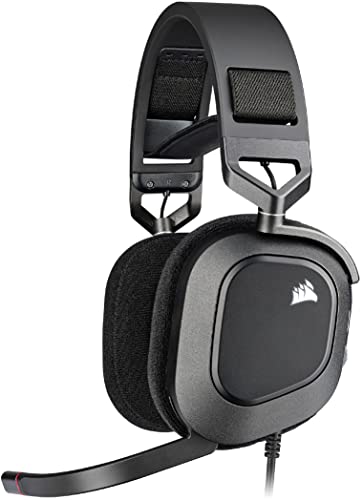
Product A · ASIN B09YHQWHKV
Corsair HS80 RGB USB
Last observed offer
$109.00
Per listed package.
Offer eligibility must be confirmed on Amazon.
Checked 2026-10-19 19:43 UTC. Price and availability may change.

Product B · ASIN B0C3BSZ56D
HyperX Cloud III Wired
Last observed offer
$69.99 List Price: $99.99
Per listed package.
Offer eligibility must be confirmed on Amazon.
Checked 2026-10-19 16:38 UTC. Price and availability may change.
Pickoryx may earn a commission from qualifying purchases through the paid Amazon links on this page, at no added cost to you.
The buying question
Does the headset need a 3.5 mm connection, and would you rather raise an attached microphone or remove it?
HS80 stays on a USB connection and keeps its flip-to-mute boom attached. Cloud III adds an analog connection and a removable boom, with an earcup mute button.
Quick verdict
Choose Corsair HS80 RGB USB if
- You want to keep the boom attached and raise it to mute.
- Your headset will use a compatible USB computer connection.
Choose HyperX Cloud III Wired if
- You need to plug into a controller’s 3.5 mm headset jack.
- You want to remove the boom when you do not need it.
When the recommendation changes
- You move from a USB computer to a controller headset jack.
- You want the boom physically removed during listening or storage.
- A console requires a different audio route from the computer; Cloud III’s USB adapter does not work on Xbox.
The differences that matter
Host Connection And Controller Use
Corsair HS80 RGB USB
HS80 RGB USB uses a wired USB connection; Corsair lists PC and Mac audio compatibility. It does not provide a 3.5 mm analog connection for a controller headset jack.[1, 2]
HyperX Cloud III Wired
Cloud III wired provides 3.5 mm, USB-C and USB-A connection options. The package includes a USB dongle and a USB-C-to-USB-A adapter alongside the headset and detachable microphone.[3]
What this changes: If a controller’s 3.5 mm headset jack is part of the routine, choose Cloud III. At a compatible USB computer, either can fit; microphone handling becomes the more useful distinction.[1, 2, 3]
Microphone Removal And Mute Handling
What this changes: Choose HS80 for a boom that stays with the headset and can be raised to mute. Choose Cloud III when removing the boom matters, accepting a separate part to keep track of. A mute button is available on both.[1, 2, 3, 4]
Best for your routine
USB desk use with a microphone that stays attached
Best fit: Corsair HS80 RGB USB
Based on listed features, not comparative testing.
HS80 provides the attached flip-up mute routine, plus a left-earcup button. Choose it if that physical routine matters more than analog connectivity or microphone removal.
Moving between a computer and a controller headset jack
Best fit: HyperX Cloud III Wired
Based on listed features, not comparative testing.
Cloud III offers analog and USB options. Use its 3.5 mm connection for a compatible controller jack; the included USB adapter is not an Xbox connection.
Listening or storing the headset with the boom removed
Best fit: HyperX Cloud III Wired
Based on listed features, not comparative testing.
Cloud III’s microphone detaches. Keep the separate microphone with the headset so it is available for the next voice session. HS80’s boom remains attached.
Value and trade-offs
One or both observed offers have eligibility conditions, so no unrestricted price difference is shown.
Compare current offers after checking the required port and microphone routine. A discount cannot supply an analog connection or detachable boom that the selected model does not have.
There is not enough verified price history to recommend buying now or waiting for a historical low.
Limitations
- No controlled comparison here establishes a sound-quality, microphone-quality, comfort, latency or durability winner.
- PC/Mac audio compatibility does not mean every software feature works identically on both. Corsair’s guide describes additional features through iCUE on Windows; check current software requirements for your computer.
- These are the wired HS80 RGB USB CA-9011237-NA and Black Cloud III 727A8AA. Wireless, MAX and Cloud III S models are different products. Connector options do not guarantee support for every device or every feature.
Questions shoppers ask
Does the HS80 RGB USB only mute when I lift its microphone?
No. Its guide also documents a left-earcup mute button. iCUE can reassign that button, so check its configured action if it behaves differently. The attached flip-up boom remains the main physical distinction from Cloud III’s removable microphone.
Can I use Cloud III’s included USB adapter on Xbox?
No. HyperX says that adapter does not function on Xbox. For an Xbox controller with a 3.5 mm headset jack, use Cloud III’s analog connection. Its included DTS license is for PC, not Xbox.
Methodology and sources
We compared the documented host connections, Xbox USB limitation, microphone attachment and physical mute controls. Recommendations reflect feature fit rather than measured sound or comfort.
AI assisted with source research and drafting.
View 5 sources
- 1.Corsair HS80 RGB USB, Carbon, CA-9011237-NACorsair · Official specifications · Source checked 2026-10-05 20:41 UTC
Evidence used on this page
- Product SKU; microphone description; Tech Specs; Quick Start Guide link: Identifies the wired USB model, PC/Mac audio compatibility and non-detachable flip-up microphone. Lists on-ear controls and links the HS80 RGB USB guide.
- 2.Corsair HS80 RGB USB Quick Start Guide, 49-002529 ABCorsair · Official specifications · Source checked 2026-10-05 20:43 UTC
Evidence used on this page
- English printed pp. 1–2, physical PDF p. 3: Getting Started; Controls and Features; Mic / iCUE Control: Shows USB computer setup and both microphone-muting methods: raising the boom or using the left-earcup button. Explains that iCUE can change the button’s function and enables additional features.
- 3.HyperX Cloud III Wired Gaming Headset, Black 727A8AAHyperX · Official specifications · Source checked 2026-10-05 14:43 UTC
Evidence used on this page
- Black variant 727A8AA; Versatile Compatibility; Connections; What’s Included in the Box: Identifies the Black wired variant and documents 3.5 mm, USB-C and USB-A connection options, a detachable microphone, earcup controls, USB dongle and USB-C-to-USB-A adapter.
- 4.HyperX Cloud III Mic Mute Button and Volume WheelHyperX · Official specifications · Source checked 2026-10-05 20:42 UTC
Evidence used on this page
- Mic Mute Button and Volume Wheel instructions: Explains the microphone mute toggle, mute indicator and volume wheel.
- 5.HyperX Cloud III: DTS Not Available on XboxHyperX · Official specifications · Source checked 2026-10-05 20:42 UTC
Evidence used on this page
- USB adapter and included DTS license limitations: States that the included USB adapter does not function on Xbox and the included DTS license is for PC use.