
ASUS ROG Strix Scope II 96 Wireless vs CORSAIR Vanguard 96: Which Should You Choose?
Both are 96% keyboards, so the useful choice is about setup and controls rather than a measured typing or gaming winner. ASUS documents Bluetooth, 2.4 GHz RF, and wired USB; CORSAIR documents wired connectivity plus an LCD, rotary dial, and six programmable G-keys with Virtual Stream Deck integration.
Published by Pickoryx · Published 2026-10-19
Source checked 2026-10-19 18:49 UTC
Products compared

Product A · ASIN B0C7KFZ5TL
ASUS ROG Strix Scope II 96 Wireless
Last observed offer
$131.32 List Price: $179.99
Per listed package.
Offer eligibility must be confirmed on Amazon.
Checked 2026-10-19 19:19 UTC. Price and availability may change.
Product B · ASIN B0FKHNFR8G
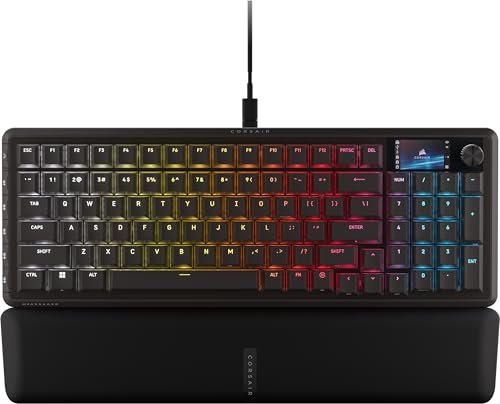
CORSAIR Vanguard 96 Mechanical Gaming Keyboard, MLX Fusion (CH-91E901F-NA)
Last observed offer
$139.99 List Price: $179.99
Per listed package.
Offer eligibility must be confirmed on Amazon.
Checked 2026-10-19 19:22 UTC. Price and availability may change.
Pickoryx may earn a commission from qualifying purchases through the paid Amazon links on this page, at no added cost to you.
The buying question
Should you prioritize the ASUS board's Bluetooth, 2.4 GHz, and wired connection choices, or the CORSAIR board's wired setup and dedicated onboard shortcut controls?
The ASUS offers several connection modes; the CORSAIR is a wired keyboard with an integrated display, programmable G-keys, rotary dial, and Virtual Stream Deck integration.
Quick verdict
Choose ASUS ROG Strix Scope II 96 Wireless if
- You need a Bluetooth or 2.4 GHz connection option alongside wired USB.
- You expect to use Bluetooth support for up to three devices.
Choose CORSAIR Vanguard 96 Mechanical Gaming Keyboard, MLX Fusion (CH-91E901F-NA) if
- A fixed wired USB desk setup is fine and you want six dedicated programmable G-keys with Virtual Stream Deck integration.
- You want the CORSAIR's integrated LCD and rotary dial as part of your keyboard control layout.
When the recommendation changes
- If the keyboard will remain wired to one host, the ASUS connection options may add little value; if dedicated on-key shortcuts and the display/control layout matter more, the CORSAIR feature set may be the better fit.
The differences that matter
Host Connection And Cable Setup
ASUS ROG Strix Scope II 96 Wireless
Bluetooth (up to three devices), 2.4 GHz RF, and wired USB are listed for the ROG Strix Scope II 96 Wireless.[2, 3]
CORSAIR Vanguard 96 Mechanical Gaming Keyboard, MLX Fusion (CH-91E901F-NA)
Wired keyboard connectivity is listed for Vanguard 96 model CH-91E901F-NA.[1]
What this changes: ASUS suits a buyer who needs a wireless path; CORSAIR suits a buyer whose setup is wired and who values its onboard control set.[2, 3, 1]
Onboard Control And Shortcut Workflow
ASUS ROG Strix Scope II 96 Wireless
A multi-function button and wheel are documented for media, volume, and lighting; F1–F5 are documented as capture hotkeys.[2]
CORSAIR Vanguard 96 Mechanical Gaming Keyboard, MLX Fusion (CH-91E901F-NA)
A 1.9-inch integrated color LCD, rotary dial, six programmable G-keys, and Virtual Stream Deck integration are documented.[1]
What this changes: The control layouts support different feature-fit preferences, not an objective winner: ASUS documents media/lighting and capture controls, while CORSAIR documents dedicated programmable keys, display, dial, and Stream Deck functions.[2, 1]
Best for your routine
A setup that needs Bluetooth or 2.4 GHz options in addition to wired USB
Best fit: ASUS ROG Strix Scope II 96 Wireless
Based on listed features, not comparative testing.
The ASUS product page lists Bluetooth, 2.4 GHz RF, and wired USB; CORSAIR lists model CH-91E901F-NA as wired. This favors ASUS only when those wireless paths solve a real setup need.
A wired desk where dedicated programmable shortcuts and Virtual Stream Deck actions are wanted on the keyboard
Best fit: CORSAIR Vanguard 96 Mechanical Gaming Keyboard, MLX Fusion (CH-91E901F-NA)
Based on listed features, not comparative testing.
CORSAIR documents six programmable G-keys and Virtual Stream Deck integration. ASUS documents a different wheel and capture-hotkey layout; the choice depends on which controls the buyer will use.
Value and trade-offs
One or both observed offers have eligibility conditions, so no unrestricted price difference is shown.
Compare the live offers at purchase time against the connection options and controls you will actually use; this draft does not make a price-premium or value claim.
No decision-grade current offer or price-history window is established here, so there is not enough price evidence for a buy-now or wait recommendation.
Limitations
- This is a comparison of documented features, not a hands-on test. It does not rank typing feel, switch sound, responsiveness, latency, gaming outcomes, durability, or reliability.
- ASUS's U.S. product pages describe the ROG Strix Scope II 96 Wireless family and note that keycap material may vary by region. Check the exact offer if regional finish or included-accessory details matter; those details are not used to support the recommendations here.
- The shared 96% layout does not establish that the keyboards have identical dimensions or desk footprints; confirm the product dimensions if precise desk fit is important.
Questions shoppers ask
Does the CORSAIR Vanguard 96 offer a wireless connection?
CORSAIR lists CH-91E901F-NA as a wired keyboard. Choose the ASUS if wireless connectivity is required.
Can the ASUS connect over Bluetooth and 2.4 GHz?
The ROG page lists Bluetooth for up to three devices, 2.4 GHz RF, and wired USB. It does not make a comparative battery-life or real-world wireless-performance claim in this article.
Which board has dedicated programmable shortcut keys?
CORSAIR specifies six programmable G-keys and Virtual Stream Deck integration. ASUS specifies F1–F5 capture hotkeys and a multiwheel for media, volume, and lighting. Pick the control layout that matches the actions you plan to use.
Methodology and sources
I compared each product's documented connection choices and onboard control layout. Published feature descriptions are treated as configuration facts, not tests of latency, responsiveness, typing feel, sound, or gaming outcomes.
Research assistance helped locate and organize manufacturer pages. Product statements are based on the cited U.S. manufacturer pages.
View 3 sources
- 1.VANGUARD 96 Mechanical Gaming Keyboard, CORSAIR MLX FusionCORSAIR · Official specifications · Source checked 2026-10-19 18:49 UTC
Evidence used on this page
- SKU CH-91E901F-NA at product page lines 25 and 90; overview/Stream Deck lines 137-140; 1.9-inch display lines 149-156; six G-keys lines 163-165; wired connectivity and product contents lines 472-499.: The U.S. product page names SKU CH-91E901F-NA, lists wired keyboard connectivity, and documents an integrated 1.9-inch color LCD, six programmable G-keys, a multi-function rotary dial, and Virtual Stream Deck integration.
- 2.ROG Strix Scope II 96 Wireless | Keyboards | ROG USAASUS ROG · Official specifications · Source checked 2026-10-19 18:49 UTC
Evidence used on this page
- Model name and features lines 71-82: 96% layout, three connection modes, up to three Bluetooth devices, F1-F5 capture hotkeys, multi-function button/wheel.: The U.S. model page describes the ROG Strix Scope II 96 Wireless as a 96% keyboard with Bluetooth, 2.4 GHz and wired USB options, plus F1–F5 recording/capture hotkeys and a multiwheel for media, volume and lighting.
- 3.ROG Strix Scope II 96 Wireless - Tech Specs | ROG USAASUS ROG · Official specifications · Source checked 2026-10-19 18:49 UTC
Evidence used on this page
- Connectivity lines 107-113; 96% size lines 115-117; dimensions/contents lines 150-174; regional-availability note lines 191-195.: The U.S. specifications repeat USB, Bluetooth 5.1 and RF 2.4 GHz connectivity and list the 96% size. ASUS cautions that specifications/features and local product availability may vary; its feature page also notes keycap material may vary by region.