
DJI Osmo 360 Standard Combo vs Insta360 X5: Which Fits Your Mic and Lens-Care Routine?
Pick based on the connection routine and recording preparation you need: Osmo 360 documents linking up to two supported DJI transmitters at once, transmitter-start recording and optional separate WAV backup, plus 105 GB usable internal storage. X5's guide also lists selected DJI microphone routes over direct connection or Bluetooth, and documents a replacement-lens kit procedure. Neither source set establishes better audio or image quality.
Published by Pickoryx · Published 2026-10-21
Source checked 2026-10-21 20:20 UTC
Products compared
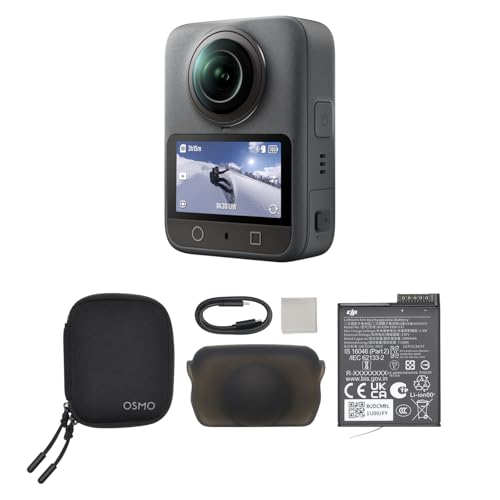
Product A · ASIN B0DTTZZ6Q3
DJI Osmo 360 Standard Combo
Last observed offer
$494.99
Per listed package.
Offer eligibility must be confirmed on Amazon.
Checked 2026-10-31 20:08 UTC. Price and availability may change.

Product B · ASIN B0DZCBYCNY
Insta360 X5
Last observed offer
$549.99
Per listed package.
Offer eligibility must be confirmed on Amazon.
Checked 2026-10-31 20:08 UTC. Price and availability may change.
Pickoryx may earn a commission from qualifying purchases through the paid Amazon links on this page, at no added cost to you.
The buying question
Which camera better fits the buyer's microphone setup and storage/lens-care routine?
Osmo 360 documents linking up to two supported DJI wireless transmitters at once, transmitter-triggered recording and optional separate WAV backup, plus usable internal storage. X5 also supports selected DJI and other microphones through model-specific direct, adapter or Bluetooth routes, and documents a user lens-replacement procedure while using a compatible microSD card for storage.
Quick verdict
Choose DJI Osmo 360 Standard Combo if
- You specifically need Osmo 360's documented workflow for linking up to two supported DJI transmitters simultaneously; a linked transmitter can start recording, and built-in-mic backup can optionally save as a separate WAV file.
- You want the documented 105 GB usable internal-storage option for starting a recording without an inserted microSD card.
Choose Insta360 X5 if
- Your exact microphone appears on Insta360's X5 compatibility information and its listed direct, adapter or Bluetooth route fits your setup; X5's Bluetooth microphone connection is limited to one Bluetooth microphone at a time.
- You value a documented lens-replacement procedure and accept its tool, environment, and calibration steps.
When the recommendation changes
- Check the exact microphone model and intended connection route in the current manufacturer lists before buying. An unlisted model is unverified here, not proof that either camera is incompatible.
- If user-performed lens replacement is important, confirm DJI's current service/replacement terms before comparing that requirement with X5's documented kit process.
The differences that matter
Microphone And Accessory Workflow
What this changes: Choose by exact microphone and the workflow you need: Osmo 360 documents up to two supported DJI transmitters at once, transmitter-start recording, and optional separate WAV backup. X5's compatibility guide also lists direct or Bluetooth routes for selected DJI microphones; Bluetooth is one microphone at a time, and the USB-cover step applies to port-connected gear. Check the exact model and connection route before buying; these features do not establish audio quality.[2, 5, 4]
Lens Care And Recording Storage
What this changes: If you sometimes start recording before checking for a card, Osmo 360's documented usable internal storage gives you a fallback. With X5, plan for a compatible card and routine file transfer; both support expansion up to 1 TB, so card capacity alone does not decide between them.[2, 3, 9, 8]
Lens Care And Recording Storage
DJI Osmo 360 Standard Combo
DJI’s manual documents Lens Protection Mode for use with the separately sold Osmo 360 Transparent Lens Protector and gives lens cleaning instructions. It does not settle the camera’s repair or user-replacement route.[2]
What this changes: If you want a documented do-it-yourself lens-replacement path, X5 has one, with controlled setup and calibration steps. DJI’s manual explains a separate protective-lens workflow; verify DJI’s current service or replacement terms before making owner replacement a deciding requirement.[2, 6, 7]
Best for your routine
Linking up to two supported DJI wireless transmitters simultaneously
Best fit: DJI Osmo 360 Standard Combo
Based on listed features, not comparative testing.
Osmo 360's manual documents linking up to two supported transmitters at once; a linked transmitter can start recording, and built-in-mic backup can optionally be saved as a separate WAV file. X5's guide also lists selected DJI microphone routes, including direct or Bluetooth connections, with Bluetooth limited to one microphone at a time. Choose this Osmo workflow only if those documented controls match your setup; this is not a claim that X5 lacks every way to use multiple microphones.
Replacing a damaged lens using a documented user kit procedure
Best fit: Insta360 X5
Based on listed features, not comparative testing.
Insta360 publishes an X5-specific kit procedure and calibration step. DJI's checked manual documents lens protection, not a replacement procedure, so this is a one-sided fit indication rather than proof that DJI lacks an equivalent service option.
Starting a recording without a microSD card already inserted
Best fit: DJI Osmo 360 Standard Combo
Based on listed features, not comparative testing.
DJI specifies 105 GB usable internal storage; X5's hardware specification lists microSD storage and no internal-storage capacity.
Value and trade-offs
One or both observed offers have eligibility conditions, so no unrestricted price difference is shown.
Compare the current offers for the exact Osmo 360 Standard Combo and X5 base package, including seller, condition, included accessories, return terms, and any warranty or service-plan eligibility. Which costs more can change with the offers.
Price history is insufficient for timing advice; compare the exact current offers and seller terms at checkout.
Limitations
- No hands-on testing was conducted; this is a feature-fit comparison from official product and support documentation, not an audio, image, or durability ranking.
- Microphone support depends on the exact transmitter or mic model and its listed connection route. Insta360's X5 guide lists selected DJI microphones and allows one Bluetooth microphone at a time; verify the current list before purchase. Do not infer DJI authorization, warranty, or DJI Care eligibility from an Amazon.com listing.
- This comparison does not establish that either package in the current listing includes a microSD card, microphone, lens protector, or replacement-lens kit; check the exact seller's included-items list.
- DJI's checked manual documents lens protection and cleaning but does not establish its lens-replacement/service route. Confirm current service terms if user replacement is a deciding requirement.
- Current offers can change; seller, condition, exact bundle, return terms, and service coverage should be checked on the live offer. Price history was not available for a timing call.
Questions shoppers ask
Can I use a DJI wireless microphone with either camera?
Check the exact mic model and connection route. Insta360's X5 compatibility guide lists selected DJI microphones for direct or Bluetooth use, and says X5 connects one Bluetooth microphone at a time. Osmo 360's manual documents up to two supported DJI transmitters linked simultaneously, transmitter-start recording, and optional separate WAV backup. Those are documented workflow differences, not an audio-quality comparison.
Does the X5 require a memory card?
Insta360's X5 storage pages specify microSD storage, up to 1 TB, using exFAT UHS-I V30-or-faster cards. Plan for a compatible card; the exact offer contents still need to be checked on the exact offer.
Can I replace the X5 lens myself?
Insta360 publishes an X5 replacement-lens-kit procedure. It calls for a low-dust setting, humidity management, the correct tools, and Stitching Calibration afterward. Check that a compatible replacement kit is available and included only if the exact offer says so.
Methodology and sources
Compared the documented simultaneous-transmitter, recording-control and backup-audio workflows with the X5's model-specific microphone routes, plus usable storage guidance and manufacturer-published lens-care/replacement procedures. No sound, image, durability, or repair-service test was conducted.
Automation organized the cited specifications and procedures into a conditional buyer guide; all product claims are tied to the linked manufacturer sources.
View 9 sources
- 1.Osmo 360 - All in One - DJI United StatesDJI · Official specifications · Source checked 2026-10-21 20:20 UTC
Evidence used on this page
- Osmo 360 product overview; OsmoAudio Direct Microphone Connection; United States region: DJI identifies the product as Osmo 360 and lists OsmoAudio direct microphone connection among its features. This is a product-page feature claim, not evidence of audio quality or every transmitter's compatibility.
- 2.Osmo 360 User Manual v1.2DJI · Official specifications · Source checked 2026-10-21 20:20 UTC
Evidence used on this page
- Printed p. 15, Control Center > Wireless Microphone; printed p. 17, Lens Protection Mode; printed p. 10, storage; printed pp. 21–22, cleaning: The manual describes linking up to two supported DJI wireless microphone transmitters, using a linked transmitter to start recording, and optional built-in-mic backup saved as a separate WAV file. It gives 105 GB usable internal storage and microSD expansion, a Lens Protection Mode for the separate Osmo 360 Transparent Lens Protector, and lens/camera cleaning instructions.
- 3.Osmo 360 - Specs - DJIDJI · Official specifications · Source checked 2026-10-21 20:20 UTC
Evidence used on this page
- Specs > Supported SD Cards and Recommended microSD Cards: DJI lists microSD support up to 1 TB and gives recommended card models. It does not establish that a card is included in the Osmo 360 Standard Combo listing.
- 4.Insta360 X5 Camera Tutorial - Attach External DevicesInsta360 · Official support · Source checked 2026-10-21 20:20 UTC
Evidence used on this page
- X5 Support > Attach External Devices, steps 1–3: The X5 instructions say to remove its USB port cover to attach external microphones and other devices, then reattach the cover securely to preserve waterproofing. The instructions do not establish audio quality.
- 5.X Series: Connecting a MicrophoneInsta360 · Official support · Source checked 2026-10-21 20:20 UTC
Evidence used on this page
- Third-party microphone compatibility tables and FAQs; X5 column/model notes: The X-series microphone article explicitly includes X5 in its applicability and lists microphone-specific compatibility/connection methods, including direct USB-C and adapter-dependent cases. It lists DJI Mic and selected DJI Mic 2/Mic mini routes for X5, says X5 supports Bluetooth microphones, and limits Bluetooth microphone connection to one at a time. Compatibility is model-specific, not universal.
- 6.X5: Replacement Lens Kit Installation/RemovalInsta360 · Official support · Source checked 2026-10-21 20:20 UTC
Evidence used on this page
- Applicable Models: X5; environmental requirements; lens removal and installation steps: The X5-specific guidance describes replacement using the lens grip and removal tools in a low-dust environment; for humidity above 60%, it directs the user to dehumidify first. After installation, it instructs the user to run Stitching Calibration. It does not compare repairability with DJI.
- 7.Insta360 X5 Camera Tutorial - CleaningInsta360 · Official support · Source checked 2026-10-21 20:20 UTC
Evidence used on this page
- X5 Support > Cleaning, steps 1–3: X5 cleaning guidance names a lens pen, air blower, or cloth for lens/lens-guard debris and recommends keeping the battery cover and microSD slot clear of debris.
- 8.Insta360 X5 Camera Tutorial - File StorageInsta360 · Official support · Source checked 2026-10-21 20:20 UTC
Evidence used on this page
- X5 Support > File Storage, opening requirements and compatibility table: The X5 page requires exFAT microSD cards rated UHS-I and V30 or higher for normal recording, supports cards up to 1 TB, and lists tested cards. The X5 base-package contents are not established by this page.
- 9.X Series: Hardware SpecificationsInsta360 · Official support · Source checked 2026-10-21 20:20 UTC
Evidence used on this page
- Memory row, Insta360 X5 column: The X5 entry lists microSD storage (UHS-I V30 or higher) rather than an internal-storage figure; it supports the storage distinction without inferring card inclusion or recording duration.