
eero Max 7 2-Pack vs TP-Link Deco XE75 2-Pack
Should you choose eero Max 7 or TP-Link Deco XE75 based on Wi-Fi client and mesh-backhaul compatibility, plus the wired ports your network needs?
Products compared

ASIN B09HJGSNXB
eero Max 7 2-Pack
Your Wi-Fi clients or mesh setup can use Wi-Fi 7 features, rather than simply connecting on older standards.
Last observed offer
$799.99
List Price: $1,149.99
Size: 2-pack
Price checked
Observed offer ends
Observed condition: new. Coupon and subscription requirements unverified.
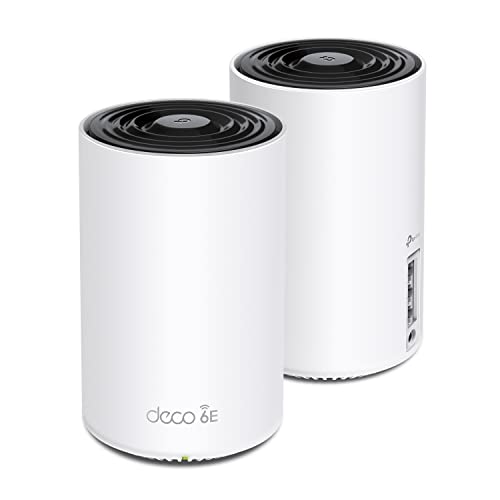
ASIN B09VW5JHPH
TP-Link Deco XE75 2-Pack
Wi-Fi 6E and 6 GHz client/backhaul options meet your planned setup, and Gigabit Ethernet is enough for its wired devices.
Last observed offer
$139.49
List Price: $199.99
Size: 2 Pack
Price checked
Observed offer ends
Observed condition: new. Coupon and subscription requirements unverified.
Prices are per listed package. Pickoryx may earn a commission from qualifying purchases through the paid Amazon links on this page, at no added cost to you.
Published by Pickoryx · Published 2026-11-08 · Source checked 2026-11-08 07:34 UTC
The main trade-off
eero Max 7 publishes Wi-Fi 7 features and multi-gig Ethernet ports; Deco XE75 publishes Wi-Fi 6E with configurable 6 GHz client/backhaul use and three Gigabit ports per unit. These are capability differences, not measured outcomes.
Quick verdict
Choose eero Max 7 if your network can use Wi-Fi 7 and multi-gigabit Ethernet; those are its clearest documented advantages. Choose Deco XE75 if its Wi-Fi 6E features and Gigabit ports meet your requirements. These are conditional feature-fit recommendations, not a measured speed, latency or coverage ranking.
Choose eero Max 7 2-Pack if
- Your Wi-Fi clients or mesh setup can use Wi-Fi 7 features, rather than simply connecting on older standards.
- Your wired internet, switch, NAS or other endpoints have multi-gigabit links that can use the Max 7's 10 GbE and 2.5 GbE ports.
Choose TP-Link Deco XE75 2-Pack if
- Wi-Fi 6E and 6 GHz client/backhaul options meet your planned setup, and Gigabit Ethernet is enough for its wired devices.
- You do not need the Max 7's Wi-Fi 7-specific enhancements or ports faster than Gigabit; compare current two-pack offers before deciding because no price ranking is included here.
When the recommendation changes
- If your clients use Wi-Fi 6 or older, they remain compatible with eero, but do not gain the Wi-Fi 7 enhancements described by eero.
- If your 6 GHz plan is for Deco clients rather than mesh backhaul, those clients must support Wi-Fi 6E.
- If your wired service, switch, cable or endpoint is limited to Gigabit, faster eero ports will not raise that link's capability; if your network has multi-gig endpoints, the port difference matters more.
The differences that matter
| Decision point | eero Max 7 2-Pack | TP-Link Deco XE75 2-Pack |
|---|---|---|
| Wifi Generation And 6ghz Use | eero Max 7 is a Wi-Fi 7 tri-band model. Its published compliance specification lists 320 MHz channels in 6 GHz. Older Wi-Fi 6 and earlier clients can connect using their existing Wi-Fi standards, but do not gain Wi-Fi 7 enhancements.[2, 3] | Deco XE75 is a Wi-Fi 6E tri-band model with 6 GHz 802.11ax HE160. Its user guide says 6 GHz is dedicated to mesh backhaul by default, or can be made available to Wi-Fi 6E-capable clients.[4, 5, 6] |
What this changes: Check the actual client devices and decide whether 6 GHz is needed for clients or mesh backhaul. Max 7's Wi-Fi 7 features matter only for compatible devices and Wi-Fi 7 mesh links; older clients remain supported but do not gain those features. XE75's 6 GHz band can instead serve its mesh nodes by default or Wi-Fi 6E clients when configured. These capabilities do not prove a real-world speed or stability winner.[3, 5, 6] The better fit depends on your priorities | ||
| Per Node Wired Port Classes | Each eero Max 7 unit has two auto-sensing 10 GbE ports and two auto-sensing 2.5 GbE ports.[2] | Each Deco XE75 unit has three auto-sensing Gigabit Ethernet ports.[4] |
What this changes: Max 7's port capabilities fit a wired network with multi-gig service, switching or devices; XE75's Gigabit ports fit when those wired links do not need higher link rates. Every connected service, cable, switch and endpoint must also support the intended rate. The port specifications are not measured internet or Wi-Fi throughput.[2, 4] The better fit depends on your priorities | ||
Best for your routine
A home has Wi-Fi 7 clients and a multi-gig wired path that can use the faster Ethernet ports.
Best fit: eero Max 7 2-Pack
Based on listed features, not comparative testing.
eero Max 7's documented Wi-Fi 7 and 10/2.5 GbE features match that setup. This does not predict measured Wi-Fi performance.
A home needs Wi-Fi 6E/6 GHz options and Gigabit ports cover its wired links.
The better fit depends on your priorities
Deco XE75 meets those published requirements, but eero Max 7 remains compatible with older Wi-Fi standards and may also meet them. Without a same-time price or management preference comparison, the evidence does not establish which is the better purchase.
Value and trade-offs
The offers shown are per listed package; check the quantities and current terms on Amazon before comparing totals.
No same-time two-pack price comparison is made here. If the current offers differ, consider the extra cost only against Wi-Fi 7 and multi-gig ports that your client and wired equipment can use.
Only current catalog observations were available; a comparable price-history window was not verified, so this article makes no time-sensitive purchase recommendation.
Limitations
- The comparison uses opened manufacturer specifications and setup guidance. No matched throughput, latency, coverage, interference, stability, security or reliability test was performed.
- Advertised band widths and Ethernet port rates describe capabilities, not a promise of end-to-end performance. Client hardware, cabling, service and local network conditions affect the result.
- Manufacturer coverage figures are omitted because their published bases are not comparable here.
- No same-time price comparison or usable price-history window is included.
Methodology and sources
Compared official Wi-Fi standards, client-compatibility guidance, 6 GHz mesh/client use, and per-unit wired port specifications. No benchmark or coverage comparison was used.
AI-assisted source retrieval and claim cross-checking of published capabilities and setup guidance.
View 6 sources
- 1.eero Max 7: 10GB Mesh Routereero · Official specifications · Source checked 2026-11-08 07:34 UTC
Evidence used on this page
- Product page, pack-size selector and eero Max 7 product heading: Identifies eero Max 7 and offers a two-pack configuration. Used for assigned bundle identity; no offer price or coverage claim is reused.
- 2.Legal: Safety and Compliance Informationeero · Official support · Source checked 2026-11-08 07:34 UTC
Evidence used on this page
- US English page, eero Max 7, model V010001: Wi-Fi connectivity and wired connectivity: Lists Wi-Fi 7 tri-band, 320 MHz channels in 6 GHz and two auto-sensing 10 GbE plus two auto-sensing 2.5 GbE ports for the eero Max 7 model.
- 3.What is Wi-Fi 7?eero Support · Official support · Source checked 2026-11-08 07:34 UTC
Evidence used on this page
- Sections: eero Wi-Fi 7 technology; Which devices are compatible with Wi-Fi 7?: Names eero Max 7 among Wi-Fi 7 mesh devices. States older-standard clients remain compatible but do not receive Wi-Fi 7 enhancements, and Wi-Fi 7 backhaul is supported for Wi-Fi 7 eeros.
- 4.Deco XE75 | AXE5400 Tri-Band Mesh Wi-Fi 6E SystemTP-Link · Official specifications · Source checked 2026-11-08 07:34 UTC
Evidence used on this page
- US English V1 2-pack page, Wireless specifications and Hardware/Ethernet Ports: Identifies the Deco XE75 2-pack, Wi-Fi 6E/802.11ax tri-band, 6 GHz 2402 Mbps HE160, and three auto-sensing Gigabit ports per Deco unit.
- 5.Common Questions Regarding Wi-Fi 6E DecoTP-Link Support · Official support · Source checked 2026-11-08 07:34 UTC
Evidence used on this page
- Questions 3, 7 and 8: Wi-Fi 6E mesh backhaul, legacy clients and XE75 mixed-Deco use: Says older clients may use 2.4/5 GHz but cannot use 6 GHz without 6 GHz-capable hardware; Deco XE75 can use 6 GHz wireless backhaul with compatible Deco mesh models.
- 6.Deco XE75 User Guide, AXE5400 Tri-Band Mesh Wi-Fi 6E SystemTP-Link · Official specifications · Source checked 2026-11-08 07:34 UTC
Evidence used on this page
- Chapter Wi-Fi Settings, section on using 6 GHz Wi-Fi: Explains that 6 GHz is used for dedicated backhaul by default and can be switched to a client Wi-Fi network; only Wi-Fi 6E-capable devices can find and join that client network.