
Garmin Edge 540 or Edge 840: Choose Your Controls and Map Setup
Choose the Edge 540 if you want a button-only interface and accept Garmin Express on a computer for map updates. Choose the Edge 840 if you want touch as an additional input and prefer its documented Wi-Fi Map Manager workflow. Neither choice establishes which device is easier or performs better on a ride.
Published by Pickoryx · Published 2026-09-29
Source checked 2026-09-29 01:31 UTC
Products compared

Product A · ASIN B0BT36VBGM
Garmin Edge 540
Last observed offer
$328.00 List Price: $349.99
Per listed package.
Offer eligibility must be confirmed on Amazon.
Checked 2026-10-19 17:24 UTC. Price and availability may change.
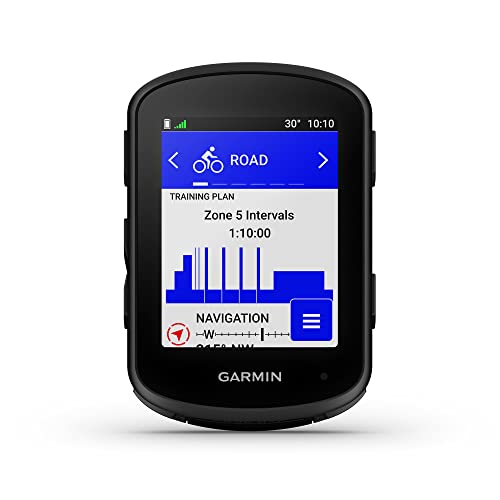
Product B · ASIN B0BT36CRCQ
Garmin Edge 840
Last observed offer
$449.99
Per listed package.
Offer eligibility must be confirmed on Amazon.
Checked 2026-10-19 08:11 UTC. Price and availability may change.
Pickoryx may earn a commission from qualifying purchases through the paid Amazon links on this page, at no added cost to you.
The buying question
Do you prefer a button-only interface and computer-based map updates, or touchscreen input with the documented Wi-Fi map-management workflow?
The Edge 540 is button-only and its manual says map updates are available through Garmin Express. The Edge 840 adds touchscreen input while retaining buttons, and its manual describes map management through Map Manager after connecting to Wi-Fi. This is a preference and setup choice, not a performance verdict.
Quick verdict
Choose Garmin Edge 540 if
- You specifically want a touchscreen-free, button-operated unit and can use Garmin Express on a computer when updating maps.
Choose Garmin Edge 840 if
- You want touchscreen input in addition to buttons and prefer managing maps through Map Manager after connecting the Edge 840 to Wi-Fi.
When the recommendation changes
- If touch input is useful but not required, weigh it against whether the documented map setup path fits your routine; the 840 retains buttons.
- If computer-based Garmin Express updates fit your routine and you prefer a touchscreen-free interface, the 540's documented setup may fit better.
- If a particular regional map or map combination is decisive, check its current availability and requirements with Garmin; this comparison does not establish map-region fit.
The differences that matter
Control Input And Touch Preference
Garmin Edge 540
Garmin's U.S. page for standard model 010-02694-00 lists Touchscreen: No and describes Edge 540-series button controls.[1]
Garmin Edge 840
Garmin's U.S. page for standard model 010-02695-00 lists Touchscreen: Yes with buttons.[2]
What this changes: If you want no touchscreen, the documented 540 interface matches that preference. If you want touch available while keeping buttons, the documented 840 interface matches that preference. These specifications do not establish which interface is easier to use while riding.[1, 2]
Map Update Preparation Workflow
Garmin Edge 540
The Edge 540 manual says map updates are available only through Garmin Express.[3]
Garmin Edge 840
The Edge 840 manual says to connect to Wi-Fi before managing map data; System > Map Manager provides options to check or update a current map and download another map.[4]
What this changes: Plan map changes around the setup you can use: Garmin documents Express for 540 map updates and Wi-Fi-connected Map Manager for 840 map management. The 540's separate phone or Wi-Fi software-update paths are not map updates.[3, 4]
Best for your routine
A rider who specifically prefers no touchscreen and can use a computer with Garmin Express when updating maps.
Best fit: Garmin Edge 540
Based on listed features, not comparative testing.
The 540 page lists no touchscreen and its manual directs map updates through Garmin Express. This is a match to the stated input and setup preferences, not an ease or performance finding.
A rider who wants touch input available alongside buttons and prefers the Wi-Fi-connected Map Manager workflow for map changes.
Best fit: Garmin Edge 840
Based on listed features, not comparative testing.
The 840 page lists touchscreen with buttons, and its manual describes map management after connecting to Wi-Fi. This is a documented feature-fit choice, not a claim that the device is easier to operate.
Value and trade-offs
One or both observed offers have eligibility conditions, so no unrestricted price difference is shown.
This comparison does not assess whether a current price difference is justified; its recommendation is limited to input preference and documented map setup.
Compare current offers with your budget.
Is the upgrade worth it?
Worth considering if
- Riders who specifically want both touch input and the documented Wi-Fi map-management workflow.
Skip the upgrade if
- You prefer a touchscreen-free interface and are comfortable preparing map updates through Garmin Express on a computer.
Limitations
- This covers the standard non-Solar Edge 540 and Edge 840 models; bundle and accessory variations are outside this choice.
- This comparison does not establish current regional map availability, map file sizes, entitlements, or whether a particular map combination fits. Verify the specific map requirements with Garmin.
- It does not assess current firmware fixes, glove or rain usability, navigation accuracy, ride or training performance, safety, or battery-life outcomes.
- Garmin's documented specifications and manual workflows are not matched riding tests, and Pickoryx did not test either device.
Questions shoppers ask
Does the Edge 840 have buttons as well as a touchscreen?
Yes. Garmin's U.S. page for standard model 010-02695-00 lists touchscreen input with buttons.
Can I use the Edge 540's phone or Wi-Fi software-update route for map updates?
The manual distinguishes software updates from map updates: it says map updates are available only through Garmin Express.
What does the Edge 840 manual require before map management?
It says to connect to Wi-Fi, then describes System > Map Manager for checking or updating a current map and downloading another map.
Methodology and sources
Compared the standard U.S. model pages for input options and the model-specific manual topics for map-update preparation. The recommendations are limited to interface and setup preference; they do not assess current map-region fit or real-world usability.
AI research and drafting only; no device, map-download, riding, or performance testing.
View 4 sources
- 1.Garmin Edge 540 Standard EditionGarmin · Official support · Source checked 2026-09-29
Evidence used on this page
- U.S. standard model page, product description and Specs: touchscreen and controls: The U.S. standard model 010-02694-00 page lists touchscreen as No and describes button controls for the Edge 540 series. It does not establish riding ease or measured performance.
- 2.Garmin Edge 840 Standard EditionGarmin · Official support · Source checked 2026-09-29
Evidence used on this page
- U.S. standard model page and Specs: touchscreen with buttons: The U.S. standard model 010-02695-00 page lists touchscreen input with buttons. It does not establish riding ease or measured performance.
- 3.Edge 540 Owner's Manual: Product UpdatesGarmin · Official support · Source checked 2026-09-29
Evidence used on this page
- EN-US Owner's Manual, Product Updates: map updates and Garmin Express: The model-specific manual states that map updates are available only through Garmin Express and distinguishes map updates from software-update paths.
- 4.Edge 840 Owner's Manual: Managing MapsGarmin · Official support · Source checked 2026-09-29
Evidence used on this page
- EN-US Owner's Manual, Managing Maps: Wi-Fi prerequisite and System > Map Manager: The model-specific manual says Wi-Fi must be connected before managing map data and describes checking/updating a current map or downloading another map in System > Map Manager.