
Hypervolt Go 3 vs Go 2: Which controls and kit fit your routine?
The Go 3 is more adjustable at the handle: an encoder dial selects five speeds, while the Go 2 uses its power/speed button to cycle through three. For the kit, Hyperice explicitly lists a Go 3 carry case with Flat and Wedge heads; the Go 2 black/gray specification lists Bullet and Flat heads and a USB-A-to-USB-C cable, with its 5V USB-A charging brick sold separately. The Go 3 guide also calls for a USB-A adapter, but its package list does not confirm that adapter is included.
Published by Pickoryx · Published 2026-10-17
Source checked 2026-10-17 19:32 UTC
Products compared
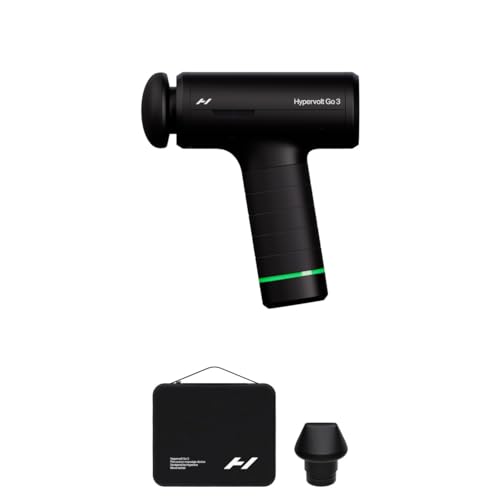
Product A · ASIN B0G82W9ZZK
Hyperice Hypervolt Go 3 (HVG3001)
Last observed offer
$149.00
Per listed package.
Offer eligibility must be confirmed on Amazon.
Checked 2026-10-19 19:18 UTC. Price and availability may change.
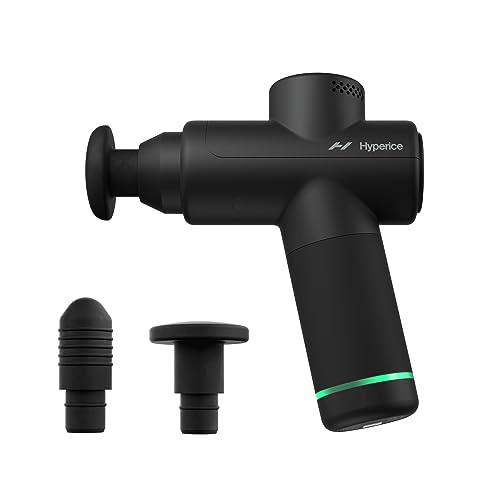
Product B · ASIN B0CDMX8QBZ
Hyperice Hypervolt Go 2 Black (HVG2001)
Last observed offer
$139.00
Per listed package.
Offer eligibility must be confirmed on Amazon.
Checked 2026-10-19 15:14 UTC. Price and availability may change.
Pickoryx may earn a commission from qualifying purchases through the paid Amazon links on this page, at no added cost to you.
The buying question
Is the Go 3's rotary five-speed control and documented travel kit a better fit than the Go 2's button-cycled three speeds and listed attachment and charging setup?
The Go 3 adds two speed choices and its maker explicitly lists a carry case with Flat and Wedge heads; the Go 2 keeps a button sequence and its black/gray specification lists Bullet and Flat heads plus a USB-A-to-USB-C cable, with no USB charging brick.
Quick verdict
Choose Hyperice Hypervolt Go 3 (HVG3001) if
- You want five dial-selected speeds rather than cycling a button through three settings.
- You want the Go 3's maker-listed carry case and Flat/Wedge head set.
Choose Hyperice Hypervolt Go 2 Black (HVG2001) if
- Three button-selected speeds are enough and you prefer the Go 2's listed Bullet/Flat heads.
- You already have a 5V USB-A charging brick for the Go 2 cable.
When the recommendation changes
- If Go 3 adapter inclusion matters, confirm the exact seller package: its guide specifies a USB-A adapter but the package list does not confirm an adapter in the box.
- If case inclusion is decisive for the Go 2, verify the exact package rather than assuming the product page's silence means no case.
The differences that matter
Speed Selection Controls
What this changes: The number and physical selector may determine which control workflow a buyer prefers; neither establishes treatment quality.[2, 5]
Charging And Travel Package
What this changes: Compare the named head and storage items and ensure a suitable USB-A adapter is available; Go 3 adapter inclusion remains unconfirmed.[1, 2, 6]
Best for your routine
A buyer who wants more on-device speed choices and a rotary selector
Best fit: Hyperice Hypervolt Go 3 (HVG3001)
Based on listed features, not comparative testing.
The Go 3 has five dial-selected settings; the Go 2 has three settings selected by button presses. This identifies control fit, not massage effectiveness.
A buyer who prefers the Go 2 Bullet head and already owns a 5V USB-A charging brick
Best fit: Hyperice Hypervolt Go 2 Black (HVG2001)
Based on listed features, not comparative testing.
The Go 2 black/gray specification lists Bullet and Flat heads and an A-to-C cable, and says its charging brick is not included.
A buyer who wants a manufacturer-listed travel case with the Go 3 Flat/Wedge heads
Best fit: Hyperice Hypervolt Go 3 (HVG3001)
Based on listed features, not comparative testing.
Hyperice explicitly includes the Go 3 carry case and those two head types. Go 2 case inclusion is unconfirmed; verify its exact offer if a case is decisive.
Value and trade-offs
One or both observed offers have eligibility conditions, so no unrestricted price difference is shown.
Whether any current Go 3 premium is justified depends on whether its dial-selected speed range and listed kit match your needs; exact offer prices can change.
Current offer data alone does not establish a good time to buy; there is not enough price history here for a buy-now or wait recommendation.
Limitations
- This compares documented controls and package details; it does not establish stronger percussion, better treatment outcomes, comfort, durability, or real-world battery runtime.
- The Go 3 operating guide calls for a USB-A adapter, but Hyperice's package list names the USB-C cable without confirming adapter inclusion. Check the exact seller bundle if you need an adapter in the box.
- For new Black/Arctic Gray Go 2 units, Hyperice says the USB charging brick is not included. Confirm the exact package if the offer differs from that configuration.
- The Go 2 official contents do not confirm whether a carry case is included; that omission is not proof it is absent.
Questions shoppers ask
Does either kit include a wall charging adapter?
Hyperice says the new Black/Arctic Gray Go 2 does not include a USB charging brick. For Go 3, the instructions call for a USB-A adapter, but its package list does not confirm whether the adapter is in the box. Check the exact offer if you need one included.
Methodology and sources
Compared manufacturer-documented physical speed selectors and the exact product-page/support kit details. No treatment, comfort, noise, runtime or durability testing was performed.
AI-assisted research and drafting. Pickoryx did not conduct hands-on testing.
View 6 sources
- 1.Hypervolt Go 3Hyperice · Official specifications · Source checked 2026-10-17 19:31 UTC
Evidence used on this page
- Full specifications; What's included; Carry case included: The Go 3 product page lists five percussion speeds and the included Flat and Wedge heads, USB-C charging cable, and premium carry case.
- 2.Operating Instructions (Hypervolt Go 3)Hyperice Support · Official support · Source checked 2026-10-17 19:31 UTC
Evidence used on this page
- Operating; Charging: Instructions say the encoder dial selects speeds 1–5 and the USB-C cord connects to a USB-A adapter; they do not confirm adapter inclusion.
- 3.Specifications (Hypervolt Go 3)Hyperice Support · Official support · Source checked 2026-10-17 19:32 UTC
Evidence used on this page
- Power supply; Frequency/speed settings; Attachments: Specifications describe a digital speed dial with five levels, Flat and Wedge attachments, and USB-C charging at 5V 2A.
- 4.Hypervolt Go 2Hyperice · Official specifications · Source checked 2026-10-17 19:31 UTC
Evidence used on this page
- Full specifications; What's included: The Go 2 Black product page lists three speeds and package contents of the device, two head attachments, and a 5V USB-A-to-USB-C charging cable.
- 5.Operating your Device (Hypervolt Go 2)Hyperice Support · Official support · Source checked 2026-10-17 19:31 UTC
Evidence used on this page
- Operating: Instructions say to cycle speeds 1–3 by pressing the power/speed setting button once per speed.
- 6.Specifications (Hypervolt Go 2)Hyperice Support · Official support · Source checked 2026-10-17 19:32 UTC
Evidence used on this page
- Power supply; Attachments; new Black/Arctic Gray variant: For new Black/Arctic Gray Go 2 units, Hyperice specifies a 5V USB-A-to-USB-C cable, says the USB charging brick is not included, and lists Bullet and Flat attachments.