
Instant Pot Pro vs Pro Plus: Which Control Workflow Fits You?
Choose by control workflow rather than a claimed cooking-results winner. The Pro has onboard one-touch programs and Favorites. The Pro Plus adds app-guided cooking, but household devices must share one account, iPhone app use currently requires iOS 16.4 or later, and Sauté cannot be controlled remotely. Instant does not say whether other app functions keep working during a Wi-Fi outage, and the Android minimum is unconfirmed.
Published by Pickoryx · Published 2026-09-28
Source checked 2026-09-28 00:18 UTC
Products compared

Product A · ASIN B08PQ2KWHS
Instant Pot Pro 6QT Multi-Use Pressure Cooker (112-0123-01)
Last observed offer
$169.99
Per listed package.
Offer eligibility must be confirmed on Amazon.
Checked 2026-10-19 15:15 UTC. Price and availability may change.
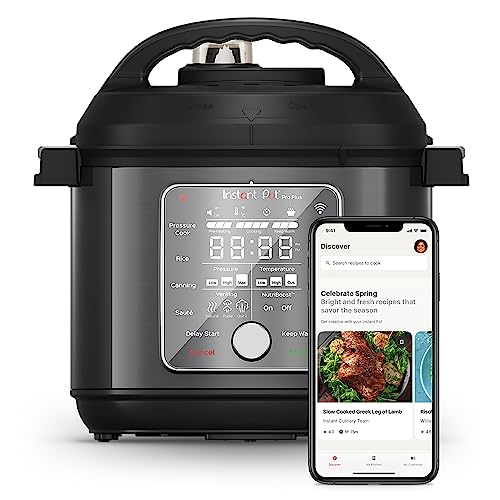
Product B · ASIN B08TMTJZ8L
Instant Pot Pro Plus 6QT Smart Multi-Cooker (112-0124-01)
Last observed offer
$229.95
Per listed package.
Offer eligibility must be confirmed on Amazon.
Checked 2026-10-19 15:15 UTC. Price and availability may change.
Pickoryx may earn a commission from qualifying purchases through the paid Amazon links on this page, at no added cost to you.
The buying question
Does the Pro Plus app workflow suit your household, and will its remote-control limits fit the way you cook?
The Pro has onboard one-touch programs and Favorites; the Pro Plus adds app-guided cooking and remote adjustment, with Bluetooth pairing and a shared-account requirement but no remote Sauté control.
Quick verdict
Choose Instant Pot Pro 6QT Multi-Use Pressure Cooker (112-0123-01) if
- The Pro's one-touch programs and Favorites are the controls you expect to use.
- You prefer to make the choice without relying on the Pro Plus's connected app workflow.
Choose Instant Pot Pro Plus 6QT Smart Multi-Cooker (112-0124-01) if
- You want the Pro Plus's guided recipes, remote monitoring or adjustment, and your household can use the required app account setup.
- You are comfortable interacting with the appliance locally for a Sauté step instead of expecting app control for that function.
When the recommendation changes
- If you will not use a shared account across household devices, or your iPhone is below the current App Store requirement, the Pro Plus app benefit may not fit; the Android minimum requirement remains unverified.
- If your recipes depend on remotely starting Sauté, the Pro Plus app cannot do that; plan to use the cooker locally for that step.
- If you need to know which cooker cooks better, tastes better, lasts longer, or is safer, this comparison cannot identify a winner.
The differences that matter
App Setup And Household Account Fit
Instant Pot Pro 6QT Multi-Use Pressure Cooker (112-0123-01)
Instant lists an LCD, 28 one-touch programs, and five Favorites for the Pro.[1]
What this changes: The Pro Plus app is a better fit only when the household can meet its account and phone requirements and use Sauté locally; its touchscreen provides controls at the cooker.[1, 2, 3, 4]
Remote Saute Control Limit
Instant Pot Pro 6QT Multi-Use Pressure Cooker (112-0123-01)
Instant lists Sauté as a Pro cooker function; remote app control for the Pro is unconfirmed.[1]
What this changes: App-first buyers must plan to interact with the Pro Plus locally for Sauté; no offline behavior for other functions is inferred.[1, 2, 3]
Best for your routine
You want Instant Connect guided recipes and remote monitoring or adjustment.
Best fit: Instant Pot Pro Plus 6QT Smart Multi-Cooker (112-0124-01)
Based on listed features, not comparative testing.
Instant lists guided recipes, monitoring, and adjustment for the Pro Plus. Choose it if those app features match how you cook; this is a feature match, not a claim that it cooks better. Account setup and the remote Sauté limit still apply.
You want the Pro onboard one-touch programs and Favorites and do not need the Pro Plus app workflow.
Best fit: Instant Pot Pro 6QT Multi-Use Pressure Cooker (112-0123-01)
Based on listed features, not comparative testing.
Instant lists an LCD, one-touch programs, and Favorites for the Pro. Choose it if you want these listed controls and do not need the Pro Plus app workflow; the Pro Plus also has its own touchscreen controls.
Value and trade-offs
One or both observed offers have eligibility conditions, so no unrestricted price difference is shown.
Compare the live offers at decision time. Any Pro Plus premium is worth considering only if you expect to use the connected workflow and accept its setup and remote-Sauté limits.
A current price alone cannot show whether today's offer is unusually good, so there is no Buy Now or Wait recommendation.
Is the upgrade worth it?
Worth considering if
- Buyers who want to use phone-guided recipes or remote monitoring and can meet the app setup requirements.
- Households comfortable sharing one account across connected Android and iOS devices.
Skip the upgrade if
- The app workflow is not useful to you or your household cannot use the shared account arrangement.
- You need a confirmed Android minimum before relying on the app; verify compatibility with your phone first.
Limitations
- Instant's FAQ lists Android 10–14 and iOS 15–16, while the current US App Store listing requires iOS 16.4 or later. For iPhone, check the current listing before buying. For Android, verify compatibility with your phone; no minimum version is confirmed.
- When Wi-Fi or internet is unavailable, Instant describes the Wi-Fi indicator but does not say whether the other app features keep working.
- If stovetop or oven use matters, check the Pro's inner-pot compatibility with Instant before buying; that compatibility is unconfirmed.
- This comparison does not determine which cooker performs better, tastes better, is quieter, is safer, or lasts longer.
- Neither cooker was hands-on tested. Prices can change; this comparison cannot tell you whether the current offer is a good time to buy.
Questions shoppers ask
Can different household phones use one Pro Plus?
Instant says household devices using Android and iOS can connect to the same Pro Plus account. The current US iPhone listing requires iOS 16.4 or later. For Android, verify compatibility with your phone; a minimum version is not confirmed.
Can the Pro Plus app remotely run Sauté?
No. Instant says Sauté cannot be controlled remotely in the app. Use the cooker locally for that step. Instant does not say whether other app features keep working during a Wi-Fi or internet outage.
Methodology and sources
This comparison looks at the Pro onboard controls, the Pro Plus connected recipe and monitoring features, household app setup, and the need to use the Pro Plus locally for Sauté. It makes no claim about cooking quality or how other app features behave during a network outage.
This document-based comparison did not involve operating or testing either cooker.
View 4 sources
- 1.Instant Pot Pro 6QT Multi-Use Pressure CookerInstant Pot · Official specifications · Source checked 2026-09-28 00:18 UTC
Evidence used on this page
- SKU 112-0123-01; features and product description: Identifies the exact Pro 6QT SKU and lists its LCD, 28 customizable one-touch programs, five Favorites, and Sauté function.
- 2.Instant Pot Pro Plus 6QT Smart Multi-CookerInstant Pot · Official specifications · Source checked 2026-09-28 00:18 UTC
Evidence used on this page
- SKU 112-0124-01; product description and feature list: Identifies the exact Pro Plus 6QT SKU and lists its touchscreen controls, app-guided recipes, remote monitoring and adjustment, and cooking functions.
- 3.Frequently Asked Questions – Instant PotInstant Pot · Official support · Source checked 2026-09-28 00:18 UTC
Evidence used on this page
- Instant Connect FAQ: Pro Plus pairing, cross-device account requirement, remote Sauté restriction, and Wi-Fi indicator behavior: Pro Plus pairing instructions require Bluetooth enabled on the phone; connected household devices may use Android and iOS but must share an account; Sauté is disabled for remote app control. Wi-Fi indicator guidance does not specify the behavior of every other function during an outage.
- 4.Instant Connect – App StoreApple App Store US · Official support · Source checked 2026-09-28 00:18 UTC
Evidence used on this page
- Compatibility: Requires iOS 16.4 or later: The current US iPhone listing states iOS 16.4 or later is required; it does not establish Android minimum OS requirements.