
Kasa KP303 vs BN-LINK BNC-U1: Which Scheduling Style Fits?
Choose Kasa KP303 for three independently scheduled AC outlets and app-based remote changes. Choose BN-LINK BNC-U1 for four outlets sharing one repeating mechanical schedule alongside four always-on AC outlets. Check the installation restrictions and BN-LINK listing conflicts below before buying.
Published by Pickoryx · Published 2026-10-10
Source checked 2026-10-10 19:50 UTC
Products compared

Product A · ASIN B083JKSSR5
Kasa KP303
Last observed offer
$29.99
Per listed package.
Offer eligibility must be confirmed on Amazon.
Checked 2026-10-19 19:07 UTC. Price and availability may change.
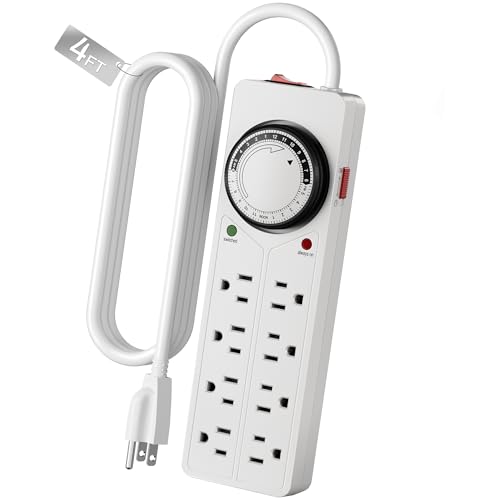
Product B · ASIN B00MWHQZX0
BN-LINK BNC-U1
Last observed offer
$22.99
Per listed package.
Offer eligibility must be confirmed on Amazon.
Checked 2026-10-19 19:06 UTC. Price and availability may change.
Pickoryx may earn a commission from qualifying purchases through the paid Amazon links on this page, at no added cost to you.
The buying question
Do your devices need separate schedules or one shared daily schedule, and do you want to change it remotely or at a dial?
Kasa offers three separately scheduled AC outlets with app control; BN-LINK offers four jointly timed outlets plus four always-on AC outlets with a local dial.
Quick verdict
Choose Kasa KP303 if
- Different AC devices need different on/off times.
- You want remote changes and can use a secured 2.4 GHz Wi-Fi network and the Kasa app.
Choose BN-LINK BNC-U1 if
- The timed devices can all follow the same daily schedule, with other AC connections left always on.
- You prefer setting a physical dial in 15-minute steps and using a row-level override.
When the recommendation changes
- A fourth independently scheduled connection exceeds what either strip provides.
- A need for remote changes favors Kasa; a need to program locally favors the BN-LINK dial.
- Installation restrictions or unresolved unit ratings can rule out an otherwise suitable control layout.
The differences that matter
Individual Group Scheduling
Kasa KP303
Three AC outlets can each follow a separate schedule. The two USB ports are always on.[1, 4]
BN-LINK BNC-U1
Four AC outlets follow one shared timer; four other AC outlets are always on.[2]
What this changes: Count distinct schedules before counting sockets. Two devices that must switch at different times need separate control, which the BN-LINK timed row does not provide.[1, 4, 2]
Network Dial Workflow
What this changes: Choose Kasa if remote changes are useful and you can provide the documented network/app setup. Choose BN-LINK if a repeating local dial schedule and row-level override suit the job; keep the controls accessible.[1, 4, 2, 3]
Best for your routine
Two AC connections need different shutoff times
Best fit: Kasa KP303
Based on listed features, not comparative testing.
Kasa lets you schedule the outlets separately. Putting both connections on BN-LINK’s timed row would give them the same schedule.
A timed group plus separate always-on AC connections
Best fit: BN-LINK BNC-U1
Based on listed features, not comparative testing.
BN-LINK provides a four-outlet timed row and four always-on outlets, provided one daily repeating pattern suits the timed group and the actual load is permitted.
Change switching without reaching the strip
Best fit: Kasa KP303
Based on listed features, not comparative testing.
Kasa documents app-based remote control. Its lack of a separate hub does not remove the secured 2.4 GHz Wi-Fi setup requirement.
Value and trade-offs
One or both observed offers have eligibility conditions, so no unrestricted price difference is shown.
Pay more for separate schedules or remote changes only if you will use them; a shared daily pattern may make the mechanical layout sufficient.
Insufficient price history for a purchase-timing recommendation.
Limitations
- BN-LINK’s selected listing title says 4FT and 1875W/10A, while its detailed listing and current manufacturer page say 3 ft and 15 A; the BNC-U1 specification labels its maximum load as resistive. These conflicts remain unresolved for the selected item. Confirm the actual unit label and matching manual; no exact cord length, load capacity or appliance compatibility is established here.
- KP303 has multiple hardware revisions. The US V1 page and retained US Revision 2.0.0 guide support the controls described, but do not establish the selected retail revision. Check its label, matching guide and current app requirements.
- The cited KP303 guide permits only dry indoor use, prohibits desk mounting and plugging into another power strip or extension cord, and requires at least 10 meters (30 feet) of wiring between the outlet and electrical service panel. Ask a qualified electrician if that wiring requirement is unclear.
- A timer can energize an outlet unexpectedly. KP303’s guide says to unplug the connected appliance before servicing it. Follow each strip’s and each connected device’s instructions; additional sockets do not multiply the strip’s total capacity.
- BN-LINK’s specification requires indoor use. No comparative testing establishes surge-protection equivalence, lightning protection, timing accuracy, connectivity reliability, energy savings or durability.
Questions shoppers ask
Does “no hub required” mean Kasa needs no Wi-Fi?
No. It means there is no separate hub to buy. The documented setup still uses a secured 2.4 GHz Wi-Fi network and the Kasa app.
Can I use Kasa’s USB ports as two more scheduled outlets?
No. The two USB ports are always on; the independent switching and scheduling apply to the three AC outlets.
What should I map out before buying?
List which AC connections must switch together, which need different times, and which must remain on. If two connections need different schedules, the BN-LINK timed row cannot separate them. Then check the unit ratings and installation requirements for every connection.
Methodology and sources
Compared manufacturer-documented outlet grouping, schedule entry, remote controls and installation restrictions. Current product pages and a specification were checked alongside a retained KP303 user guide; source retrieval dates are preserved. Recommendations describe feature fit, not measured performance.
AI assisted with source research, drafting and editing this comparison. Neither product was tested hands-on.
View 4 sources
- 1.Kasa KP303 US V1 product pageTP-Link · Official specifications · Source checked 2026-10-10 19:35 UTC
Evidence used on this page
- Overview: Individual Control; Set Schedules and Timers; No Hub Required; Specifications: Three individually controlled AC outlets, two always-on USB ports, remote app controls and secured 2.4 GHz Wi-Fi with no separate hub. V1 documentation does not establish the selected retail hardware revision.
- 2.BN-LINK BNC-U1 eight-outlet timer stripBN-LINK · Official specifications · Source checked 2026-10-10 19:35 UTC
Evidence used on this page
- SKU BNC-U1; manufacturer Product description: Timer Function, Set And Go, Override Switch: Four outlets share a timer and four remain always on; 15-minute pin intervals, 24-hour repeat and on override for the timed row. Cord and load conflicts remain unresolved for the selected ASIN.
- 3.BNC-U1 specificationBN-LINK · Official specifications · Source checked 2026-10-10 19:36 UTC
Evidence used on this page
- Function Description; Ratings & Approval: ON/Timer slide switch, 15-minute minimum setting, indoor use. Published maximum is resistive; not universal appliance authorization and not an attestation of selected ASIN rating.
- 4.Kasa KP303 User Guide, Revision 2.0.0TP-Link · Official specifications · Source checked 2026-10-05 20:51 UTC
Evidence used on this page
- Printed pp. 2–8: outlets, USB and app setup; p. 40: installation cautions: The 2021 guide illustrates the US version, identifies each outlet button, specifies always-on USB with a shared output, and explains individual scheduling. It also states indoor, dry-location, mounting and wiring restrictions. The selected retail unit’s hardware revision has not been established.