
Kobo Clara BW (Black, 16GB) vs Amazon Kindle Paperwhite (12th Generation, 2024, Black, 16GB)
Will the Kobo Clara BW or 2024 Kindle Paperwhite fit the reader's library and personal-file workflow, and which screen size do they want?
Products compared

ASIN B0D1KV8J76
Kobo Clara BW (Black, 16GB)
You want the Kobo library-borrowing workflow and have a participating library with eligible titles.
Last observed offer
$159.99
- Confirm offer eligibility on Amazon
Price checked
Observed condition: new. Coupon and subscription requirements unverified.
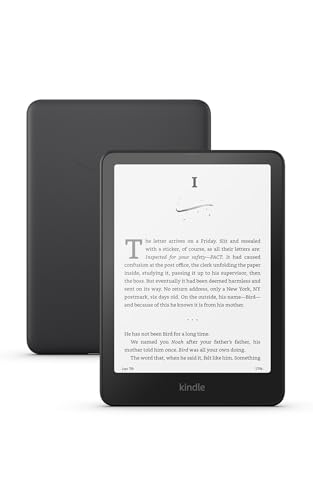
ASIN B0CFPJYX7P
Amazon Kindle Paperwhite (12th Generation, 2024, Black, 16GB)
Your Libby loan offers Read With Kindle in the US and you prefer that book to arrive through your Amazon account.
Last observed offer
$199.99
- Confirm offer eligibility on Amazon
Price checked
Observed condition: new. Coupon and subscription requirements unverified.
Prices are per listed package. Pickoryx may earn a commission from qualifying purchases through the paid Amazon links on this page, at no added cost to you.
Published by Pickoryx · Published 2026-10-21 · Source checked 2026-10-21 19:19 UTC
The main trade-off
Clara BW supports Kobo's on-device library path and direct transfer of non-protected EPUB/PDF files on a 6-inch screen. Paperwhite offers a 7-inch screen and eligible US Libby loans through Amazon; for personal files, Amazon lists EPUB/PDF for wireless Send to Kindle, while USB transfer on a 2024 Kindle connected to a Mac needs a compatible separate application. Amazon's Send to Kindle Mac app is one example, and its USB Manager supports Intel/M1–M3 Macs running macOS 12 or later.
Quick verdict
Start with the books you already borrow or own: Kobo describes an on-reader library route and direct USB loading for non-protected EPUB/PDF files, while Libby sends most eligible US loans to Kindle through Amazon. For personal files, Amazon lists EPUB/PDF for wireless Send to Kindle; on a Mac, USB transfer to a 2024 Kindle needs a compatible app, and Amazon's own USB Manager supports Intel/M1–M3 Macs with macOS 12 or later. For screen size, Clara BW is 6 inches and the 2024 Paperwhite is 7 inches; neither size establishes a comfort or reading-quality winner.
Choose Kobo Clara BW (Black, 16GB) if
- You want the Kobo library-borrowing workflow and have a participating library with eligible titles.
- You regularly copy non-protected EPUB or PDF files from a computer and prefer the Clara BW's 6-inch display.
Choose Amazon Kindle Paperwhite (12th Generation, 2024, Black, 16GB) if
- Your Libby loan offers Read With Kindle in the US and you prefer that book to arrive through your Amazon account.
- You want the Paperwhite's 7-inch display; if transferring personal files, you are comfortable using wireless Send to Kindle or a compatible USB application for your computer and Kindle.
- You use a Mac and plan USB transfers to the 2024 Kindle only if your setup supports a compatible transfer app; Amazon's USB Manager supports Intel/M1–M3 Macs on macOS 12 or later.
When the recommendation changes
- Your local library does not support the Kobo borrowing route, or the titles you need are not eligible on Kobo.
- A Libby title does not offer Read With Kindle, or your personal-file workflow depends on a transfer method your computer and Kindle do not support; Amazon's USB Manager supports Intel/M1–M3 Macs running macOS 12 or later.
- You decide that display size, device weight, or hand feel matters more than the sourced workflow differences; no hands-on comfort comparison was conducted.
The differences that matter
| Decision point | Kobo Clara BW (Black, 16GB) | Amazon Kindle Paperwhite (12th Generation, 2024, Black, 16GB) |
|---|---|---|
| Library And Ebook Workflow | Kobo lists local-library ebook borrowing for Clara BW. Its Libby help describes adding a public-library card to a supported Kobo eReader and borrowing or syncing books on the device; access varies by library and title, and some titles may be limited to the Libby app or Kobo Store availability.[1, 2] | Libby says most Libby books can be read on a Kindle eReader in the US: from a loan, choose Read With, then Kindle, finish the Get Library Book step on Amazon, and the title appears on devices associated with that Amazon account.[6, 5] |
What this changes: The route is not interchangeable: check whether your library and the specific loan support Kobo's device workflow or Libby's Kindle handoff before choosing based on library access.[2, 6] The better fit depends on your priorities | ||
| Library And Ebook Workflow | Kobo's computer-transfer instructions allow non-protected EPUB and PDF files to be copied to an eReader; DRM-protected files need a different method. Clara BW has USB-C connectivity.[3, 1] | Amazon lists EPUB and PDF among the file types supported by wireless Send to Kindle. That list describes the wireless service, not direct/native USB copying. For a 2024 Kindle connected by USB to a Mac, Amazon says a compatible separate application is required; its Send to Kindle app is one example, and its USB Manager works with Intel or M1–M3 Macs running macOS 12 or later. Amazon says Windows USB transfer does not require a separate application.[7, 5] |
What this changes: If your library is a folder of DRM-free EPUB/PDF files, compare the route you would actually use: Kobo documents direct computer copy of non-protected EPUB/PDF, while Amazon lists those formats for wireless Send to Kindle. USB transfer to a 2024 Kindle from a Mac instead requires a compatible app; Amazon's app is one example, with USB Manager support limited to the stated Mac and OS range. Windows USB transfer needs no separate app. The wireless format list does not promise equivalent direct USB handling or compatibility with every DRM-protected file.[3, 7] The better fit depends on your priorities | ||
| Reading Screen And Portability | Clara BW has a 6-inch glare-free E Ink Carta 1300 HD touchscreen, 16GB, and ComfortLight PRO controls for brightness and blue-light reduction.[1] | The standard Paperwhite introduced in 2024 has a 7-inch display and 16GB; Amazon identifies the 12th-generation 2024 Paperwhite as having adjustable warm light and IPX8 water resistance.[4, 5] |
What this changes: Choose by the screen diagonal you want: 6 inches on Clara BW or 7 inches on Paperwhite. This comparison does not measure comfort, reading speed, or hand feel, and screen diagonal alone does not establish total-device portability.[1, 4] The better fit depends on your priorities | ||
Value and trade-offs
One or both observed offers have eligibility conditions, so no unrestricted price difference is shown.
A higher current offer is worth considering only if the buyer values its library/file-transfer route or larger display; compare the live offers for these exact 16GB models.
There is not enough price history for a buy-now or wait recommendation; compare current offers for the exact models.
Limitations
- Library-card access, catalog availability, loan eligibility, and lending periods vary by library and title. Kobo's help says some library content is available only in Libby and that a library title may also need to be sold on Kobo.com for the Kobo route.
- Kobo's direct computer-copy method is for non-protected EPUB/PDF files; DRM-protected files require a separate path. Amazon's EPUB/PDF list applies to wireless Send to Kindle and does not establish equivalent direct USB handling or compatibility with every file or DRM scheme. On Mac, 2024 Kindle USB transfer requires a compatible separate application; Amazon's USB Manager supports Intel/M1–M3 Macs running macOS 12 or later. Amazon does not verify or guarantee third-party transfer apps.
- No hands-on test was conducted. The screen-size comparison does not establish display quality, reading comfort, speed, battery superiority, or which device feels more portable in use.
- Current offers can change, and the available price observations do not support a historical-low or purchase-timing claim.
Questions shoppers ask
Can I read public-library loans on either e-reader?
Kobo describes borrowing local-library ebooks on Clara BW and its Libby instructions cover supported Kobo readers. In the US, Libby says most of its books can be sent to a Kindle eReader through Read With Kindle and Amazon. Check your library and the specific title because eligibility differs.
Can I load my own EPUB or PDF files?
Both have documented paths for supported personal files, but the steps differ. Kobo documents direct computer transfer of non-protected EPUB/PDF. Amazon lists EPUB/PDF for its wireless Send to Kindle service; that format list is not a promise of the same native USB route. For a 2024 Kindle connected to a Mac by USB, a compatible separate app is required. Amazon's Send to Kindle app is one example, and its USB Manager supports Intel/M1–M3 Macs running macOS 12 or later; Windows USB transfer does not require a separate app. Check file rights and compatibility before relying on a DRM-protected ebook.
Methodology and sources
Compared the official US product specifications and current library/file-transfer instructions for these exact eReader families. The transfer answer separates Kobo's direct computer-copy instructions, Amazon's wireless Send to Kindle format list, and the distinct USB steps by computer and Kindle generation, then matches those steps to common US library and personal-file workflows.
AI assistance organized the documented library, file-transfer and display differences; Pickoryx did not test either eReader.
View 7 sources
- 1.Kobo Clara BW | Rakuten Kobo eReader Store United StatesRakuten Kobo · Official specifications · Source checked 2026-10-21 19:02 UTC
Evidence used on this page
- Product overview; technical specifications and device dimensions: Exact US Clara BW page identifies the black-and-white 6-inch Carta 1300 HD model, 16GB, ComfortLight PRO brightness/blue-light controls, USB-C, device dimensions and local-library ebook borrowing.
- 2.About the Libby appRakuten Kobo Help · Official support · Source checked 2026-10-21 19:02 UTC
Evidence used on this page
- Before you start; Add your Public Library Card; Borrow Library Books; Limitations when using Libby with Kobo: For supported Kobo eReaders, Kobo describes adding a valid library card, browsing and borrowing on the eReader, syncing loans, automatic return, and variation in library/title availability; the article notes some content may be Libby-only and the library book may also need to be sold on Kobo.com.
- 3.Add non-protected PDF and ePub files to your Kobo eReader using your computerRakuten Kobo Help · Official support · Source checked 2026-10-21 19:02 UTC
Evidence used on this page
- File-type and DRM notes; computer transfer steps: Kobo documents computer transfer of non-protected PDF/ePub files, says DRM-protected files require another method, and describes connecting the eReader, copying files and disconnecting.
- 4.Meet the all-new Kindle family, including the first color KindleAmazon About Amazon · Official specifications · Source checked 2026-10-21 19:02 UTC
Evidence used on this page
- The new Kindle Paperwhite; article dated October 16, 2024 and updated September 1, 2026: Amazon's 2024 Paperwhite launch information identifies a 7-inch display, waterproofing, 16GB storage and Black among the standard Paperwhite colors; Signature Edition is separately identified as 32GB.
- 5.Identify Your Kindle E-ReaderAmazon Kindle Support · Official support · Source checked 2026-10-21 19:02 UTC
Evidence used on this page
- Kindle Paperwhite (12th Generation): Amazon identifies the 12th-generation Paperwhite as released in 2024, with USB-C, adjustable warm light, IPX8 waterproofing and 16GB internal storage for the standard version.
- 6.Reading Kindle Books on a Kindle ereaderLibby Help · Official support · Source checked 2026-10-21 19:02 UTC
Evidence used on this page
- US availability and Read With Kindle steps: Libby says most Libby books can be read on Kindle eReaders in the US and gives the loan-to-Amazon-to-Kindle handoff; not every Libby title is promised.
- 7.Connect, Browse, and Transfer Files on E-ReaderAmazon Kindle Support · Official support · Source checked 2026-10-21 19:19 UTC
Evidence used on this page
- Connect Your Kindle E-Reader for Mac Users (wireless Send to Kindle supported file types, 2024-device USB requirement, USB Manager support range and third-party note); Connect Your Kindle E-reader for Windows Users: Amazon lists EPUB and PDF among the supported types for its wireless Send to Kindle service. Separately, it says 2024-release Kindle devices connected by USB on Mac require a compatible application, such as Amazon's Send to Kindle app; that app's USB Manager supports Intel and M1–M3 Macs running macOS 12 or later. Amazon says Windows USB transfer needs no separate app and does not guarantee third-party transfer apps.