
Logitech G PRO X Wired vs G335: Choose Your Connection and Controls
Choose PRO X if you will use its included USB sound card and supported PC software, or want a removable boom with cable controls. Choose G335 if an analog headset jack suits your setup and you prefer boom-up mute with earcup volume. PRO X also works through analog audio, but its USB processing is not active on that path.
Published by Pickoryx · Published 2026-10-09
Source checked 2026-10-09 03:25 UTC
Products compared

Product A · ASIN B07PDFBJZD
Logitech G PRO X Wired Gaming Headset (Black, 981-000817)
Last observed offer
$92.06 List Price: $129.99
Per listed package.
Offer eligibility must be confirmed on Amazon.
Checked 2026-10-19 19:05 UTC. Price and availability may change.
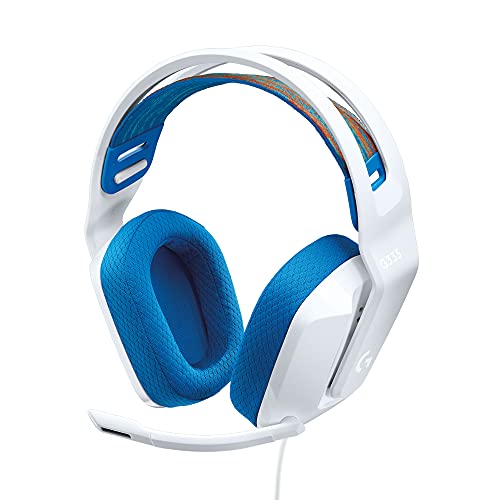
Product B · ASIN B08KKZ8S36
Logitech G335 Wired Gaming Headset (White, 981-001017)
Last observed offer
$39.99
Per listed package.
Offer eligibility must be confirmed on Amazon.
Checked 2026-10-19 15:44 UTC. Price and availability may change.
Pickoryx may earn a commission from qualifying purchases through the paid Amazon links on this page, at no added cost to you.
The buying question
Will you use PRO X’s PC processing, and which physical mute routine fits your play?
PRO X offers a USB processing path and cable controls; G335 centers on an analog connection and boom-up muting.
Quick verdict
Choose Logitech G PRO X Wired Gaming Headset (Black, 981-000817) if
- You will use G HUB with the supplied USB sound card on a supported PC.
- You prefer cable-mounted mute or removing the boom.
Choose Logitech G335 Wired Gaming Headset (White, 981-001017) if
- Your analog-jack setup is sufficient and you prefer boom-up mute and earcup volume.
When the recommendation changes
- You plan to use only analog audio.
- You cannot run the required software on your gaming PC.
- You prefer one mute gesture even when the connection is the same.
The differences that matter
Usb Processing And Analog Routing
What this changes: Choose PRO X for its included PC processing route only if you will actually use it. For analog-only use, decide by the controls below rather than counting inactive software features.[1, 3]
Microphone And Controls Workflow
What this changes: PRO X suits removing the boom or leaving it positioned while muting from the cable. G335 suits a boom-up mute gesture and reaching the headset for volume. This choice still matters when both use analog audio.[2, 4]
Best for your routine
Supported PC processing with the supplied USB sound card
Best fit: Logitech G PRO X Wired Gaming Headset (Black, 981-000817)
Based on listed features, not comparative testing.
PRO X provides this route; check software support before choosing it.
Analog play with boom-up muting
Best fit: Logitech G335 Wired Gaming Headset (White, 981-001017)
Based on listed features, not comparative testing.
G335 matches both the connection plan and that control preference.
Muting while leaving the boom positioned
Best fit: Logitech G PRO X Wired Gaming Headset (Black, 981-000817)
Based on listed features, not comparative testing.
Use the PRO X cable’s mute control.
Value and trade-offs
One or both observed offers have eligibility conditions, so no unrestricted price difference is shown.
If PRO X costs more, pay for processing you will use or a preferred control routine. Analog-only use removes the processing justification.
There is not enough verified price history here to recommend buying now or waiting.
Limitations
- This is a documentation-based comparison without Pickoryx listening or wear tests. It does not establish a sound, microphone-quality, comfort, isolation, latency or durability winner.
- Check your device’s headset-input requirements and current software support. Third-party adapters are outside this comparison.
- These are the Black wired PRO X and White G335, not wireless PRO X models or special-edition packages. Confirm the selected seller’s accessories before ordering.
Questions shoppers ask
Will PRO X’s PC processing follow me onto a console controller?
No. The PRO X guide excludes its G HUB processing features on the analog controller connection. Choose for that connection and the physical controls, not the PC software.
What if my PC has separate headphone and microphone sockets?
Both standard packages list a Y-splitter for that arrangement. PRO X can alternatively use its included USB sound card on a supported PC; that changes which software features are available.
Methodology and sources
Compared the supplied connection paths and physical microphone/volume controls, keeping software conditions separate from sound quality.
AI assisted source comparison and drafting; no hands-on testing was performed.
View 4 sources
- 1.PRO X Setup GuideLogitech G · Official specifications · Source checked 2026-10-09 03:24 UTC
Evidence used on this page
- English pp. 3–6: PC setup, console setup and FAQ: USB DAC and G HUB processing conditions; analog connection bypasses these features; saved EQ and live microphone processing have different requirements.
- 2.PRO X Wired Gaming Headset, Black 981-000817Logitech G · Official specifications · Source checked 2026-10-09 03:12 UTC
Evidence used on this page
- ProductModel SKU 981-000817 and packageContents in official page data: Exact Black SKU; listed USB external sound card, detachable microphone, cable-mounted volume/mute and PC splitter.
- 3.G335 Wired Gaming Headset, White 981-001017Logitech G · Official specifications · Source checked 2026-10-09 03:13 UTC
Evidence used on this page
- White ProductModel 981-001017; Plug and Play; Built-in Controls; requirements and packageContents: Exact White SKU, analog headset-jack requirement, supplied PC Y-splitter and earcup volume roller.
- 4.G335 Setup GuideLogitech G · Official specifications · Source checked 2026-10-09 03:25 UTC
Evidence used on this page
- English pp. 3 and 5: setup instructions and features: Analog connector, raising the boom to mute and on-ear volume control.