
Mac mini M1 vs M4: Choose by Desk Fit and Display Setup
For these listed Renewed configurations, choose by the space your setup allows and the screens you need to connect. The M4 has a smaller desk footprint but a taller chassis and supports more display arrangements in Apple's published limits; the M1 is shorter and its documented maximum is two displays. Neither conclusion measures speed or image quality.
Published by Pickoryx · Published 2026-10-16
Source checked 2026-10-16 22:20 UTC
Products compared
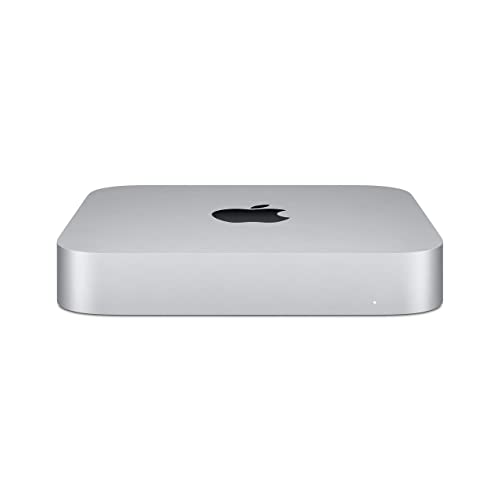
Product A · ASIN B08PF2RF76
Apple Mac mini (M1, 2020), Silver, 8GB/256GB (Renewed listing)
Last observed offer
$511.38 List Price: $699.00
Per listed package.
Offer eligibility must be confirmed on Amazon.
Checked 2026-10-19 15:51 UTC. Price and availability may change.

Product B · ASIN B0DTPPBN95
Apple Mac mini (M4, 2024), Silver, base M4 10-core CPU, 16GB/256GB (Renewed listing)
Last observed offer
$709.99 List Price: $759.00
Per listed package.
Offer eligibility must be confirmed on Amazon.
Checked 2026-10-19 15:16 UTC. Price and availability may change.
Pickoryx may earn a commission from qualifying purchases through the paid Amazon links on this page, at no added cost to you.
The buying question
Which exact listed configuration fits the available desk space and planned external displays?
The M4 reduces width and depth and supports more documented display arrangements, while its chassis is taller; the M1 is shorter but occupies a larger square footprint and tops out at two displays.
Quick verdict
Choose Apple Mac mini (M1, 2020), Silver, 8GB/256GB (Renewed listing) if
- Your surface can accommodate a 7.7-inch square unit, your shelf clearance favors the 1.4-inch chassis, and your planned screens fit Apple's two-display M1 mode.
Choose Apple Mac mini (M4, 2024), Silver, base M4 10-core CPU, 16GB/256GB (Renewed listing) if
- Desk width or depth is tight, or your planned three-screen arrangement matches one of Apple's listed base-M4 display modes, and you have clearance for its 2-inch height.
When the recommendation changes
- Your exact monitor resolution, refresh rate, or connection differs from the Apple configurations listed here.
- The available shelf clearance or desk surface changes, or the marketplace listing's renewed condition, included items, or seller terms do not suit you.
The differences that matter
Desktop Footprint And Placement
Apple Mac mini (M1, 2020), Silver, 8GB/256GB (Renewed listing)
7.7 x 7.7 inches across the desk; 1.4 inches high[1]
Apple Mac mini (M4, 2024), Silver, base M4 10-core CPU, 16GB/256GB (Renewed listing)
5 x 5 inches across the desk; 2 inches high[2]
What this changes: The M4 takes less width and depth but has a taller chassis; measure both the available surface and shelf clearance before choosing.[1, 2]
External Display Configuration
Apple Mac mini (M1, 2020), Silver, 8GB/256GB (Renewed listing)
Up to two simultaneous displays: one up to 6K/60Hz over Thunderbolt and one up to 4K/60Hz over HDMI[1]
Apple Mac mini (M4, 2024), Silver, base M4 10-core CPU, 16GB/256GB (Renewed listing)
Up to three simultaneous displays in Apple's listed M4 modes, including two up to 6K/60Hz over Thunderbolt plus one up to 5K/60Hz over Thunderbolt or 4K/60Hz over HDMI[2]
What this changes: Count screens and match each resolution and connection to Apple's supported mode; the M4 documentation covers three-display arrangements while the M1 maximum is two.[1, 2]
Best for your routine
A planned three-display arrangement that matches an Apple-listed M4 mode
Best fit: Apple Mac mini (M4, 2024), Silver, base M4 10-core CPU, 16GB/256GB (Renewed listing)
Based on listed features, not comparative testing.
The base M4's official specification includes supported three-display combinations; the M1's stated simultaneous maximum is two displays. Confirm each monitor's connection and resolution against the exact mode before buying.
A placement where the 7.7-inch square base fits but a 2-inch chassis height exceeds the stated opening
Best fit: Apple Mac mini (M1, 2020), Silver, 8GB/256GB (Renewed listing)
Based on listed features, not comparative testing.
The M1 is listed at 1.4 inches high compared with 2 inches for the M4; allow any installation clearance your setup requires and do not treat chassis dimensions as a fit guarantee.
Value and trade-offs
One or both observed offers have eligibility conditions, so no unrestricted price difference is shown.
No price premium was assessed. Compare current offers separately and weigh them against the exact space and display setup you need.
Current offers and price history were not assessed; price timing is outside this comparison.
Limitations
- Both current product listings identify the configurations as Renewed. Apple's technical specifications confirm the model families and listed base configurations but do not verify a marketplace unit's condition, included items, seller, or warranty; check those listing terms before purchase.
- Display support depends on the exact screen count, resolution, refresh rate, port, and connection path. The configurations above are published support limits, not a guarantee for every monitor or adapter.
- No current offer or price-history assessment was performed. This comparison does not test compute speed, graphics performance, display quality, acoustics, or long-term reliability.
- The base M4 described here is not the M4 Pro configuration.
Questions shoppers ask
Will either Mac mini work with my exact monitors?
Use Apple's mode for the correct chip and check every display's resolution, refresh rate, and connection. The listed M1 mode covers one 6K/60Hz Thunderbolt display plus one 4K/60Hz HDMI display; the base M4 lists several multi-display combinations. Check any adapter or dock separately.
Does Apple's spec page confirm the condition of these Renewed listings?
No. The listings label these configurations Renewed, while Apple's specification pages describe the model families and configurations. Review the marketplace seller, condition, included items, return terms, and warranty information for the actual listing.
Methodology and sources
Compared Apple's listed chassis dimensions and model-specific external-display modes for the two identified configurations. No benchmark, monitor compatibility test, or renewed-unit inspection was performed.
AI assisted source review and writing; neither computer was physically tested.
View 2 sources
- 1.Mac mini (M1, 2020) - Tech SpecsApple Support · Official support · Source checked 2026-10-16 22:20 UTC
Evidence used on this page
- Size and Weight; Video Support; Memory; Storage: Apple lists the M1 (2020) chassis as 7.7 x 7.7 x 1.4 inches; its simultaneous display maximum is one 6K/60Hz display over Thunderbolt plus one 4K/60Hz display over HDMI. The page lists 8GB unified memory and 256GB SSD as the base configuration. It does not identify the marketplace ASIN or seller condition.
- 2.Mac mini (2024) - Tech SpecsApple Support · Official support · Source checked 2026-10-16 22:20 UTC
Evidence used on this page
- Chip; Memory; Storage; Display Support; Size and Weight: Apple lists the base M4 (2024) as a 10-core CPU/10-core GPU configuration with 16GB unified memory and 256GB SSD. The chassis is 5 x 5 x 2 inches. The M4 supports up to three displays in listed configurations, including two up to 6K/60Hz over Thunderbolt and one up to 5K/60Hz over Thunderbolt or 4K/60Hz over HDMI. The page does not identify the marketplace ASIN or seller condition.