
MacBook Air M1 vs M2: Which Renewed Model Fits Your Setup?
The M1 has two USB-C / Thunderbolt ports that support charging. The M2 adds a separate MagSafe charging port while keeping two such ports, and has a larger listed built-in display. Pick based on the connection layout and screen specifications you want; the listed external-display support is the same.
Published by Pickoryx · Published 2026-10-17
Source checked 2026-10-17 11:13 UTC
Products compared

Product A · ASIN B08PNQTYV2
Apple MacBook Air (M1, 2020), 8GB / 256GB, Space Gray (Renewed listing)
Last observed offer
$495.00
Per listed package.
Offer eligibility must be confirmed on Amazon.
Checked 2026-10-19 16:49 UTC. Price and availability may change.
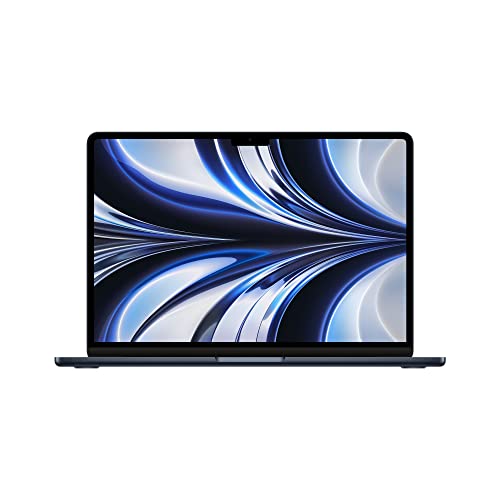
Product B · ASIN B0BHC15G32
Apple MacBook Air (M2, 2022), 8GB / 256GB, Midnight (Renewed listing)
Last observed offer
$686.84
Per listed package.
Offer eligibility must be confirmed on Amazon.
Checked 2026-10-19 16:51 UTC. Price and availability may change.
Pickoryx may earn a commission from qualifying purchases through the paid Amazon links on this page, at no added cost to you.
The buying question
Which model better fits the buyer’s charging-port and built-in-display preferences?
The M1 charges through either of its two USB-C / Thunderbolt ports; the M2 also offers separate MagSafe charging and has a 13.6-inch listed display instead of 13.3 inches.
Quick verdict
Choose Apple MacBook Air (M1, 2020), 8GB / 256GB, Space Gray (Renewed listing) if
- You prefer the 13.3-inch listed display and are comfortable charging through one of the two USB-C / Thunderbolt ports.
Choose Apple MacBook Air (M2, 2022), 8GB / 256GB, Midnight (Renewed listing) if
- You want a separate MagSafe charging connection and prefer the 13.6-inch listed display.
When the recommendation changes
- If charging through a USB-C / Thunderbolt port is acceptable and you prefer the 13.3-inch display, the listed differences do not establish a reason to choose the M2.
- If you want to keep both listed USB-C / Thunderbolt ports available while charging, the M2 has the separate MagSafe option.
The differences that matter
Charging And Peripheral Setup
Apple MacBook Air (M1, 2020), 8GB / 256GB, Space Gray (Renewed listing)
Two Thunderbolt / USB 4 ports; Apple says both support charging.[1]
Apple MacBook Air (M2, 2022), 8GB / 256GB, Midnight (Renewed listing)
MagSafe 3 charging plus two Thunderbolt / USB 4 ports, which also support charging.[2]
What this changes: The M2 gives you a separate MagSafe charging connection if you want to keep both listed USB-C / Thunderbolt ports available for peripherals. The M1 can charge through either of its two listed ports. This is a port-layout choice, not a claim about charging speed.[1, 2]
Built In Display Fit
Apple MacBook Air (M1, 2020), 8GB / 256GB, Space Gray (Renewed listing)
13.3-inch built-in display, 2560 × 1600 resolution, listed at 400 nits.[1]
Apple MacBook Air (M2, 2022), 8GB / 256GB, Midnight (Renewed listing)
13.6-inch built-in display, 2560 × 1664 resolution, listed at 500 nits.[2]
What this changes: Choose by the listed screen size and specifications that fit your workspace and preferences; these figures do not establish a measured picture-quality winner.[1, 2]
External Display Support
Apple MacBook Air (M1, 2020), 8GB / 256GB, Space Gray (Renewed listing)
Apple lists support for one external display up to 6K at 60Hz.[1]
Apple MacBook Air (M2, 2022), 8GB / 256GB, Midnight (Renewed listing)
Apple lists support for one external display up to 6K at 60Hz.[2]
What this changes: The listed external-display ceiling is the same for both, so it does not separate these choices.[1, 2]
Best for your routine
Buyer prioritizing a separate charging connection while keeping the listed USB-C / Thunderbolt ports available
Best fit: Apple MacBook Air (M2, 2022), 8GB / 256GB, Midnight (Renewed listing)
Based on listed features, not comparative testing.
Apple lists MagSafe 3 separately on the M2 and says its two Thunderbolt / USB 4 ports also support charging.
Buyer who prefers the 13.3-inch listed display and charging through a USB-C / Thunderbolt port
Best fit: Apple MacBook Air (M1, 2020), 8GB / 256GB, Space Gray (Renewed listing)
Based on listed features, not comparative testing.
Those preferences align with the M1’s listed display size and charging-capable ports.
Value and trade-offs
One or both observed offers have eligibility conditions, so no unrestricted price difference is shown.
Compare the current offers for the exact renewed listings. Any price difference should be weighed against the separate MagSafe option and listed display differences, not assumed performance or condition differences.
There is not enough price history here for a timing recommendation.
Limitations
- Both products are sold as renewed listings. Apple’s model-family specifications do not verify the condition, battery health, warranty, seller, or included items of either renewed unit.
- No matched hands-on testing was performed. The display figures are listed specifications, not a comparative picture-quality assessment.
- Apple lists one external display up to 6K at 60Hz for each model; this comparison does not assess dock or adapter workarounds.
Questions shoppers ask
Does the M2 have to charge through MagSafe?
No. Apple says the M2’s two Thunderbolt / USB 4 ports also support charging; MagSafe 3 is an additional charging connection.
Do these models support different numbers of external displays?
Apple lists one external display up to 6K at 60Hz for each.
Do Apple’s original box contents confirm what comes with these renewed listings?
No. The specifications describe original configurations, not the contents or condition of the renewed offers compared here.
Methodology and sources
Compared Apple’s listed charging connections, built-in display specifications, and external-display support for the named model years. No performance, battery-life, display-quality, or renewed-unit condition result was inferred.
AI assisted source review and drafting. No hands-on testing was performed.
View 2 sources
- 1.MacBook Air (M1, 2020) - Tech SpecsApple Support · Official support · Source checked 2026-10-17 11:12 UTC
Evidence used on this page
- Display; Charging and Expansion; External Display Support: Apple lists the 2020 M1 MacBook Air display as 13.3 inches, 2560 × 1600 and 400 nits; two Thunderbolt / USB 4 ports support charging; and support for one external display up to 6K at 60Hz. Original in-box items are not applied to a renewed listing.
- 2.MacBook Air (M2, 2022) - Tech SpecsApple Support · Official support · Source checked 2026-10-17 11:12 UTC
Evidence used on this page
- Display; Charging and Expansion; External Display Support: Apple lists the 2022 M2 MacBook Air display as 13.6 inches, 2560 × 1664 and 500 nits; MagSafe 3 charging and two Thunderbolt / USB 4 ports that also support charging; and support for one external display up to 6K at 60Hz. Original in-box items are not applied to a renewed listing.