
Ring Pan-Tilt Indoor Cam 2K vs Indoor Cam 2K: Which Control Style Fits Your Room?
Pick the Pan-Tilt model for app-directed reframing and its integrated camera-and-microphone shutter. Pick the Indoor Cam 2K if its removable lens-cover routine suits you and you are willing to use the app separately for microphone privacy.
Published by Pickoryx · Published 2026-10-16
Source checked 2026-10-16 00:22 UTC
Products compared

Product A · ASIN B0GZLRN1ST
Ring Pan-Tilt Indoor Cam 2K (White, Plug-In)
Last observed offer
$69.99
Per listed package.
Offer eligibility must be confirmed on Amazon.
Checked 2026-10-19 15:44 UTC. Price and availability may change.
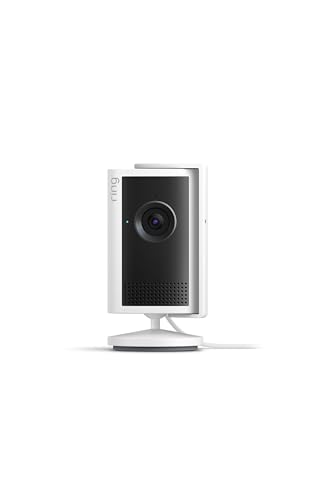
Product B · ASIN B0DXM9Y8J1
Ring Indoor Cam 2K (White, Plug-In)
Last observed offer
$59.99
Per listed package.
Offer eligibility must be confirmed on Amazon.
Checked 2026-10-19 19:13 UTC. Price and availability may change.
Pickoryx may earn a commission from qualifying purchases through the paid Amazon links on this page, at no added cost to you.
The buying question
Do you want app-directed pan and tilt, and which physical camera-and-microphone privacy routine fits how you use the room?
The Pan-Tilt model supports app-directed camera movement and uses one integrated shutter for camera and microphone; the Indoor Cam 2K uses a listed field of view and swivel mount, plus a removable lens cover with separate microphone control.
Quick verdict
Choose Ring Pan-Tilt Indoor Cam 2K (White, Plug-In) if
- You want to pan or tilt the camera from the Ring app rather than repositioning it by hand.
- You want one physical shutter action that Ring says disables both camera and microphone.
Choose Ring Indoor Cam 2K (White, Plug-In) if
- You prefer a detachable lens cover that slides over the lens and can swivel aside.
- You are comfortable disabling the microphone separately in the Ring app when you want audio privacy.
When the recommendation changes
- If you do not need app-directed reframing and prefer the removable cover workflow, the standard Indoor Cam 2K may fit better; if you want the camera and microphone disabled together with one physical action, the Pan-Tilt model is the documented fit.
The differences that matter
Framing Control
Ring Pan-Tilt Indoor Cam 2K (White, Plug-In)
Ring says the camera can be manually panned and tilted from the Ring app; Auto Tracking rotates it to keep a detected person or pet in frame during Live View and recordings.[1]
Ring Indoor Cam 2K (White, Plug-In)
Ring lists a 115° horizontal by 60° vertical field of view and describes a flexible swivel mount that can be placed on a tabletop or mounted on a wall or ceiling.[2]
What this changes: Choose A if changing the camera view from the app is part of your setup. For B, Ring lists a field of view and a swivel mount; its app-directed pan/tilt instructions are specific to A.[1, 2]
Privacy Control Workflow
Ring Pan-Tilt Indoor Cam 2K (White, Plug-In)
Ring describes an integrated physical shutter that disables the camera and microphone together with one slide.[1]
Ring Indoor Cam 2K (White, Plug-In)
Ring describes a detachable lens cover that blocks the camera view and muffles the microphone; it says the microphone can be fully disabled separately in the Ring app.[2]
What this changes: A fits a buyer who wants one physical action for camera and microphone. B fits a buyer who wants a removable cover and accepts a separate app step for complete audio privacy; neither mechanism establishes a broader privacy or security advantage.[1, 2]
Best for your routine
App-directed reframing or a one-slide physical camera-and-microphone shutter
Best fit: Ring Pan-Tilt Indoor Cam 2K (White, Plug-In)
Based on listed features, not comparative testing.
Ring documents manual app pan/tilt and an integrated shutter that disables the camera and microphone together.
A removable lens-cover routine with microphone privacy handled separately in the app
Best fit: Ring Indoor Cam 2K (White, Plug-In)
Based on listed features, not comparative testing.
Ring documents a detachable cover that slides over the lens and can swivel aside, with a separate app control for fully disabling the microphone.
Value and trade-offs
One or both observed offers have eligibility conditions, so no unrestricted price difference is shown.
No price-history analysis is included. Whether app-directed movement or the integrated shutter justifies any current offer difference depends on whether you need those controls.
No buy-timing recommendation is made because price history is unavailable.
Limitations
- This comparison uses Ring's published feature descriptions and specifications; Pickoryx did not conduct hands-on tests.
- The sources do not establish which camera gives better real-world room coverage, detection, footage, privacy, or security outcomes.
- No current offer comparison or price-history analysis is included.
Questions shoppers ask
Does the Indoor Cam 2K's lens cover switch off its microphone?
Ring says the cover blocks the camera view and muffles the microphone. For complete audio privacy, Ring directs users to disable the microphone separately in the app.
Can I change the Pan-Tilt camera's view from the app?
Ring says you can manually pan and tilt it from the Ring app. The page also describes Auto Tracking during Live View and recordings; this comparison does not assess how well tracking works in a room.
Methodology and sources
Compared Ring's published framing controls and physical privacy-control workflows for the selected white plug-in models. The comparison treats feature fit as conditional guidance and makes no measured performance, privacy, or security claim.
AI-assisted research and writing based on manufacturer-published information; Pickoryx did not conduct hands-on testing.
View 3 sources
- 1.Pan-Tilt Indoor Cam 2K | RingRing · Official specifications · Source checked 2026-10-16 00:22 UTC
Evidence used on this page
- Sections '360° view of your space' and 'You're in control' (lines 206-215); product comparison table for model naming (lines 357-365, 591-598).: Ring says the Pan-Tilt Indoor Cam 2K can be manually panned and tilted from its app, describes Auto Tracking rotation during Live View and recordings, and says its integrated shutter physically disables camera and microphone together with one slide. Numeric movement/coverage claims are not used because Ring's page/table contains conflicting descriptions.
- 2.Indoor Cam 2K | RingRing · Official specifications · Source checked 2026-10-16 00:22 UTC
Evidence used on this page
- Removable Lens Cover and placement sections (lines 1194-1210); Tech Specs, field of view (lines 1300-1323); FAQ name change (lines 1388-1390) and lens-cover workflow (lines 1398-1401).: Ring identifies this page as Indoor Cam 2K and says the Indoor Cam Plus name changed while features remain the same. It describes the detachable lens cover as blocking the camera view and muffling the microphone, with full microphone disable available separately in the Ring app. It lists a 115° horizontal by 60° vertical field of view and flexible swivel mount.
- 3.Compare Indoor Cameras | RingRing · Official specifications · Source checked 2026-10-16 00:22 UTC
Evidence used on this page
- Selector and comparison table list Pan-Tilt Indoor Cam 2K and Indoor Cam 2K as plug-in options (lines 51-62 and 140-147).: Ring presents both selected 2K indoor-camera lines in its indoor-camera comparison selector as plug-in choices. Used only as qualitative co-choice context, not as product fact, popularity, or independent performance evidence.