
Should You Buy the 1TB BarraCuda or 2TB SkyHawk?
Start with two checks: how much nominal space you need and the drive's annualized host workload. The BarraCuda is listed at 1TB with an average workload rating below 55 TB/year; the SkyHawk is 2TB with a limit below 180 TB/year and is documented for always-on, low-transaction surveillance workloads. Those are planning references, not speed, reliability, or lifespan guarantees.
Published by Pickoryx · Published 2026-10-15
Source checked 2026-10-15 15:54 UTC
Products compared

Product A · ASIN B01LNJBA2I
Seagate BarraCuda ST1000DM010 1TB
Last observed offer
$99.99
Per listed package.
Offer eligibility must be confirmed on Amazon.
Checked 2026-10-19 07:27 UTC. Price and availability may change.
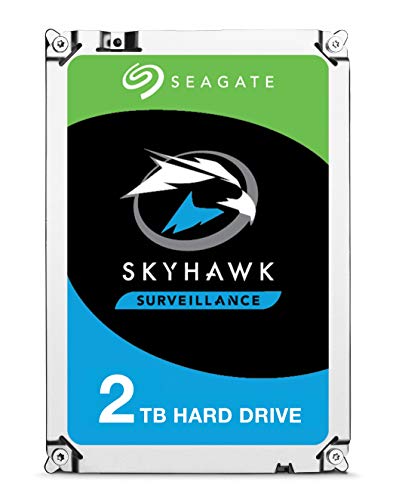
Product B · ASIN B01LOOJ8QM
Seagate SkyHawk ST2000VX008 2TB
Last observed offer
$144.00 List Price: $170.00
Per listed package.
Offer eligibility must be confirmed on Amazon.
Checked 2026-10-19 07:27 UTC. Price and availability may change.
Pickoryx may earn a commission from qualifying purchases through the paid Amazon links on this page, at no added cost to you.
The buying question
Is the 1TB BarraCuda ST1000DM010 enough, or does the 2TB SkyHawk ST2000VX008 better fit the planned capacity and annualized workload?
The SkyHawk lists twice the nominal capacity and a higher published annualized workload limit, while its documentation describes an always-on, low-transaction surveillance profile; the BarraCuda is documented for desktop-storage conditions and has a lower workload rating.
Quick verdict
Choose Seagate BarraCuda ST1000DM010 1TB if
- One terabyte of nominal capacity is sufficient and your planned system supports ST1000DM010.
- Your annualized host read-and-write workload fits the BarraCuda manual's published rating and desktop-storage conditions.
Choose Seagate SkyHawk ST2000VX008 2TB if
- You need two terabytes of nominal capacity and your system supports ST2000VX008.
- You are planning an always-on, low-transaction surveillance workload that fits the SkyHawk's published profile and rate limit.
When the recommendation changes
- Your estimate of host reads plus writes, annualized by power-on hours, changes which published workload rating is relevant.
- Your computer, DVR, or NVR lists only one exact model as supported, or requires a different capacity or drive class.
The differences that matter
Nominal Capacity
Seagate BarraCuda ST1000DM010 1TB
1,000 GB (1 TB) formatted capacity for ST1000DM010[1]
Seagate SkyHawk ST2000VX008 2TB
2,000 GB (2 TB) formatted capacity for ST2000VX008[2]
What this changes: The SkyHawk lists twice the nominal capacity. The manuals define TB in decimal bytes and note that formatted, operating-system-visible space can be lower, so compare storage needs rather than expecting the full label amount as usable space.[1, 2]
Published Annualized Workload Profile
What this changes: Estimate annualized host reads plus writes and compare that figure with the model-specific published rating. The larger SkyHawk figure is a workload-planning distinction, not evidence of higher speed, longer life, lower failure risk, or a guarantee for a particular recorder.[1, 2, 3, 4]
Best for your routine
A desktop-storage setup needs only 1TB nominal capacity and the estimated annualized host workload is within the BarraCuda's published rating.
Best fit: Seagate BarraCuda ST1000DM010 1TB
Based on listed features, not comparative testing.
The BarraCuda manual lists the exact ST1000DM010 as a 1TB model and gives its desktop-storage workload conditions. Confirm the computer supports this model before buying.
A supported DVR/NVR build needs 2TB nominal capacity and has an always-on, low-transaction surveillance workload within the SkyHawk's published profile.
Best fit: Seagate SkyHawk ST2000VX008 2TB
Based on listed features, not comparative testing.
The SkyHawk manual lists ST2000VX008 at 2TB, and Seagate describes its surveillance workload profile and model-specific rate limit. Confirm recorder support and estimate workload before choosing it.
Value and trade-offs
One or both observed offers have eligibility conditions, so no unrestricted price difference is shown.
No current offer comparison was used. Compare the exact model listings at purchase time; a higher price only matters if the additional nominal capacity or the documented workload profile is useful for your system.
Price history was not evaluated, so this comparison cannot say whether to buy now or wait.
Limitations
- Nominal capacity is not the same as formatted or operating-system-visible space; actual available capacity varies with formatting and the system.
- A workload rating is a published planning limit, not a measurement of speed or a guarantee of drive life, reliability, or failure rate.
- The SkyHawk data sheet describes an always-on, low-transaction surveillance profile; it does not establish that every DVR/NVR supports this exact drive.
- Check the exact computer or recorder's drive-support list, capacity limits, and interface requirements before purchase.
- Seagate says individual warranty status must be checked using the drive serial number, model or part number, and country of purchase.
- No current prices, hands-on results, or comparative speed, noise, or longevity tests were used.
Questions shoppers ask
How do I compare my workload with the TB-per-year ratings?
Seagate's support method annualizes lifetime host reads plus writes by multiplying their sum by 8,760 and dividing by lifetime power-on hours. Use a measured estimate for the drive's expected workload, then compare it with the exact model's published rating; the formula is a planning check, not a performance test.
Will a 2TB drive show exactly 2TB of usable space?
Not necessarily. Seagate defines 1TB as one trillion bytes and says formatted capacity or the amount reported by an operating system can be lower.
Does the SkyHawk's higher workload rating prove it will last longer?
No. The rating describes a manufacturer-published workload limit and the intended workload profile. It is not comparative lifespan or reliability evidence.
Methodology and sources
Compared the exact model numbers in Seagate manuals and data sheets, then used Seagate's workload-rate formula to explain how a buyer can compare an estimated annualized host workload with each published rating. No price history or performance test was used.
AI-assisted research and writing used Seagate’s published documents to prepare this conditional comparison; Pickoryx did not conduct hands-on testing or benchmark either drive.
View 4 sources
- 1.Seagate BarraCuda Product Manual, Rev. FSeagate · Official specifications · Source checked 2026-10-15 15:54 UTC
Evidence used on this page
- Printed pp. 8–9: Table 1 identifies ST1000DM010 and 1,000GB (1TB); p. 9 states average annualized workload rating below 55TB/year and explains its I/O-workload assumption; printed p. 18 identifies Desktop Storage field conditions; p. 9 directs checking an individual warranty by serial, model/part number, and purchase country.: Model-specific manual covering ST1000DM010. It lists 1TB formatted capacity, a below-55TB/year average annualized workload rating, desktop-storage field conditions, and a warning that accessible capacity may vary with formatting and system reporting.
- 2.Seagate SkyHawk Product Manual, Rev. CSeagate · Official specifications · Source checked 2026-10-15 15:54 UTC
Evidence used on this page
- Printed pp. 10–11: Table 2 names ST2000VX008 and 2,000GB (2TB); p. 11 states average annualized workload rating below 180TB/year and warranty lookup requirements. Table footnotes state decimal capacity and note that accessible capacity may vary.: Model-specific manual that identifies ST2000VX008 at 2TB and lists an average annualized workload rating below 180TB/year. Its capacity note says the amount accessible can vary by operating environment and formatting.
- 3.Seagate SkyHawk 3.5 Hard Drive Data Sheet, DS1902.6-1710USSeagate · Official specifications · Source checked 2026-10-15 15:54 UTC
Evidence used on this page
- Printed p. 3: the 2TB column identifies ST2000VX008 and lists a 180TB/year workload rate limit; pp. 1 and 3 describe SkyHawk surveillance drives as designed for always-on, low-transaction workloads (20% duty cycle), with higher-transaction workloads directed to enterprise-class offerings.: US English data sheet explicitly lists the 2TB ST2000VX008 and describes the SkyHawk workload profile. This establishes the manufacturer's published application framing, not a measured performance or lifespan advantage.
- 4.Annualised Workload RateSeagate Support · Official support · Source checked 2026-10-15 15:54 UTC
Evidence used on this page
- Annualised Workload Rate section: formula adds lifetime host writes and reads, multiplies by 8,760 hours/year, and divides by lifetime power-on hours; result is an annualized average in TB/year.: Seagate explains that annualized workload uses total host reads plus writes adjusted for power-on hours. Used here to help readers estimate their workload, not as a test result or a reliability guarantee.