
Sony WH-1000XM6 vs Beats Studio Pro: Which Fits Your Listening Setup?
Both headphones support a 3.5 mm wired route, but their documented wired options differ: Sony's guide explains passive music with the headset off and noise canceling over its supplied cable when powered; Beats documents USB-C lossless audio on supported devices while charging. For on-ear controls, Sony uses a touch panel and Beats uses physical buttons. Choose around your source and control preference, not an assumed sound-quality winner.
Published by Pickoryx · Published 2026-10-02
Source checked 2026-10-02 11:52 UTC
Products compared

Product A · ASIN B0F3PQHWTZ
Sony WH-1000XM6
Last observed offer
$458.00
Per listed package.
Offer eligibility must be confirmed on Amazon.
Checked 2026-10-19 19:09 UTC. Price and availability may change.
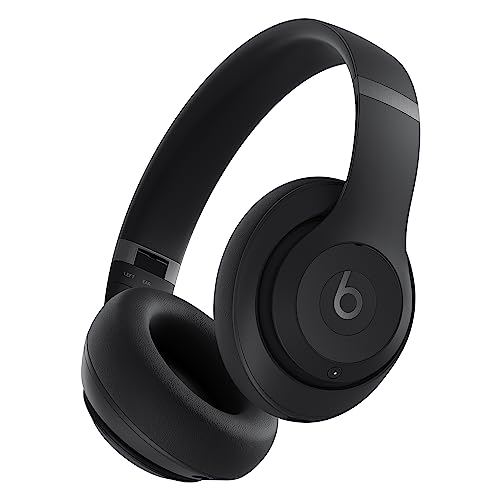
Product B · ASIN B0C8PR4W22
Beats Studio Pro
Last observed offer
$249.95 List Price: $299.99
Per listed package.
Offer eligibility must be confirmed on Amazon.
Checked 2026-10-19 19:07 UTC. Price and availability may change.
Pickoryx may earn a commission from qualifying purchases through the paid Amazon links on this page, at no added cost to you.
The buying question
Which model better fits your wired source and the way you want to control playback on the headphones?
Beats documents USB-C lossless audio on supported devices and has tactile playback buttons, while Sony documents a supplied analog cable that can play music with the headset off or run with noise canceling on when powered, plus touch playback controls.
Quick verdict
Choose Sony WH-1000XM6 if
- You want Sony's documented supplied 3.5 mm cable workflow, including passive music with the headset off or noise canceling when it is on.
- You prefer swipe and tap playback controls and may want to switch Sony's touch panel off in its app.
Choose Beats Studio Pro if
- You want the documented USB-C lossless route with a supported source and lossless audio enabled, while listening and charging.
- You prefer physical playback and volume buttons on the earcup.
When the recommendation changes
- Your source has a 3.5 mm output and you want passive listening with the headset powered off; both manuals document this use.
- Your source is on Apple's supported-device list or a supported Android device and you specifically want Beats' USB-C lossless listening path.
- You prefer swipe gestures that can be disabled in Sony's app or physical buttons for playback and volume.
The differences that matter
Wired Source Workflow
Sony WH-1000XM6
The WH-1000XM6 guide describes playback through its headphone-cable input using the supplied cable. Music can play with the headset off, but noise canceling and Ambient Sound require it on; Bluetooth is unavailable while using that cable. Its USB Type-C port is described for charging.[1, 2]
What this changes: Both have a documented 3.5 mm option, so a standard analog source can work with either. Beats gives a documented USB-C digital-audio workflow on supported devices; Sony's cited guide instead details analog playback and powered noise-canceling conditions. The source record does not establish that Sony lacks any unlisted USB audio feature.[1, 2, 4, 5]
Physical Control Workflow
Sony WH-1000XM6
The WH-1000XM6 touch panel supports tap/swipe playback and volume actions plus Quick Attention; the Sony Sound Connect app can turn the panel on or off. With the supplied headphone cable, playback and volume actions are performed on the source device.[3, 1]
Beats Studio Pro
Studio Pro uses its left-earcup b button for play/pause and track navigation, separate physical volume buttons, and a right-earcup System button for listening-mode changes. The guide also documents USB-C sound-profile selection using that System button on supported devices.[4]
What this changes: This is a choice between Sony's gesture-based wireless controls and Beats' physical buttons; wired playback control also depends on the connection, since Sony directs cable users to the source device. Neither layout is established here as faster or easier.[3, 1, 4]
Best for your routine
USB-C lossless listening from a compatible source while the headphones charge
Best fit: Beats Studio Pro
Based on listed features, not comparative testing.
Beats documents USB-C audio with supported devices and charging during playback; the cited Sony guide describes its USB Type-C port for charging and its audio cable route separately.
Playback controlled with physical earcup buttons rather than swipe gestures
Best fit: Beats Studio Pro
Based on listed features, not comparative testing.
The Studio Pro uses physical b and volume buttons; Sony uses a touch panel for wireless playback and volume, which can be disabled in the app.
Passive music from a 3.5 mm source with the headset powered off
No clear winner
Both manufacturer guides document analog playback without battery power; this comparison has no evidence that either sounds better in that mode.
Value and trade-offs
One or both observed offers have eligibility conditions, so no unrestricted price difference is shown.
Compare current checkout offers for the exact models. If one costs more, weigh the source connections and control workflow you will actually use; this comparison does not establish a sound-quality premium.
Check current checkout prices and terms. Price history was not assessed, so this comparison cannot recommend when to buy.
Limitations
- This is a feature-fit comparison of manufacturer-documented connection and control workflows; no hands-on testing or comparative audio, noise-canceling, microphone, comfort, or battery testing was performed.
- Beats' USB-C lossless instructions require a supported source device and lossless audio enabled in the source. They do not establish compatibility with every USB-C device.
- Sony's cited guide identifies its USB Type-C port for charging and separately documents playback through the supplied headphone cable. It does not establish the status of any undocumented USB audio mode.
- The official guides cover the named WH-1000XM6 and Studio Pro models. This comparison uses the black variants; verify exact included items at checkout.
Questions shoppers ask
Can either headphone play music over a 3.5 mm cable without battery power?
Yes. Sony says the WH-1000XM6 can play music while off through its supplied headphone cable, but noise canceling is unavailable while off. Beats says Studio Pro playback over its included 3.5 mm cable does not require battery power.
Does USB-C mean the same thing on both models?
The cited instructions describe different tasks. Beats documents USB-C lossless audio on supported sources and charging while listening. Sony documents USB Type-C charging and separately describes audio through its supplied headphone cable. That documentation does not prove an unlisted Sony audio mode is impossible.
Methodology and sources
Compared the named models' official instructions for wired connection, powered-state behavior, and on-headphone playback controls. The comparison describes feature fit and does not assess sound quality or comparative performance.
Automation assisted with organizing research and drafting. Product behavior claims are based on cited manufacturer documentation; no hands-on testing was performed.
View 5 sources
- 1.WH-1000XM6 Help Guide: Using the supplied headphone cableSony · Official specifications · Source checked 2026-10-02 11:51 UTC
Evidence used on this page
- Using the supplied headphone cable, lines 11–30: Describes the supplied cable connection, music playback while off with noise canceling unavailable, powered noise canceling/Ambient Sound, Bluetooth being unavailable while cabled, and cable-mode playback/volume operation from the source device.
- 2.WH-1000XM6 Help Guide: Location and function of partsSony · Official specifications · Source checked 2026-10-02 11:51 UTC
Evidence used on this page
- Headphone cable input jack and USB Type-C port, lines 54–69: Identifies the headphone-cable input for music players and describes the USB Type-C port as a charging connection to a computer or AC adapter.
- 3.WH-1000XM6 Help Guide: About the touch sensor control panelSony · Official specifications · Source checked 2026-10-02 11:51 UTC
Evidence used on this page
- Main actions and touch panel setting, lines 10–63: Lists tap/swipe playback and volume actions, Quick Attention activation, and the app option to switch the touch panel on or off.
- 4.Use your Beats Studio ProApple Beats User Guide · Official support · Source checked 2026-10-02 11:51 UTC
Evidence used on this page
- Controls, lossless audio, cable playback and charging, lines 117–197: Names Studio Pro, depicts its button locations, documents b/volume/System button operations, lossless playback with supported USB-C devices or 3.5 mm cable, no battery requirement for 3.5 mm playback, and charging during USB-C listening.
- 5.Beats Studio Pro SupportBeats by Dre · Official specifications · Source checked 2026-10-02 11:51 UTC
Evidence used on this page
- FAQ: Can I use with a wired connection?, lines 78–80: Confirms Studio Pro's included 3.5 mm connection and USB-C audio/call connection to compatible source devices.