
Steam Deck OLED vs Legion Go S SteamOS: Which Fits Your Controls and Dock Setup?
Pick by the controls and connection layout you will actually use. The Steam Deck OLED gives you two trackpads and a 7.4-inch HDR OLED screen; the selected Legion Go S gives you an 8-inch 1920x1200 VRR touchscreen and two USB-C ports. Neither specification set establishes which screen looks better or which device runs games faster.
Published by Pickoryx · Published 2026-10-21
Source checked 2026-10-21 21:04 UTC
Products compared

Product A · ASIN B0CQ3RWQQZ
Valve Steam Deck OLED 512GB
Last observed offer
$854.99
Per listed package.
Offer eligibility must be confirmed on Amazon.
Checked 2026-10-22 20:51 UTC. Price and availability may change.
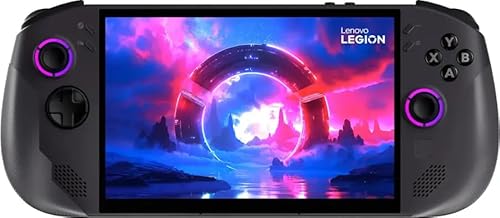
Product B · ASIN B0FTM1S785
Lenovo Legion Go S Powered by SteamOS, Ryzen Z1 Extreme, 32GB RAM, 1TB SSD (83N6000GUS)
Last observed offer
$999.99 List Price: $1,555.99
Per listed package.
Offer eligibility must be confirmed on Amazon.
Checked 2026-10-22 20:51 UTC. Price and availability may change.
Pickoryx may earn a commission from qualifying purchases through the paid Amazon links on this page, at no added cost to you.
The buying question
Do the Steam Deck OLED's two trackpads and HDR OLED screen fit better, or does the Legion Go S's larger VRR IPS screen and two USB-C ports suit the buyer's controls and dock plan?
The Deck combines a 7.4-inch HDR OLED display, two trackpads, and one USB-C port that can carry video and charging; the selected Legion Go S has an 8-inch 1920x1200 IPS touchscreen with a 48–120Hz VRR range, one small right-side touchpad, and two USB-C USB4 ports. These are published layout and connection choices, not a measured display or gaming-performance ranking.
Quick verdict
Choose Valve Steam Deck OLED 512GB if
- You want two built-in trackpads as part of the handheld's control layout and prefer the Deck's 7.4-inch HDR OLED specification.
- A single USB-C connection to a compatible dock or hub suits your external-display and charging plan.
Choose Lenovo Legion Go S Powered by SteamOS, Ryzen Z1 Extreme, 32GB RAM, 1TB SSD (83N6000GUS) if
- You prefer an 8-inch 1920x1200 touchscreen with a documented 48–120Hz variable-refresh range.
- You want two USB-C sockets available on the handheld when planning charging, display, or accessory connections.
When the recommendation changes
- If you need a preinstalled Windows 11 system, neither of these selected configurations fits: both are SteamOS models.
- If you already own a particular monitor or dock, confirm its resolution, charging, and accessory requirements against the exact handheld and dock before buying; port labels alone do not guarantee that setup.
The differences that matter
Display And Control Layout Fit
Valve Steam Deck OLED 512GB
The 512GB Steam Deck OLED has a 7.4-inch, 1280x800 HDR OLED touchscreen with refresh up to 90Hz and two 32.5mm square trackpads.[1, 2]
Lenovo Legion Go S Powered by SteamOS, Ryzen Z1 Extreme, 32GB RAM, 1TB SSD (83N6000GUS)
The Legion Go S 8APU1 family specification lists an 8-inch 1920x1200 multitouch IPS display with a 48–120Hz VRR range and one buttonless 10x10mm touchpad on the right controller. The Lenovo US page identifies the selected SteamOS model as 83N6000GUS; the PSREF is the 8APU1 family specification.[4, 5]
What this changes: The layouts answer different preferences: Deck supplies two physical trackpads alongside its OLED display, while the Go S family pairs a larger touch display with one small right-side touchpad. Use those stated dimensions and controls to choose a layout; they do not show which panel looks better, which controls feel more comfortable, or which games perform better.[2, 5, 4]
Docking And External Device Setup
Valve Steam Deck OLED 512GB
The Deck has one USB-C charging port that supports DisplayPort video and USB 3 Gen 2. Valve's Dock page says its Dock works with OLED and LCD Decks, supports up to two external displays, and that third-party hubs or docks may be used; Valve advises checking a specific setup if it does not work.[2, 3]
Lenovo Legion Go S Powered by SteamOS, Ryzen Z1 Extreme, 32GB RAM, 1TB SSD (83N6000GUS)
The Legion Go S 8APU1 PSREF lists two USB-C USB4 40Gbps ports with USB Power Delivery input/output and DisplayPort 1.4, and says USB-C docking solutions are supported. Its exact compatibility list and a specific multi-display arrangement should be checked for the accessories and monitors a buyer plans to use.[5]
What this changes: If you plan to connect a display or accessory and handle charging through separate direct connections, the Go S's two USB-C ports give you two sockets to plan around; the Deck's single port means a hub or dock is needed when the same port must handle both jobs. Either way, confirm the exact monitor, dock, resolution, and power requirements rather than assuming every USB-C accessory will work.[2, 3, 5]
Operating System Fit
Valve Steam Deck OLED 512GB
Valve lists SteamOS 3 for Steam Deck.[2]
What this changes: A buyer who needs Windows 11 preinstalled should choose neither of these exact SteamOS configurations.[2, 4, 5]
Best for your routine
A buyer who specifically wants two built-in trackpads on the handheld
Best fit: Valve Steam Deck OLED 512GB
Based on listed features, not comparative testing.
Valve lists two trackpads on the selected Deck hardware; the Lenovo 8APU1 specification lists one small right-controller touchpad. This is a control-layout match, not a claim about comfort, accuracy, or performance.
A buyer who wants two USB-C ports on the handheld for a direct connection plan
Best fit: Lenovo Legion Go S Powered by SteamOS, Ryzen Z1 Extreme, 32GB RAM, 1TB SSD (83N6000GUS)
Based on listed features, not comparative testing.
Lenovo lists two USB-C ports on the Legion Go S 8APU1, while Valve lists one USB-C port on the Deck. Confirm the exact dock and monitor setup; this port count alone does not promise a particular display arrangement.
Value and trade-offs
One or both observed offers have eligibility conditions, so no unrestricted price difference is shown.
Compare the current offers for these exact configurations and decide whether the screen/control layout or direct-port arrangement you prefer is worth any price difference. No offer terms or price history are used to make a timing recommendation.
There is not enough price history here to recommend buying now or waiting; compare current offers for the exact configurations and review their seller and condition terms.
Limitations
- These are published specification and connection-layout comparisons, not hands-on use or a matched performance test. They do not establish screen quality, comfort, frame rates, battery life in a particular game, or connection reliability.
- The Lenovo US page identifies the selected 83N6000GUS configuration. Its detailed hardware figures come from Lenovo's Legion Go S 8APU1 family PSREF; confirm the exact regional offer and dock/accessory requirements before purchase.
- A USB4 or DisplayPort label does not guarantee a given monitor resolution, number of displays, charging behavior, or dock compatibility. Check the exact device, monitor, dock, cable, and power requirements together.
Questions shoppers ask
Do both devices run SteamOS?
Yes for these selected configurations: Valve lists SteamOS 3 for the Deck, and Lenovo identifies model 83N6000GUS as powered by SteamOS. If you need Windows 11 preinstalled, neither is the right configuration.
Does the Legion Go S's USB4 label guarantee a particular monitor setup?
No. Lenovo lists two USB4 ports with DisplayPort and USB-C docking support, but the exact compatible dock and display arrangement depends on the accessories and setup. Check Lenovo's compatibility information and the requirements for your monitor and dock before buying.
Methodology and sources
Compared official display and control layouts, USB-C port functions, and published docking guidance. Lenovo's detailed figures are identified as 8APU1 family specifications alongside the exact US model page. No game-performance, display-quality, ergonomics, or accessory-compatibility test was performed.
AI assistance organized the cited manufacturer specifications and translated their screen, control, and port layouts into conditional buying guidance; neither device was physically tested.
View 5 sources
- 1.Introducing Steam Deck OLEDValve · Official specifications · Source checked 2026-10-21 21:04 UTC
Evidence used on this page
- Compare Steam Decks; 512GB OLED: Valve's product page lists the 512GB OLED configuration and identifies its 1280x800 HDR OLED screen, 7.4-inch diagonal size, and up-to-90Hz refresh rate.
- 2.Steam Deck Tech SpecsValve · Official specifications · Source checked 2026-10-21 21:04 UTC
Evidence used on this page
- Controls and Input; Display; Power; Expansion; Software: Valve lists two trackpads, the 7.4-inch OLED display, one USB-C charging port with DisplayPort and USB 3 Gen 2, 45W USB-C power input, and SteamOS 3. These details support a layout and connection discussion, not a comparative performance claim.
- 3.Steam Deck Docking StationValve · Official specifications · Source checked 2026-10-21 21:04 UTC
Evidence used on this page
- Increased flexibility; Made for each other; Plays well with others: Valve says its Dock works with OLED and LCD Steam Decks and can connect the Deck to up to two external displays. The page also welcomes third-party hubs and docks while telling users to contact Valve if a specific setup does not work; it does not guarantee every combination.
- 4.Lenovo Legion Go S Gen 1, model 83N6000GUSLenovo US · Official specifications · Source checked 2026-10-21 21:04 UTC
Evidence used on this page
- Product title and model identifier: Lenovo's US product page identifies model 83N6000GUS as Legion Go S Powered by SteamOS in Nebula Nocturne. The page is used for selected-model identity; detailed display and port figures are taken from Lenovo's 8APU1 PSREF and are labeled as family specifications.
- 5.Legion Go S 8APU1 Product Specifications ReferenceLenovo PSREF · Official support · Source checked 2026-10-21 21:04 UTC
Evidence used on this page
- Display; Input Device; Ports; Docking; Operating System: Lenovo's 8APU1 family reference lists the 8-inch 1920x1200 IPS touchscreen with 48–120Hz VRR, one 10x10mm buttonless right-controller touchpad, two USB-C USB4 40Gbps ports with PD and DisplayPort 1.4, USB-C docking support, SteamOS as a family OS option, and Z1 Extreme/32GB/1TB family options. It is not a SKU-specific configuration table; the Lenovo US product page independently identifies the selected 83N6000GUS SteamOS model.