
UGREEN NASync DH2300 2-Bay NAS (Diskless) vs Synology DiskStation DS223j 2-Bay NAS (Diskless)
Should you plan a direct HDMI cable from the DH2300 to a display, or choose between the two vendors’ documented app workflows for family files and photos?
Products compared

ASIN B0FNWHSPXF
UGREEN NASync DH2300 2-Bay NAS (Diskless)
You need documented 4K-at-60-Hz HDMI output for a direct connection from the NAS to a display.
Last observed offer
$239.99
List Price: $269.99
- Confirm offer eligibility on Amazon
Size: 2-Bay
Price checked
Observed condition: new. Coupon and subscription requirements unverified.
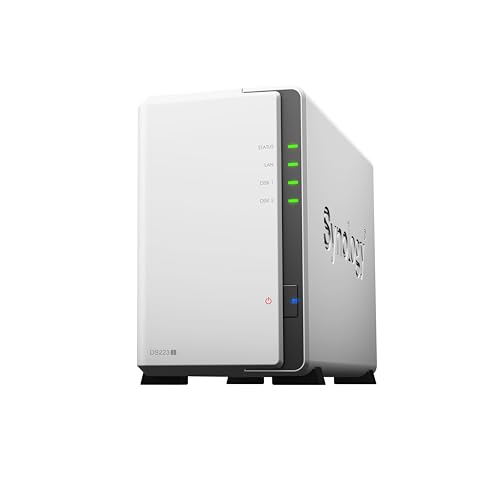
ASIN B0C8814GKB
Synology DiskStation DS223j 2-Bay NAS (Diskless)
Your household already uses or specifically wants the listed Synology Drive clients or Synology Photos workflow.
Last observed offer
$209.99
- Confirm offer eligibility on Amazon
Size: 2-bay
Price checked
Observed condition: new. Coupon and subscription requirements unverified.
Prices are per listed package. Pickoryx may earn a commission from qualifying purchases through the paid Amazon links on this page, at no added cost to you.
Published by Pickoryx · Published 2026-10-21 · Source checked 2026-10-21 21:05 UTC
The main trade-off
The DH2300 documents direct 4K60 HDMI and its UGOS app’s phone/photo backup path; the DS223j lists Synology Drive, Photos, Hyper Backup and Cloud Sync. Both list network DLNA, so choose by the physical hookup and the vendor app workflow your household wants.
Quick verdict
Both exact listings are two-bay diskless NAS units, so plan and budget for compatible drives separately. The DH2300 is the fit when a direct HDMI cable to a display is required; the DS223j may fit households that specifically want its listed Synology apps. UGREEN also documents its own UGOS app and phone/photo backup path, so compare the exact tasks you need rather than assuming one vendor lacks equivalent functions.
Choose UGREEN NASync DH2300 2-Bay NAS (Diskless) if
- You need documented 4K-at-60-Hz HDMI output for a direct connection from the NAS to a display.
- You prefer the DH2300’s documented UGOS app and phone/photo backup workflow for the devices and tasks in your household.
Choose Synology DiskStation DS223j 2-Bay NAS (Diskless) if
- Your household already uses or specifically wants the listed Synology Drive clients or Synology Photos workflow.
- You plan to use the listed Hyper Backup or Cloud Sync path; confirm any account, destination or subscription requirements for your setup.
When the recommendation changes
- If a TV needs a cable directly from the NAS, the DH2300 has the documented HDMI output; if playback will be through networked devices, both pages list DLNA, so check the receiving device and media client.
- If household members prefer Synology Drive or Photos, the DS223j page lists those named apps; if they prefer UGREEN’s documented UGOS phone/photo backup workflow, the DH2300 page describes that route. These sources do not establish full app-feature parity or a usability winner.
The differences that matter
| Decision point | UGREEN NASync DH2300 2-Bay NAS (Diskless) | Synology DiskStation DS223j 2-Bay NAS (Diskless) |
|---|---|---|
| Hardware Setup And Connections | DH2300 has two SATA bays, is sold without drives, and includes a 4K 60 Hz HDMI output with documented direct HDMI and DLNA playback.[1] | DS223j has two SATA drive bays and lists 1GbE LAN and two USB 3.2 Gen 1 ports; Synology also lists DLNA compliance, but its product hardware/spec page does not list an HDMI output.[2] |
What this changes: If the television will connect directly to the NAS, the DH2300 supplies a documented HDMI path. If playback will happen over the home network, both have a stated DLNA route, so check the receiving device and media apps you intend to use.[1, 2] The better fit depends on your priorities | ||
| File Access And Software Workflow | UGREEN describes the DH2300’s UGOS all-in-one app and says the unit supports phone/photo and video storage, automatic phone backup, organization and sharing. Its page notes that remote access depends on the internet connection and UGREENlink, and that phone operating systems may pause background uploads.[1] | Synology lists Drive clients for PC, Mac, Linux, Chromebook, Android, iOS and browser access; it also names Synology Photos for mobile backup, Hyper Backup for backup destinations, and Cloud Sync for services including Google Drive, Dropbox and OneDrive.[2] |
What this changes: Both manufacturers document their own app and backup paths. If household members already use or specifically want the named Synology apps, the DS223j has those listed workflows; if they prefer UGREEN’s documented UGOS phone/photo backup path, the DH2300 has that route. These pages do not establish full feature equivalence or which system is easier in practice, so verify the specific tasks and devices you depend on.[1, 2] The better fit depends on your priorities | ||
| Hardware Setup And Connections | The DH2300 is diskless with two SATA bays; UGREEN directs buyers to select the exact NAS model and verify a drive by full part number in its compatibility list.[1, 3] | The DS223j listing is diskless with two SATA bays; Synology’s specifications support 3.5-inch SATA HDDs or 2.5-inch SATA SSDs, with an optional Type C holder required for 2.5-inch drives.[2] |
What this changes: Buyers bringing an existing drive should check its exact model against the maker’s list and include any required mounting part. Do not select either NAS based only on drive brand or capacity.[1, 3, 2] The better fit depends on your priorities | ||
Best for your routine
Connect the NAS directly to a TV or display for local playback.
Best fit: UGREEN NASync DH2300 2-Bay NAS (Diskless)
Based on listed features, not comparative testing.
UGREEN documents a 4K60 HDMI output and direct HDMI playback for the DH2300. Choose it when a direct cable from the NAS is part of the room setup; verify display input and media-file support before buying.
Use Synology’s named apps already preferred by household members.
Best fit: Synology DiskStation DS223j 2-Bay NAS (Diskless)
Based on listed features, not comparative testing.
The DS223j page lists Synology Drive across desktop and mobile platforms and Synology Photos for phone backup. Choose it when those named apps fit the household’s existing or intended workflow; UGREEN also documents its own app and backup route, so this is a vendor-workflow preference rather than proof of exclusive capability.
Value and trade-offs
One or both observed offers have eligibility conditions, so no unrestricted price difference is shown.
Compare current exact offers with the separate cost of compatible drives and any required mounting hardware; a premium is justified only if the direct connection or the vendor app workflow you plan to use matters to your household.
Recorded price history is insufficient to assess purchase timing. Compare current offers and include compatible-drive and mounting costs before you buy.
Limitations
- Both selected listings are diskless; drives must be purchased separately, and final usable capacity depends on the drives and storage configuration.
- This feature comparison does not measure transfer speed, media-transcoding quality, simultaneous-user performance, noise or long-term reliability.
- UGREEN’s current DH2300 page says the unit has no official Docker support and does not support virtual machines. This does not establish which self-hosted applications are supported on the DS223j; verify any required app against current compatibility information for both exact models.
- A two-drive RAID arrangement is not a second copy stored elsewhere. Keep another backup of irreplaceable files.
- The cited pages describe each vendor’s own software paths but do not establish full app-feature parity or comparative ease of use. Verify the specific client, backup destination and device workflow you require.
Questions shoppers ask
Do these exact listings include drives?
No. Both are diskless listings. UGREEN states the DH2300’s drives are sold separately, and the selected DS223j listing is also diskless. Check current box contents and compatibility information before ordering drives.
Can either NAS play media through a TV?
The DH2300 documents direct 4K60 HDMI output and DLNA. Synology lists DLNA compliance for the DS223j, so network playback with a compatible client is another route; its listed hardware ports do not show HDMI.
Methodology and sources
Compared the exact US diskless models on direct-display versus network-DLNA hookup, then on the vendor app workflows each manufacturer documents. The sources support conditional feature fit, not measured performance or a full app-parity conclusion.
Automation assisted source collection and structured drafting; no hands-on test was conducted.
View 3 sources
- 1.UGREEN NASync DH2300 | 2-Bay Home NAS for Photo Backup & 64TB StorageUGREEN · Official specifications · Source checked 2026-10-21 21:05 UTC
Evidence used on this page
- Frequently Asked Questions: device/photo backup, app workflow, direct playback, diskless drives and supported applications; Specs: SKU 95087, model DH2300, bays, ports and HDMI output: Identifies the DH2300 as a two-bay diskless NAS; states its bays, 4K60 HDMI output and DLNA, describes its UGOS app and phone/photo backup workflow, and documents product limitations for Docker and virtual machines.
- 2.DiskStation® DS223j | Synology Inc.Synology · Official support · Source checked 2026-10-21 21:05 UTC
Evidence used on this page
- Product features and Hardware Specifications: Synology Drive/Photos, Hyper Backup, Cloud Sync, DLNA, drive bays, ports and mounting requirements: Describes DS223j file access through Drive clients, mobile photo backup, Hyper Backup and Cloud Sync; lists two SATA bays, LAN/USB ports, DLNA, SMB, and the optional Type C holder required for 2.5-inch drives.
- 3.UGREEN NAS Compatibility List for HDDs, SSDs, RAM & UPSUGREEN · Official specifications · Source checked 2026-10-21 20:48 UTC
Evidence used on this page
- NAS Compatibility FAQs: select exact NAS model and verify by full component part number: UGREEN says to select the exact NAS model and confirm the full drive part number; an unlisted part number is not automatically incompatible, but its interoperability has not been verified by UGREEN.