
Cricut Explore 5 Essential Bundle vs Silhouette CAMEO 5 Alpha
Will your projects fit the matless material and cut-length workflow each machine documents, and how will your existing SVG files fit the design software you plan to use?
Products compared
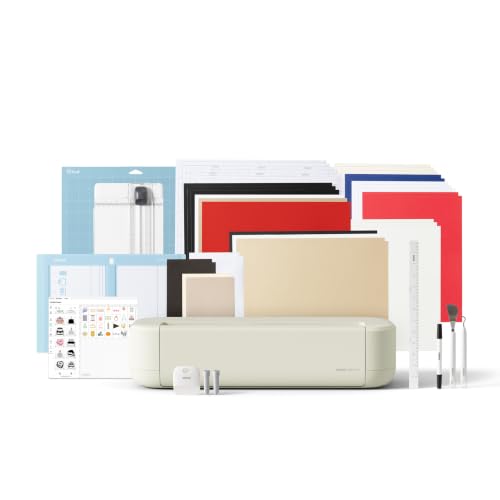
ASIN B0GJFL3WHS
Cricut Explore 5 Essential Bundle
You plan to use Cricut Smart Materials and your matless project lengths fit within Cricut's stated 12-ft limit.
Last observed offer
$249.00
- Confirm offer eligibility on Amazon
Size: 65 Project Bundle
Price checked
Observed condition: new. Coupon and subscription requirements unverified.

ASIN B0FQFYVF8B
Silhouette CAMEO 5 Alpha
Your planned lined-material cuts need more than 12 ft but no more than CAMEO 5 Alpha's listed 16-ft maximum.
Last observed offer
$299.00
- Confirm offer eligibility on Amazon
Price checked
Observed condition: new. Coupon and subscription requirements unverified.
Prices are per listed package. Pickoryx may earn a commission from qualifying purchases through the paid Amazon links on this page, at no added cost to you.
Published by Pickoryx · Published 2026-10-22 · Source checked 2026-10-22 17:32 UTC
The main trade-off
Cricut documents matless Smart Material cuts up to 12 ft and direct SVG upload in Design Space; Silhouette lists CAMEO 5 Alpha cuts up to 16 ft with lined material, while Studio SVG opening depends on the software edition.
Quick verdict
Choose by the material and software workflow you will actually use. Cricut documents matless Smart Material cuts up to 12 ft and SVG upload in Design Space; CAMEO 5 Alpha lists cuts up to 16 ft with lined material, while opening SVG in Studio requires Designer Edition or above. These are stated capabilities, not a cutting-performance test.
Choose Cricut Explore 5 Essential Bundle if
- You plan to use Cricut Smart Materials and your matless project lengths fit within Cricut's stated 12-ft limit.
- You start with outside SVG files and want to use Cricut's documented Design Space upload route, within its stated file limits.
- You already use Silhouette Studio Basic and prefer not to change editions or convert your SVG workflow; verify the exact CAMEO listing's software license before deciding.
Choose Silhouette CAMEO 5 Alpha if
- Your planned lined-material cuts need more than 12 ft but no more than CAMEO 5 Alpha's listed 16-ft maximum.
- You already own or plan to use Studio Designer Edition or above and its SVG workflow fits your design files.
When the recommendation changes
- If you already own Designer Edition or above, the software-edition difference matters less; base the choice on the material and project-length workflow.
- If your planned material or SVG workflow falls outside either manufacturer's stated conditions, verify compatibility before choosing.
The differences that matter
| Decision point | Cricut Explore 5 Essential Bundle | Silhouette CAMEO 5 Alpha |
|---|---|---|
| Matless Media And Length | Cricut says Explore 5 can cut Smart Materials without a mat for projects up to 12 ft in one go.[1] | CAMEO 5 Alpha is listed for cuts up to 16 ft with lined material.[3] |
What this changes: Compare the type of material you plan to feed and the length of your longest single project. These manufacturer limits do not show which machine cuts faster or produces a better result.[1, 3] The better fit depends on your priorities | ||
| Svg Import And Software Tier | Cricut identifies Design Space as free and documents SVG upload on desktop and mobile, subject to its stated limits and initial internet requirement.[1, 2] | Silhouette lists SVG opening in Studio Designer Edition or above; the CAMEO 5 Alpha page names Studio software but does not identify the included edition.[3, 4, 5] |
What this changes: A buyer who already starts with SVG files can use Cricut’s documented upload route in its free Design Space app, while a Silhouette Studio Basic user would need to use another supported format or have Designer Edition or above. Check the software license for the exact CAMEO listing before assuming an upgrade is included or needed.[1, 2, 3, 4, 5] The better fit depends on your priorities | ||
Best for your routine
A crafter planning a matless roll project that needs more than 12 ft but stays within 16 ft and uses lined material.
Best fit: Silhouette CAMEO 5 Alpha
Based on listed features, not comparative testing.
The CAMEO 5 Alpha page lists up to 16 ft with lined material; Cricut lists matless Smart Material projects up to 12 ft. This is a fit to the stated job, not a performance result.
A crafter who starts with outside SVG files and wants a documented upload route without relying on Studio Designer Edition.
Best fit: Cricut Explore 5 Essential Bundle
Based on listed features, not comparative testing.
Cricut identifies Design Space as free and documents SVG upload; Silhouette says Studio Basic does not list SVG and Designer Edition or above adds SVG opening. Confirm the exact CAMEO offer’s license before assuming an upgrade is required or included.
Value and trade-offs
One or both observed offers have eligibility conditions, so no unrestricted price difference is shown.
Compare the current offer for each exact listing against the material and software workflow you will use; a higher offer only matters if its specific fit is useful to you.
There is not enough price history here to say whether to buy now or wait; recheck the current exact listings and seller conditions.
Limitations
- The listed cut lengths are manufacturer-stated limits for different material conditions, not a matched test of cut quality, speed, or reliability.
- Cricut's stated 12-ft matless limit applies to Smart Materials; CAMEO 5 Alpha's stated 16-ft limit applies with lined material. Check that your specific material is supported before purchase.
- Cricut documents a 5,000-path limit for SVG uploads and notes that linked or unsupported content may fail; the initial upload requires an internet connection.
- Silhouette says Studio Designer Edition or above opens SVG files. The CAMEO 5 Alpha product page lists Silhouette Studio but does not identify the software edition in the selected listing.
- Cricut’s official page for an Explore 5 Essential Bundle uses item 2012404, while the selected US listing is identified as part 8003147. Check the exact listing’s included contents; this comparison does not rely on unconfirmed bundle accessories.
Questions shoppers ask
Can I open outside SVG files in Silhouette Studio Basic?
Silhouette's file-type guide does not list SVG for Basic Edition; it says Designer Edition or above adds SVG opening. The CAMEO 5 Alpha page does not specify which Studio edition comes with the selected listing, so check that license before buying.
Methodology and sources
Compared each maker's stated matless material and cut-length conditions, then checked the software support documents for SVG import and edition requirements. No hands-on cutting or software test was performed.
Automation helped locate and organize official product and support information.
View 5 sources
- 1.Cricut Explore 5Cricut · Official specifications · Source checked 2026-10-22 17:32 UTC
Evidence used on this page
- Features / Smart Materials; Design Space description: Cricut says Explore 5 can cut Smart Materials without a mat for projects up to 12 ft in one go and identifies Design Space as its free app. This is a stated material/workflow limit, not a measured quality or speed result.
- 2.How to upload images into Design SpaceCricut Help Center · Official support · Source checked 2026-10-22 17:25 UTC
Evidence used on this page
- Vector Images / Upload Instructions; mobile upload FAQ; offline upload FAQ; file too large error: Design Space documentation lists SVG uploads on desktop and mobile. Initial upload requires internet; files over 5,000 paths and some linked or unsupported SVG content may fail.
- 3.CAMEO 5 AlphaSilhouette America · Official specifications · Source checked 2026-10-22 17:32 UTC
Evidence used on this page
- Product name and SKU SILH-CAMEO-5A; Technical Specs: 11.6 in x 16 ft with lined material; software is listed as Silhouette Studio without edition: The US product page identifies CAMEO 5 Alpha, SKU SILH-CAMEO-5A, and states a maximum cut length of 16 ft with lined material. It lists Silhouette Studio software but does not identify an included Studio edition.
- 4.File Types and FeaturesSilhouette America Support · Official support · Source checked 2026-10-22 17:25 UTC
Evidence used on this page
- File Import / Basic Edition / Designer Edition: The support chart describes Studio Basic as free and lists its ready-to-cut formats without SVG. It says Designer Edition, a paid upgrade, adds SVG and PDF opening. This describes software editions, not a machine inability to use SVG.
- 5.Designer Edition FeaturesSilhouette America Support · Official support · Source checked 2026-10-22 17:25 UTC
Evidence used on this page
- Using SVG / Opening SVG Files: Silhouette identifies opening SVG files as a Designer Edition and above capability.