
Cricut Maker 4 (Seashell Digital Content Bundle) vs Cricut Explore 5 (Taupe Essential Bundle)
Do your planned projects need the Maker 4's documented expanded tool and material options, or will the Explore 5's listed everyday craft workflows cover them?
Products compared

ASIN B0DTQBZ3J3
Cricut Maker 4 (Seashell Digital Content Bundle)
You expect to use Maker 4's documented specialty paths, such as Knife Blade projects with compatible chipboard or balsa wood, or the separately sold engraving and debossing tools.
Last observed offer
$378.00
- Confirm offer eligibility on Amazon
Price checked
Observed condition: new. Coupon and subscription requirements unverified.
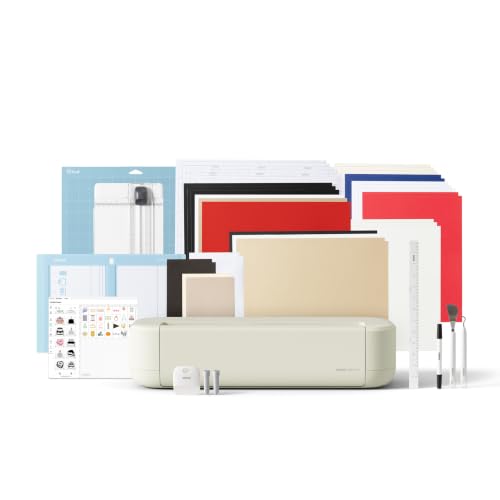
ASIN B0GJFL3WHS
Cricut Explore 5 (Taupe Essential Bundle)
Your planned projects are the vinyl decals, stickers, apparel, cards and other common materials Cricut lists for Explore 5, and you also want the option of a long matless Smart Materials cut.
Last observed offer
$249.00
- Confirm offer eligibility on Amazon
Size: 65 Project Bundle
Price checked
Observed condition: new. Coupon and subscription requirements unverified.
Prices are per listed package. Pickoryx may earn a commission from qualifying purchases through the paid Amazon links on this page, at no added cost to you.
Published by Pickoryx · Published 2026-10-22 · Source checked 2026-10-22 08:13 UTC
The main trade-off
Maker 4 is the model Cricut documents with an expanded range of materials and specialty tools; Explore 5 covers common vinyl, iron-on, cardstock, printable-material and card projects. Both pages describe matless Smart Materials cuts up to 12 feet, so long-roll length alone does not separate them.
Quick verdict
Choose Maker 4 when its documented specialty-material and tool paths match projects you actually plan to make. For everyday vinyl, iron-on, cardstock, printable-material and card work, Explore 5 is the more direct fit; Cricut lists matless Smart Materials cuts up to 12 feet for both, so length alone does not separate them.
Choose Cricut Maker 4 (Seashell Digital Content Bundle) if
- You expect to use Maker 4's documented specialty paths, such as Knife Blade projects with compatible chipboard or balsa wood, or the separately sold engraving and debossing tools.
Choose Cricut Explore 5 (Taupe Essential Bundle) if
- Your planned projects are the vinyl decals, stickers, apparel, cards and other common materials Cricut lists for Explore 5, and you also want the option of a long matless Smart Materials cut.
When the recommendation changes
- If a planned material requires a specialty blade or tip, check Cricut's exact compatibility guidance and whether that tool is included or must be purchased separately before choosing either machine.
- If the main reason for considering Maker 4 is a long matless cut, Explore 5's official page also describes Smart Materials cuts up to 12 feet.
The differences that matter
| Decision point | Cricut Maker 4 (Seashell Digital Content Bundle) | Cricut Explore 5 (Taupe Essential Bundle) |
|---|---|---|
| Project Material And Tool Scope | Maker 4 is described by Cricut as having an expanded material/tool range; examples include wood decor, engraved metal and debossed leather. The product page lists Knife Blade use for chipboard and balsa wood up to 2.4 mm, and separate engraving and debossing tips.[1] | Explore 5 is described for common projects including vinyl decals, stickers, apparel and cards. The page lists vinyl, iron-on, cardstock and printable materials; its Deep-Point Blade list names poster board, heavy cardstock, foam, rubber and magnet sheets up to 1.5 mm.[2] |
What this changes: This helps a buyer match planned materials and processes to Cricut's stated support, while requiring an exact compatibility check instead of inferring results from material counts.[1, 2] The better fit depends on your priorities | ||
| Matless Long Project Workflow | Cricut says Maker 4 can use Smart Materials without a machine mat for continuous cuts up to 12 ft; its listed maximum Smart Materials cut size is 11.7 in x 12 ft.[1] | Cricut says Explore 5 can use Smart Materials without a machine mat for continuous cuts up to 12 ft.[2] |
What this changes: The equal listed length means Explore 5 remains an option when a buyer needs a long eligible matless cut; it does not establish equal width limits.[1, 2] No clear winner | ||
Best for your routine
A crafter whose planned work specifically calls for Maker 4's listed specialty tool paths should choose Maker 4 after confirming the material/tool pairing and any separate tool purchase.
Best fit: Cricut Maker 4 (Seashell Digital Content Bundle)
Based on listed features, not comparative testing.
Cricut's Maker 4 page describes its expanded tool collection and documents the named material processes; the recommendation is for those supported capabilities, not a measured cutting result.
A crafter focused on the everyday materials and projects listed for Explore 5, including long Smart Materials cuts, can choose Explore 5 without selecting Maker 4 solely for a 12-foot matless cut.
Best fit: Cricut Explore 5 (Taupe Essential Bundle)
Based on listed features, not comparative testing.
Cricut lists those common project types for Explore 5 and states that it supports Smart Materials cuts up to 12 ft; the cited pages do not show a longer matless-length advantage for Maker 4.
Value and trade-offs
One or both observed offers have eligibility conditions, so no unrestricted price difference is shown.
If Maker 4's live offer is higher, its documented specialty-material and tool paths are easier to justify when they match projects you expect to make. If your plans fit Explore 5's listed workflows, do not pay extra solely for a 12-foot matless cut that Cricut also lists for Explore 5.
There is insufficient price history for timing advice. Compare the current offers for these exact bundles and confirm the included materials and accessories before ordering.
Limitations
- These recommendations use Cricut's published feature descriptions, not a controlled test of cutting accuracy, speed, material results, or durability.
- A capability or material list is not a guarantee for every stock, thickness, finish, or tool combination. Check Cricut's compatibility guidance for the exact project.
- The two selected Amazon offers are different named bundles. Check each live listing for the current box contents; this comparison does not assume base-machine page contents are identical to those bundles.
- Current price observations do not establish a historical low or support a buy-now/wait recommendation.
Questions shoppers ask
Can Explore 5 handle a long matless cut, or is that a reason to choose Maker 4?
Cricut says Smart Materials can be loaded without a mat for continuous cuts up to 12 ft on both pages. Its Maker 4 page also lists a maximum Smart Materials width of 11.7 in, but the Explore 5 page cited here does not give a matching maximum-width figure; check the exact project width before choosing.
Does a larger materials list mean a specific material will work?
No. Use Cricut's compatibility guidance to check the exact material, thickness, blade or tip, and machine. Some Maker 4 tools named here are sold separately.
Methodology and sources
The comparison matches the materials, tools and matless-cut information Cricut publishes for each model. It treats the manufacturer descriptions as feature information, not proof of cutting performance.
AI assisted with organizing the published product information; neither machine was tested by Pickoryx.
View 2 sources
- 1.Cricut Maker 4 – The Premium Cutting MachineCricut · Official specifications · Source checked 2026-10-22 08:13 UTC
Evidence used on this page
- Product description and Features; Knife Blade and specialty-tool listings; Specifications; FAQ: What can I make? and What are Smart Materials?: Identifies Maker 4 item 2011084; describes its material and tool range, named specialty project examples and separately sold tools; lists the Knife Blade's stated chipboard/balsa thickness; specifies the Smart Materials maximum dimensions and explains matless continuous cuts up to 12 ft.
- 2.Cricut Explore 5 | Cricut ShopCricut · Official specifications · Source checked 2026-10-22 08:13 UTC
Evidence used on this page
- Features and Included; FAQ: What can I make?, What are Smart Materials?, What can the Deep-Point Blade do?: Identifies Explore 5 item 2012400; describes common project types and listed popular materials; lists Deep-Point Blade materials and thickness; states Smart Materials can be loaded without a mat for continuous cuts up to 12 ft.