
Elgato Facecam 4K vs Insta360 Link 2C Pro: Which Setup Fits Your Recording Workflow?
Choose Facecam 4K for its USB 3.0-only, MJPG 4K60 mode and fixed desk setup with your own microphone. Choose Link 2C Pro if 4K30 is enough and autofocus, auto framing, or built-in audio modes matter more. Both list HDR support; these feature differences do not establish an image-quality winner.
Published by Pickoryx · Published 2026-10-01
Source checked 2026-10-01 16:04 UTC
Products compared

Product A · ASIN B0DVZG36J8
Elgato Facecam 4K (Black, 20WAF9901 / 10WAF9901)
Last observed offer
$159.99 List Price: $199.99
Per listed package.
Checked 2026-10-19 10:47 UTC. Price and availability may change.
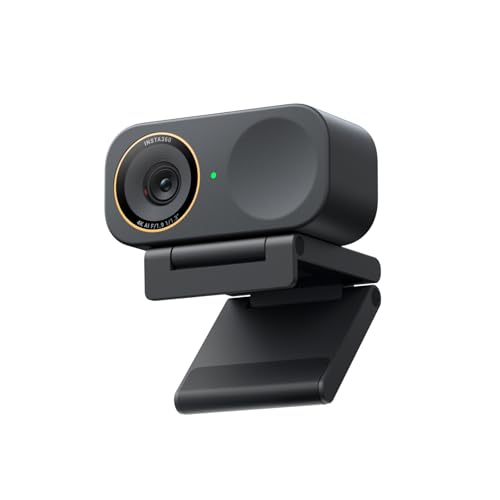
Product B · ASIN B0G3SSQMJQ
Insta360 Link 2C Pro (Graphite Black, CINSABPB-S-B)
Last observed offer
$199.99
Per listed package.
Offer eligibility must be confirmed on Amazon.
Checked 2026-10-19 19:06 UTC. Price and availability may change.
Pickoryx may earn a commission from qualifying purchases through the paid Amazon links on this page, at no added cost to you.
The buying question
Do you need a documented 4K60 webcam mode, or is 4K30 enough if autofocus, auto framing, and built-in microphone modes fit your workflow better?
Facecam 4K offers a listed 4K60 mode, but only as MJPG over USB 3.0; its 4K focus is fixed and it omits a microphone. Link 2C Pro tops out at 4K30 but adds autofocus, auto framing, and two microphones with four pickup modes. Both support HDR, and specs alone do not establish image or audio quality.
Quick verdict
Choose Elgato Facecam 4K (Black, 20WAF9901 / 10WAF9901) if
- You specifically need 4K at 60 fps and can use USB 3.0 with MJPG.
- You will sit within a fixed 30–120 cm 4K focus range and already want a separate microphone or manual-camera/filter workflow.
Choose Insta360 Link 2C Pro (Graphite Black, CINSABPB-S-B) if
- 4K30 meets your recording needs and your subject distance varies enough for autofocus to matter.
- You want digital auto framing and built-in microphone choices such as Standard, Wide, Focus, or Original.
When the recommendation changes
- If 4K60 is required, Facecam 4K is the only assigned model with a documented mode for it; budget for USB 3.0 and MJPG. If you plan to use Insta360 Virtual Camera, 50/60 fps modes are not supported.
- If your subject moves toward or away from the camera or you want to avoid a separate mic, Link 2C Pro's autofocus and built-in audio modes may simplify the setup. For portrait 4K, plan on MJPEG rather than H.264. Insta360 lists Standard, Wide, Focus, and Original for Link 2 Pro/Link 2C Pro, but its generic portrait-mode FAQ does not clarify how those Pro modes apply; check with Insta360 if portrait audio selection matters.
- If you need 4K30, HDR, or portrait 4K, both have manufacturer-documented support, though their host/app constraints differ.
The differences that matter
Video Modes And Host Requirements
Elgato Facecam 4K (Black, 20WAF9901 / 10WAF9901)
Facecam 4K lists 2160p60 only in MJPG over USB 3.0; 2160p30 supports NV12 or MJPG. Over USB 2.0, its listed maximum is 1080p60. Elgato lists HDR at 30 fps through 2160p30.[1, 2]
Insta360 Link 2C Pro (Graphite Black, CINSABPB-S-B)
Link 2C Pro lists landscape and portrait 4K at 24/25/30 fps and 1080p up to 60 fps. It supports H.264 and MJPEG, except H.264 is unavailable for portrait 4K and portrait 1080p60; HDR is supported. When using Insta360 Virtual Camera, 50/60 fps modes are unsupported.[3, 4, 5, 6]
What this changes: A creator who requires 4K at 60 fps and has a USB 3 connection can select the Facecam 4K's documented mode, with MJPG as the format. Link 2C Pro's listed 4K ceiling is 30 fps. For 4K30 or portrait recording, both offer a path, but check the Link 2C Pro codec/virtual-camera conditions and the Facecam's USB/mode requirements against the host and app you intend to use.[1, 2, 3, 4, 5, 6]
Focus Audio And Presentation Workflow
Elgato Facecam 4K (Black, 20WAF9901 / 10WAF9901)
At 4K, Facecam 4K uses fixed focus with a 30–120 cm range, is described as optimized for desk use, and has no built-in microphone. Elgato's product page lists Camera Hub manual controls and PTZ reframing; a 49 mm filter mount supports compatible screw-on filters.[1, 2]
Insta360 Link 2C Pro (Graphite Black, CINSABPB-S-B)
Link 2C Pro lists autofocus from 12 cm to infinity, two microphones, four audio modes, and Auto Framing. Its auto-framing instructions use Link Controller or gesture; the model has no gimbal. Its manual says the microphone can be used separately and lists Standard, Wide, Focus, and Original for Link 2 Pro/Link 2C Pro. A generic portrait-4K FAQ does not clarify which modes apply to Link 2C Pro in that mode; confirm with Insta360 if this workflow matters.[3, 7, 8]
What this changes: Facecam 4K suits a fixed seated position with a separately chosen microphone and a creator who wants manual camera controls or screw-on filters. Link 2C Pro suits a workflow that values autofocus across changing subject distance, automatic digital re-framing, and built-in voice input with selectable pickup modes. These are setup conveniences, not evidence that either camera records better-looking video or better audio.[1, 2, 3, 7, 8]
Best for your routine
A capture workflow that specifically needs the manufacturer's listed 4K60 mode and uses USB 3.0/MJPG.
Best fit: Elgato Facecam 4K (Black, 20WAF9901 / 10WAF9901)
Based on listed features, not comparative testing.
Elgato documents 2160p60 only in MJPG over USB 3.0; the assigned Link 2C Pro model is listed up to 4K30.
A seated or moving-presenter setup prioritizing autofocus, automatic reframing, and onboard microphone modes while 4K30 is sufficient.
Best fit: Insta360 Link 2C Pro (Graphite Black, CINSABPB-S-B)
Based on listed features, not comparative testing.
Insta360 documents autofocus from 12 cm to infinity, Auto Framing, and four audio modes on Link 2C Pro; this is a feature-fit recommendation rather than a quality ranking.
Value and trade-offs
One or both observed offers have eligibility conditions, so no unrestricted price difference is shown.
Compare current offers dynamically and pay for the workflow features you will use, such as Facecam 4K's 4K60 mode or Link 2C Pro's autofocus, framing, and onboard audio. No price premium is baked into this comparison.
Price history was not reviewed, so compare the current offers before deciding when to buy.
Limitations
- No controlled side-by-side image, autofocus, audio, or low-light measurements were used; feature lists do not prove which looks or sounds better.
- Link 2C Pro's 50/60 fps virtual-camera path is unsupported per Insta360. Available frame rates can also depend on capture mode and third-party app; check the application you plan to use.
- For Facecam 4K, USB 3.0 is required for the listed 4K modes; USB 2.0 is limited to 1080p and MJPG.
- Link 2C Pro portrait 4K does not support H.264. Insta360 lists Standard, Wide, Focus, and Original for Link 2C Pro, but its generic portrait-4K FAQ does not clarify which audio modes apply to the Pro model; verify if this workflow matters.
- No fixed offer price or Prime eligibility is quoted, and no live offer is guaranteed; check current terms for the exact Black/Graphite Black variants.
Questions shoppers ask
Can either webcam record 4K at 60 fps?
Elgato lists Facecam 4K at 2160p60 over USB 3.0 using MJPG only. Insta360 lists Link 2C Pro up to 4K30. Insta360 separately says its Virtual Camera does not support 50 or 60 fps.
Does the Link 2C Pro need Link Controller for every webcam app?
No. Insta360 says Link 2C Pro can connect directly to third-party platforms; its Virtual Camera is a separate output path for supported software features and does not support 50/60 fps. Check the selected mode and app before relying on a particular format or frame rate.
Does the Facecam 4K have a built-in microphone?
No. Elgato's product page says it omits a microphone. Link 2C Pro includes two microphones with Standard, Wide, Focus, and Original audio modes, according to Insta360's product specs and support guide.
Methodology and sources
Compared published video modes and their host/app conditions, then focus/audio/presentation features. Conditional feature-fit recommendations use no measured video or audio result and make no sensor-size inference.
Research-assisted drafting; the listed modes, compatibility conditions, focus, audio, and framing features were checked against official exact-model sources.
View 8 sources
- 1.Facecam 4K | Premium 4K 60FPS Webcam | ElgatoElgato · Official specifications · Source checked 2026-10-01 15:15 UTC
Evidence used on this page
- Exact Facecam 4K product page, tech specs at ‘Video Resolutions (USB 3.0)’ and ‘Video Resolutions (USB 2.0)’ (lines 499-515): USB 3.0 2160p60 MJPG only; 2160p30 NV12/MJPG; USB 2.0 maximum 1080p60; HDR modes listed at 30 fps. Specs lines 482-504 identify fixed focus and USB encoding; lines 532-543 show USB-C/UVC 1.5 and SKU 10WAF9901. Product copy at lines 81 and FAQ lines 443-459 says no built-in microphone and Camera Hub provides manual controls, PTZ, and HDR.: Elgato's exact Facecam 4K SKU/product page documents resolution, encoding, USB and HDR mode limits, 49-mm lens-filter support, fixed focus, and that the camera omits a built-in microphone.
- 2.Elgato Facecam 4K — Quick Start GuideElgato · Official specifications · Source checked 2026-10-01 15:15 UTC
Evidence used on this page
- Exact-model quick-start guide steps 3-5 and tech specs (lines 70-85, 119-127): recommends USB 3.0 or later, says USB 2.0 is limited to 1080p with MJPG, identifies a fixed-focus lens optimized for desk use, and gives a 30–120 cm focus range at 4K.: Elgato's Facecam 4K guide confirms the USB 2.0 ceiling and desk-optimized fixed-focus range, and recommends direct USB 3.0 or later rather than a hub for best performance.
- 3.Insta360 Link 2 Pro & Link 2C Pro - Flagship AI 4K WebcamInsta360 · Official specifications · Source checked 2026-10-01 15:15 UTC
Evidence used on this page
- Product comparison/specification table column explicitly labeled Link 2C Pro (lines 573-664): 4K up to 30 fps; H.264/MJPEG with H.264 exclusions in portrait 4K and portrait 1080p60; autofocus 12 cm–infinity; HDR; two microphones; Standard/Wide/Focus/Original audio modes; Auto Framing; no gimbal. System requirements lines 723-740; exact Link 2C Pro color Graphite Black lines 717-721.: The column explicitly for Link 2C Pro supplies exact model video formats and modes, focus range, microphones/audio modes, auto framing, no-gimbal configuration, and system requirements.
- 4.Insta360 link2cpro Specs - Link Series: Photo & Video SpecificationsInsta360 · Official support · Source checked 2026-10-01 15:15 UTC
Evidence used on this page
- The specification table names a distinct Link 2C Pro column and lists landscape and portrait 4K@30/25/24 fps, 1080p@60/50/30/25/24 fps, and H.264/MJPEG; it notes H.264 is unavailable in portrait 4K and portrait 1080p60 (lines 28-37).: The exact Link 2C Pro table confirms portrait/landscape mode and frame-rate availability and codec restrictions.
- 5.Insta360 link2cpro FAQ - Link Series: Shooting SpecsInsta360 · Official support · Source checked 2026-10-01 15:15 UTC
Evidence used on this page
- Applicable Models explicitly lists Link 2 Pro and Link 2C Pro (lines 24-39): H.264/MJPEG; YUV needs Virtual Camera or low-resolution compatibility setting; H.264 is unavailable in portrait 4K and 1080p60; both models support HDR.: The exact-model support FAQ confirms Link 2C Pro codec conditions and HDR support.
- 6.Insta360 link2cpro FAQ - CompatibilityInsta360 · Official support · Source checked 2026-10-01 15:15 UTC
Evidence used on this page
- Applicable Models explicitly lists Link 2 Pro and Link 2C Pro (lines 24-28). Lines 48-59: direct third-party platform use is supported; Link Controller works on Windows 10+ (ARM Windows unsupported) and macOS 10.13+; the virtual camera does not support 50/60 fps; CPU/RAM recommendations are listed. Lines 71-73 also state Linux UVC/UAC support without a Link Controller version.: The Link 2C Pro FAQ establishes how direct webcam use differs from the Insta360 Virtual Camera path and documents current OS/system recommendations.
- 7.Insta360 link2cpro Operation Instructions - Link Series: Audio & MicrophoneInsta360 · Official support · Source checked 2026-10-01 16:04 UTC
Evidence used on this page
- Applicable Models includes Link 2C Pro (lines 24-29); model-specific Pro table lists Standard, Wide, Focus, Original (lines 74-78). Generic portrait-4K FAQ at lines 86-92 says only Music Balance is supported and Voice Focus/Voice Suppression are unavailable, but it does not name the applicable model and refers to modes listed above for Link 2/Link 2C rather than the Pro table. The source therefore does not resolve Link 2C Pro portrait-mode audio availability. Lines 93-95 confirm the microphone can be used independently.: Exact model table verifies four Link 2C Pro microphone modes and standalone microphone use. The generic portrait-4K FAQ does not identify whether its Music Balance restriction applies to the Pro audio-mode set, so portrait-specific audio selection remains unresolved.
- 8.Insta360 link2cpro Operation Instructions - Link Series: Auto FramingInsta360 · Official support · Source checked 2026-10-01 15:15 UTC
Evidence used on this page
- Applicable Models explicitly lists Link 2C and Link 2C Pro (lines 24-29). Lines 32-48 describe subject tracking and zoom framing, operated in Link Controller or by gesture; no gimbal movement is claimed.: The exact Link 2C Pro article confirms software/gesture-based auto framing; paired with the exact product spec table's no-gimbal entry, this is electronic framing rather than a pan/tilt gimbal claim.