
Link 2C Pro vs PowerConf C200: Which Capabilities Will You Use?
Choose Link 2C Pro if automatic framing will help your calls or its higher capture modes serve a real recording need. Choose C200 when a manually selected view and 30fps capture meet the job. Treat these as two separate questions: you can need automatic framing without needing 4K, or need higher capture modes while sitting still.
Published by Pickoryx · Published 2026-10-13
Source checked 2026-10-13 09:13 UTC
Products compared
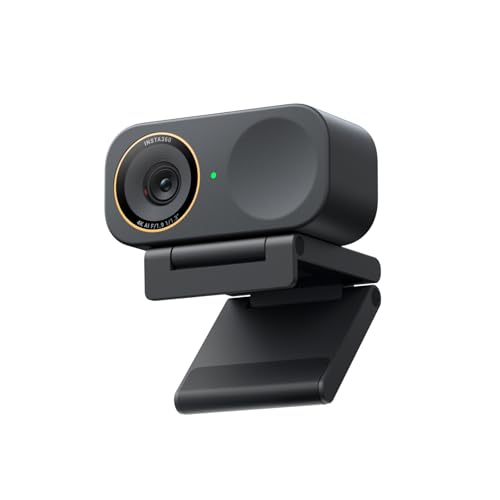
Product A · ASIN B0G3SSQMJQ
Insta360 Link 2C Pro (CINSABPB-S-B)
Last observed offer
$199.99
Per listed package.
Offer eligibility must be confirmed on Amazon.
Checked 2026-10-19 07:06 UTC. Price and availability may change.

Product B · ASIN B09MFMTMPD
Anker PowerConf C200 (Black, A3369011)
Last observed offer
$69.99
Per listed package.
Offer eligibility must be confirmed on Amazon.
Checked 2026-10-19 13:04 UTC. Price and availability may change.
Pickoryx may earn a commission from qualifying purchases through the paid Amazon links on this page, at no added cost to you.
The buying question
Is manually selected framing and 30fps capture enough, or will automatic framing or higher capture modes be used?
Link offers automatic composition and higher capture options; C200 can meet a manually composed, 30fps task without making those extras part of the purchase.
Quick verdict
Choose Insta360 Link 2C Pro (CINSABPB-S-B) if
- You move within the view or people join the shot, and want the documented automatic composition feature.
- Your compatible recording setup needs 4K30 or 1080p60.
Choose Anker PowerConf C200 (Black, A3369011) if
- You prefer choosing the composition yourself, can access AnkerWork and need no mode beyond C200’s listed options.
When the recommendation changes
- Your meeting or recording app cannot use the mode you planned to buy.
- Your computer cannot run the required controls, or you need settings to carry between computers without reconfiguration.
The differences that matter
Framing Workflow
Insta360 Link 2C Pro (CINSABPB-S-B)
Auto Framing adjusts composition for movement or changing participant counts. The fixed camera uses digital cropping; gestures start disabled.[1, 2]
Anker PowerConf C200 (Black, A3369011)
Choose 65°, 78° or 95° manually in AnkerWork.[5]
What this changes: For movement within the camera’s view or changing group size, Link 2C Pro offers a documented automatic-framing workflow. C200 suits a composition you choose yourself. This does not establish what every third-party framing tool can do with C200.[1, 2, 5]
Capture Mode Requirement
Insta360 Link 2C Pro (CINSABPB-S-B)
Landscape capture includes 4K at 30fps and 1080p at 60fps.[3]
What this changes: Choose the recording mode separately from framing: a stationary recording can still require Link’s higher modes. Confirm your computer and application can use the intended mode; camera specifications do not guarantee meeting delivery resolution.[3, 6, 7]
Best for your routine
A 1080p30 call where the speaker moves or another person joins
Best fit: Insta360 Link 2C Pro (CINSABPB-S-B)
Based on listed features, not comparative testing.
Automatic composition can be useful even when higher-resolution capture is unnecessary. This recommends the documented feature, not proven tracking accuracy.
A stationary recording that requires a higher capture mode
Best fit: Insta360 Link 2C Pro (CINSABPB-S-B)
Based on listed features, not comparative testing.
Link’s listed modes fit this requirement independently of movement. Check the output path first; Virtual Camera effects cannot supply 60fps.
A seated caller who can set the view and needs only 30fps
Best fit: Anker PowerConf C200 (Black, A3369011)
Based on listed features, not comparative testing.
C200’s selectable framing and listed modes meet that brief. Choose it on that basis if its current offer makes sense; these features do not establish a picture-quality advantage.
Value and trade-offs
One or both observed offers have eligibility conditions, so no unrestricted price difference is shown.
If Link costs more, justify the difference with automatic framing or a higher capture mode you will actually use. If neither matters, this comparison gives no feature-based reason to pay that premium.
There is insufficient price history here to recommend buying now or waiting.
Community discussions
Questions and individual experiences add context, not controlled-test results, failure rates, or owner consensus.
C200 owners discuss framing controls across operating systems
C200 owners describe setting the view on Windows or Mac before Linux use, while another commenter reports zoom resetting in an app. These older, setup-specific reports do not settle current firmware behavior. If you switch computers or cannot install controls on a work machine, test the required framing on that machine; distinguish field-of-view selection from app zoom.
Reddit discussion · Applies to Anker PowerConf C200 (Black, A3369011) · Source checked 2026-10-13 09:12 UTC
Limitations
- Neither webcam was hands-on tested. Image quality, low-light results, microphone quality, autofocus speed, framing accuracy and reliability are not ranked.
- Control-software support and basic video support are different. Link Controller is unsupported on Windows ARM and has no Linux version; basic Linux UVC/UAC camera use is separately supported.
- Japanese documentation corroborates C200 hardware, not the contents, warranty or terms of a US seller’s package. Verify the exact model and selected offer.
- Setting retention across computers is not established here. If software installation is restricted, test the desired composition on the actual work computer before relying on it.
Questions shoppers ask
Does autofocus mean C200 will automatically reframe me?
No. Both webcams have autofocus, which concerns focus. The C200 workflow documented here is manual view selection; do not confuse it with Link’s named Auto Framing feature or assume it rules out all third-party tools.
What should I check before buying Link for 60fps recording?
Select a compatible capture path rather than Insta360 Virtual Camera, which excludes 50/60fps. If recording portrait 1080p60 or portrait 4K, H.264 is unavailable. Controller defaults to MJPEG and cannot switch encoding within the app.
Methodology and sources
Separated composition control from required capture modes, then checked software limitations and owner setup questions.
AI helped inspect documentation, compare the workflows and organize conditional buying advice.
View 7 sources
- 1.Link Series: Auto FramingInsta360 · Official specifications · Source checked 2026-10-13 09:13 UTC
Evidence used on this page
- Applicable Models; What is Auto Framing; activation methods, lines 28–48: Link 2C Pro supports automatic adjustment for subject movement and changing participant counts; enable through Controller or gesture.
- 2.Basic Use (No Client Required)Insta360 · Official specifications · Source checked 2026-10-13 09:13 UTC
Evidence used on this page
- Gesture Control line 32; AI Tracking / Auto Framing line 58: Link 2C Pro uses digital crop rather than a moving gimbal. Gesture control defaults off.
- 3.Link Series: Photo & Video SpecificationsInsta360 · Official specifications · Source checked 2026-10-13 09:13 UTC
Evidence used on this page
- Link 2C Pro column, lines 35–45; encoding FAQ line 55: Landscape 4K30 and 1080p60; autofocus. Portrait 4K/1080p60 exclude H.264; Controller defaults to MJPEG without in-app format switching.
- 4.Link Series: CompatibilityInsta360 · Official specifications · Source checked 2026-10-13 09:13 UTC
Evidence used on this page
- Applicable Models line 28; questions 3–5, lines 48–73: Direct webcam use is supported; Virtual Camera excludes 50/60fps. Controller excludes Windows ARM and has no Linux version, while Linux UVC/UAC use is supported.
- 5.Anker PowerConf C200 2K WebcamAnker soundcore US · Official specifications · Source checked 2026-10-13 09:13 UTC
Evidence used on this page
- Viewing-angle bullet line 58; Complete with Software line 115: C200 has 65/78/95-degree options manually selected with AnkerWork.
- 6.Anker PowerConf C200 User ManualAnker · Official specifications · Source checked 2026-10-13 09:13 UTC
Evidence used on this page
- English printed page 4, PDF page index 5; lines 81–90: Published modes include 2K30 and 1080p30; maximum frame rate 30fps and autofocus. Hardware manual only, not US offer terms.
- 7.Anker PowerConf C200 product informationAnker Japan · Official specifications · Source checked 2026-10-13 09:13 UTC
Evidence used on this page
- Product specifications, lines 188, 193 and 195: Black A3369011 hardware identity; maximum 2560×1440 and 30fps. No regional box, price or warranty transfer.