
Elgato Stream Deck Neo vs Stream Deck+: Which Control Layout Fits Your Desk?
Both White models provide eight customizable LCD keys and use the Stream Deck app. Neo has two touch points for changing pages and an Info Bar. Stream Deck+ pairs a touch strip with four physical dials for turning and pressing through supported app actions. Choose by the on-device interaction you will use; this is a feature comparison, not a productivity or performance test.
Published by Pickoryx · Published 2026-10-04
Source checked 2026-10-04 06:32 UTC
Products compared

Product A · ASIN B0CVY4566H
Elgato Stream Deck Neo (White)
Last observed offer
$79.99 List Price: $99.99
Per listed package.
Offer eligibility must be confirmed on Amazon.
Checked 2026-10-19 19:13 UTC. Price and availability may change.
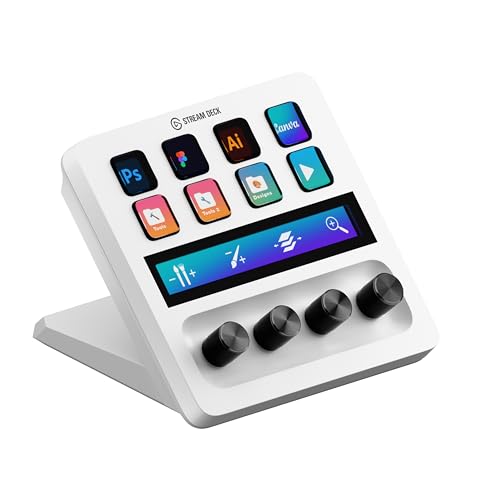
Product B · ASIN B0BXHL5DMD
Elgato Stream Deck+ (White)
Last observed offer
$159.99 List Price: $179.99
Per listed package.
Offer eligibility must be confirmed on Amazon.
Checked 2026-10-19 19:13 UTC. Price and availability may change.
Pickoryx may earn a commission from qualifying purchases through the paid Amazon links on this page, at no added cost to you.
The buying question
Would you rather switch layouts with touch points or adjust app settings with four physical dials?
Neo uses two touch points for page changes and an Info Bar; Stream Deck+ adds a touch strip with four physical dials that can turn and be pressed.
Quick verdict
Choose Elgato Stream Deck Neo (White) if
- You prefer two touch points for changing pages and want Neo’s Info Bar.
- You do not need four physical rotary dials on the device.
Choose Elgato Stream Deck+ (White) if
- You want four physical dials that can be turned and pressed for supported app controls.
- You want a touch strip that displays dial information and supports page interaction.
When the recommendation changes
- If physical rotary adjustment is not useful to you, the Plus dials may add little to your setup; choose based on the touch navigation and page information you prefer.
- If you already use dial-compatible app actions, the Plus control surface becomes more relevant; check your app and operating-system requirements before buying.
The differences that matter
Page Navigation And Active Layout Workflow
What this changes: Both provide page navigation and eight keys, but the documented touch surfaces differ: two touch points plus an Info Bar on Neo versus a broader touch strip associated with dial information on Stream Deck+. Preference determines the fit.[1, 3, 4]
Continuous Parameter Adjustment Workflow
What this changes: If turning or pressing a dedicated physical control is central to a supported app action, Stream Deck+ documents that direct hardware workflow. Neo remains configurable through its LCD keys and app, but the cited comparison does not list physical dials.[3, 4, 1]
Best for your routine
Changing between Stream Deck pages from the device surface
The better fit depends on your priorities
Neo uses two touch points for page changes, while Stream Deck+ uses its touch strip for page interaction and dial information. Which interaction is easier depends on the user; no hands-on comparison was performed.
Turning a physical control for supported app parameters
Best fit: Elgato Stream Deck+ (White)
Based on listed features, not comparative testing.
Stream Deck+ specifically documents four physical 360-degree dials with push action. Neo’s product comparison lists touch points and no physical dials; that does not mean Neo cannot trigger software-based adjustments using its keys.
Value and trade-offs
One or both observed offers have eligibility conditions, so no unrestricted price difference is shown.
Any price difference is meaningful only if the dial, touch-strip, or page-navigation workflow fits your setup; this comparison does not calculate a price premium.
Check the current checkout price, seller, and availability for each exact White model. Price history was not assessed.
Limitations
- No hands-on testing or side-by-side measurement of setup time, productivity, dial feel, reliability, or software behavior was performed.
- Software actions and compatibility can depend on the Stream Deck app, operating system, and individual plug-ins; confirm that your intended action is supported.
- The comparison describes the White variants and model-specific documentation identified in the cited manufacturer sources.
Questions shoppers ask
Do both devices have eight customizable LCD keys?
Elgato’s US comparison guide lists eight configurable LCD keys for both Neo and Stream Deck+.
Can Neo make app adjustments without physical dials?
The cited comparison guide does not list physical dials for Neo, but it does not establish that software-based adjustment actions are unavailable. The distinction here is the presence of dedicated on-device rotary controls on Stream Deck+; check app support for the actions you want.
Do these devices use different desktop apps?
Elgato’s comparison guide lists the same Stream Deck desktop app for both. Check its current operating-system requirements and whether your preferred plug-ins support your intended workflow.
Methodology and sources
Compared the assigned White model pages and Elgato’s Neo hardware documentation and Stream Deck device-comparison guide. Product behavior is limited to the documented touch-page controls, Info Bar, touch strip, physical dials, keys, and app requirements.
AI assisted research organization and drafting. Product behavior claims are based on cited manufacturer documentation; no hands-on testing was performed.
View 4 sources
- 1.Stream Deck NeoElgato · Official specifications · Source checked 2026-10-04 06:30 UTC
Evidence used on this page
- US product page: customizable keys, Touch Points, Info Bar, and technical specifications including SKU 10GBJ9901 and system requirements.: The US product page identifies Stream Deck Neo and describes eight customizable LCD keys, two Touch Points for page changes, an Info Bar, USB-C connection, and the listed app/OS requirements.
- 2.Stream Deck Neo HID APIElgato Developer · Official support · Source checked 2026-10-04 06:30 UTC
Evidence used on this page
- Device model identification and physical controls.: Identifies the Neo hardware model as 20GBJ9901 and describes its LCD keypad and two capacitive touch sensors.
- 3.Stream Deck Device ComparisonElgato · Official specifications · Source checked 2026-10-04 06:30 UTC
Evidence used on this page
- Neo and Stream Deck+ rows/columns in the device feature comparison table; shared software note above table.: Direct manufacturer table lists eight configurable LCD keys on both models; Neo has two Touch Points and an Info Bar, while Stream Deck+ has four dials and a touch strip. It also lists the Stream Deck desktop app for the compared devices.
- 4.Stream Deck+ WhiteElgato · Official specifications · Source checked 2026-10-04 06:30 UTC
Evidence used on this page
- White variant product page: overview, dial/touch-strip description, technical specifications/SKU 10GBD9911 and system requirements.: The US White product page identifies Stream Deck+ White, describes eight customizable LCD keys, a touch strip, and four 360-degree encoders with push action. It gives examples of turning dials to adjust supported app settings and lists app/OS requirements.