
Elgato Stream Deck+ vs Mini: Choose by Keys or Dial Controls
Pick the Stream Deck+ White for eight visible LCD keys and four dials plus a touch strip; pick the Mini if six keys cover your button-trigger workflow. The + dial functions depend on configured actions, and not all plugins support dials.
Published by Pickoryx · Published 2026-10-07
Source checked 2026-10-07 13:59 UTC
Products compared
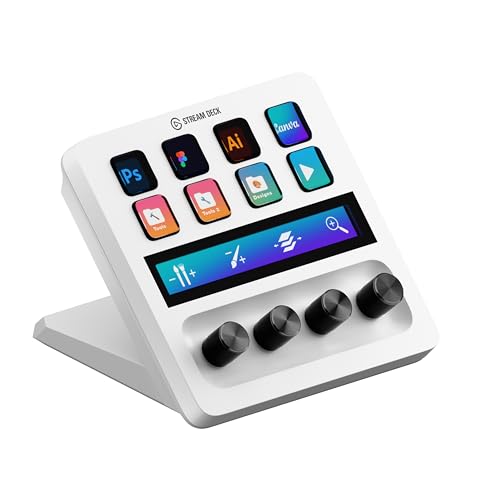
Product A · ASIN B0BXHL5DMD
Elgato Stream Deck+ White (10GBD9911)
Last observed offer
$159.99 List Price: $179.99
Per listed package.
Offer eligibility must be confirmed on Amazon.
Checked 2026-10-19 19:13 UTC. Price and availability may change.

Product B · ASIN B07DYRS1WH
Elgato Stream Deck Mini Black (10GAI9901)
Last observed offer
$51.99 List Price: $59.99
Per listed package.
Offer eligibility must be confirmed on Amazon.
Checked 2026-10-19 17:38 UTC. Price and availability may change.
Pickoryx may earn a commission from qualifying purchases through the paid Amazon links on this page, at no added cost to you.
The buying question
Do you want six or eight LCD keys visible at once, and would dedicated dials and a touch strip help with supported controls?
The Stream Deck+ White pairs eight LCD keys with four dials and a touch strip; the Mini keeps a six-key, key-led surface, while both use the same Stream Deck desktop app.
Quick verdict
Choose Elgato Stream Deck+ White (10GBD9911) if
- You want eight customizable LCD keys visible at once.
- You expect to use dial or touch-strip controls with actions that support them.
Choose Elgato Stream Deck Mini Black (10GAI9901) if
- Six customizable LCD keys are enough for the controls you want visible.
- You want the key-led layout and do not need dedicated dials or a touch strip.
When the recommendation changes
- The +'s dial/touch advantage matters only when the actions or plugins you use support those controls; if your setup is primarily button-triggered, the Mini may be sufficient.
The differences that matter
Simultaneous Visible Action Capacity
What this changes: Choose by how many labeled actions you want visible at once. The Mini's pages and folders can hold more actions behind its six-key surface, but do not make more than six LCD keys simultaneously visible; the + offers eight visible LCD keys.[1, 2, 3]
Discrete Trigger Vs Continuous Adjustment Workflow
What this changes: The + adds dedicated rotary and touch interactions for supported actions; the Mini keeps the action surface key-led. Dial support depends on the selected plugin/action, and Elgato says not all plugins support dials. Both use the same desktop app, subject to its current OS requirements.[3, 6, 8]
Best for your routine
Keep more labeled actions visible without switching pages
Best fit: Elgato Stream Deck+ White (10GBD9911)
Based on listed features, not comparative testing.
The + has eight customizable LCD keys compared with the Mini's six; choose it if that additional simultaneous key capacity matters to your layout.
Use physical rotary adjustment or touch interactions for supported actions
Best fit: Elgato Stream Deck+ White (10GBD9911)
Based on listed features, not comparative testing.
The + has four dials and a touch strip, but the specific action/plugin must support the desired dial behavior.
Use a compact key-led action surface when six visible keys are enough
Best fit: Elgato Stream Deck Mini Black (10GAI9901)
Based on listed features, not comparative testing.
The Mini provides six customizable LCD keys without dedicated dial or touch-strip controls; choose it when those extra controls are not part of the intended workflow.
Value and trade-offs
One or both observed offers have eligibility conditions, so no unrestricted price difference is shown.
The additional physical controls justify consideration only if eight visible keys or the supported dial/touch workflow matters to you. This research does not compare current offers or establish a price premium.
No timing guidance is included; current offers and a suitable price-history window were not assessed.
Limitations
- No hands-on or independent matched test assessed speed, productivity, usability, or reliability.
- Elgato says not all plugins support Stream Deck+ dials; verify the specific plugin and action you plan to use.
- The comparison addresses documented controls and software scope only; cable/USB compatibility is not used as a differentiator because Elgato's current product and support pages differ in their interface/connectivity wording.
Questions shoppers ask
Can the Mini show more than six actions?
Elgato says Mini pages and nested folders can expand the available controls beyond six. The device still has six LCD keys, so those extra actions are accessed through layouts rather than appearing simultaneously on six-plus physical keys.
Do all Stream Deck plugins work with the + dials?
No. Elgato's dial guide says only available actions appear for dial assignment and that not all Stream Deck plugins support dials. Check support for the exact plugin/action you use.
Do the Mini and + use different desktop software?
Elgato's device guide says both use the same Stream Deck desktop application. The current requirements page lists 64-bit Windows 11 on Intel or AMD, or macOS Ventura 13.0 or later; individual plugin support can vary.
Methodology and sources
Compared the exact US Stream Deck+ White model 10GBD9911 and Stream Deck Mini Black model 10GAI9901 by their documented visible-key counts, physical controls, configured dial behavior, and software scope. No speed, usability, or reliability measurements were made.
Research assistance helped locate and organize the documentation. Product facts in this comparison were checked against the cited manufacturer and official support pages. Pickoryx did not conduct a hands-on test of either device.
View 8 sources
- 1.Stream Deck+ WhiteElgato · Official specifications · Source checked 2026-10-07 13:59 UTC
Evidence used on this page
- Tech Specs: keys, dials, LCD touch panel, SKU 10GBD9911 (lines 632-662); Turn/Touch functions (lines 119-125): The US White product page identifies Stream Deck+ White and SKU 10GBD9911, with eight customizable LCD keys, four 360-degree encoders with push, and a 108 x 14 mm LCD touch panel. It describes dial turns for incremental app settings and the touch strip for app control/page changes.
- 2.Stream Deck Mini | ElgatoElgato · Official specifications · Source checked 2026-10-07 13:59 UTC
Evidence used on this page
- Product title/color (lines 4-29); tech specs and SKU 10GAI9901 (lines 494-516); current requirements (lines 524-551): The US product page identifies Stream Deck Mini in black, with six customizable LCD keys and exact SKU 10GAI9901. It describes pages and nested folders as ways to expand actions beyond the six keys. Current product-page requirements state Windows 11 or newer or macOS 13 or newer.
- 3.Stream Deck Device Comparison GuideElgato · Official support · Source checked 2026-10-07 13:59 UTC
Evidence used on this page
- Comparison table columns Mini and Stream Deck+; rows configurable keys, dials, touch strip, plugins and app (lines 22-40): The manufacturer matrix lists Mini at six configurable/LCD keys and no dials or touch strip, and Stream Deck+ at eight configurable/LCD keys, four dials and a touch strip. It says the listed devices use the same Stream Deck desktop application and lists plugins, folders, Smart Profiles and Multi Actions for both.
- 4.Elgato Stream Deck+ — Technical SpecificationsElgato Support · Official support · Source checked 2026-10-07 13:59 UTC
Evidence used on this page
- Keys, Dials, Touch Strip and Interface (lines 20-50); in-box cable (lines 74-77): Official technical specifications give Stream Deck+ eight LCD keys, four 360-degree encoders with push, an LCD touch panel measuring 108 x 14 mm, and a USB 2.0 Type-C interface.
- 5.Elgato Stream Deck Mini — Technical SpecificationsElgato Support · Official support · Source checked 2026-10-07 13:59 UTC
Evidence used on this page
- Exact model, six LCD keys, and interface (lines 7-11, 31-33, 49-51): The exact Stream Deck Mini technical specifications identify six customizable LCD keys. The current support page notes its integrated USB Type-C 2.0 cable was updated from Type-A to Type-C in 2026.
- 6.Elgato Stream Deck+ — Dials IntroductionElgato Support · Official support · Source checked 2026-10-07 13:59 UTC
Evidence used on this page
- Dial functions and plugin/action support (lines 37-47, 59-82): The four Stream Deck+ dials can be configured with actions and support rotate, press and touch-strip interactions. Only available plugins/actions appear; not all Stream Deck plugins support dials. The displayed function depends on the action.
- 7.Elgato Stream Deck+ — Touch StripElgato Support · Official support · Source checked 2026-10-07 13:59 UTC
Evidence used on this page
- LCD dimensions and tap/tap-and-hold/swipe behavior (lines 20-38, 44-54, 63-73, 82-92): Stream Deck+ has a 108 x 14 mm LCD touch strip that can accept tap, tap-and-hold and swipe input; swiping changes pages when at least two pages exist. Tap behavior depends on the configured dial action.
- 8.Elgato Stream Deck Software — System RequirementsElgato Support · Official support · Source checked 2026-10-07 13:59 UTC
Evidence used on this page
- Current requirements and version boundary (lines 14-38): Current Stream Deck software requires 64-bit Windows 11 on Intel or AMD, or macOS Ventura 13.0 or later; earlier Stream Deck 6.5-6.8.1 versions had a lower macOS minimum. These are current desktop-software requirements, not a guarantee that every plugin supports every OS or device function.