
Logitech G335 vs H390 USB-A: Controller Headset or Computer Calls?
Choose G335 for a compatible 3.5 mm computer or controller connection and flip-up muting. Choose the Black USB-A H390 for computer calls when you prefer inline mute and volume buttons. On a computer that accepts either connection, the control you want to reach may decide the choice.
Published by Pickoryx · Published 2026-10-05
Source checked 2026-10-05 17:25 UTC
Products compared
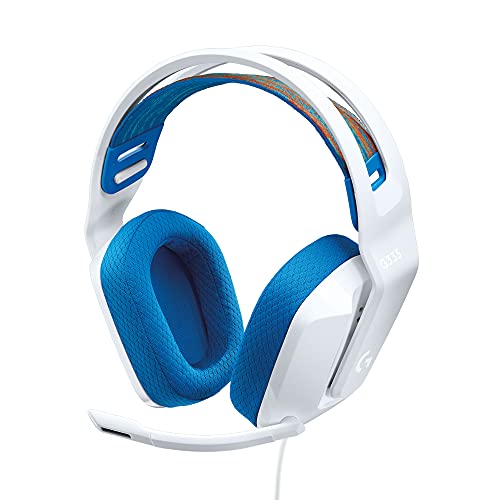
Product A · ASIN B08KKZ8S36
Logitech G335 (White)
Last observed offer
$39.99
Per listed package.
Offer eligibility must be confirmed on Amazon.
Checked 2026-10-19 15:44 UTC. Price and availability may change.

Product B · ASIN B000UXZQ42
Logitech H390 (Black, USB-A)
Last observed offer
$20.99 List Price: $24.99
Per listed package.
Offer eligibility must be confirmed on Amazon.
Checked 2026-10-19 19:46 UTC. Price and availability may change.
Pickoryx may earn a commission from qualifying purchases through the paid Amazon links on this page, at no added cost to you.
The buying question
Should your headset use a 3.5 mm jack across devices, or stay on a computer’s USB-A port, and where do you want its mute control?
G335 uses an analog headset plug, a flip-up mute boom and an earcup volume roller. H390 USB-A uses a computer USB connection and cable-mounted mute and volume buttons.
Quick verdict
Choose Logitech G335 (White) if
- You want one headset for compatible 3.5 mm devices or a console controller.
- You prefer muting by raising the boom and adjusting volume on the earcup.
Choose Logitech H390 (Black, USB-A) if
- Your supported computer has an available USB-A port.
- You prefer a cable button for muting without moving the microphone boom.
When the recommendation changes
- A controller’s 3.5 mm headset jack makes G335 the direct connection choice.
- If both connectors work on your computer, control placement becomes a separate decision.
- If the only available port is USB-C, neither selected cable connects directly; check another variant or a suitable adapter.
The differences that matter
Computer And Console Connections
What this changes: Choose G335 to move between compatible 3.5 mm hosts, including a controller with the appropriate jack. Choose H390 USB-A for a supported computer with an available USB-A port. A USB socket on a console alone does not establish H390 compatibility, and neither selected cable directly fits a USB-C-only port.[1, 2, 3, 4]
Mute And Volume Operation
What this changes: G335 suits a routine where lifting the microphone is the mute action. H390 suits someone who wants to leave the boom positioned and operate a button on the cable. Use H390’s inline control for muting; its guide describes moving the boom as positioning or putting it aside.[1, 2, 3, 4]
Best for your routine
Moving between a computer and a controller with a compatible 3.5 mm headset jack
Best fit: Logitech G335 (White)
Based on listed features, not comparative testing.
G335 provides that direct connector. Check whether the computer has a combined headset jack or separate headphone and microphone inputs that use the supplied splitter.
Computer calls with a cable-mounted mute button
Best fit: Logitech H390 (Black, USB-A)
Based on listed features, not comparative testing.
H390 USB-A combines the computer connection with inline mute and volume buttons. It lets you use the button while leaving the boom in its speaking position.
Value and trade-offs
One or both observed offers have eligibility conditions, so no unrestricted price difference is shown.
If G335 costs more, pay the difference for a 3.5 mm connection or flip-up mute routine you actually want. If USB-A and inline controls already suit your computer calls, compare the current H390 offer without assuming the gaming label makes G335 sound better.
There is not enough verified price history here to recommend buying now or waiting.
Community discussions
Questions and individual experiences add context, not controlled-test results, failure rates, or owner consensus.
A G335 buyer asks why phone and PC microphone behavior differ
A new owner reports different results across two hosts. The reply gives generic troubleshooting, including control locations that are not specific to G335. Neither the connector setup nor the cause was verified; this is a setup question, not evidence of a product fault.
Reddit discussion · Applies to Logitech G335 (White) · Source checked 2026-10-05 17:24 UTC
An H390 user asks about mute behavior at different USB ports
The poster says the headset behaves differently between ports on one laptop. Two replies suggest checks, but there is no confirmed resolution. The exact H390 connector variant is not established, so the discussion is model-level context rather than proof about this USB-A unit.
Reddit discussion · Applies to Logitech H390 (Black, USB-A) · Source checked 2026-10-05 17:24 UTC
Limitations
- Pickoryx has not tested these headsets. This comparison does not establish a sound-quality, microphone-clarity, noise-isolation or all-day-comfort winner.
- H390 advice here applies to Black USB-A 981-000014. Other H390 connector variants require a separate selection check.
- Computer compatibility does not establish H390 support on every console, dock or adapter. Verify the actual host and connection path.
Questions shoppers ask
My PC has separate headphone and microphone sockets. What does G335 need?
Use the PC Y-splitter that Logitech lists with G335 to connect its combined headset plug to those separate inputs. A headphone-only socket does not provide the microphone connection. H390 USB-A instead connects through a supported computer USB port.
Does raising H390’s boom work like G335’s flip-to-mute action?
Use H390’s inline center button to mute or unmute. Its guide describes boom movement for positioning or putting the microphone aside. G335’s guide explicitly assigns muting to raising its boom.
Does a red light mean H390 is muted?
Check whether it is flashing: the USB-A setup guide shows flashing red for mute on and solid red for mute off. The cable’s center button toggles between them.
Methodology and sources
Compared the White G335 and Black USB-A H390 for host connections and the physical steps used to mute and adjust volume. Exact H390 variant data distinguishes the USB-A selection from USB-C.
AI assisted with source comparison and drafting.
View 4 sources
- 1.Logitech G335 Wired Gaming Headset, WhiteLogitech G US · Official specifications · Source checked 2026-10-05 14:43 UTC
Evidence used on this page
- White ProductModel 981-001017; Plug and Play; Built-in Controls; packageContents in page data: The exact White SKU uses a 3.5 mm audio connection, an earcup volume roller and a flip-up mute microphone. The package data lists a PC Y-splitter for separate microphone and headphone jacks.
- 2.G335 Wired Gaming Headset: Setup GuideLogitech G · Official specifications · Source checked 2026-10-05 14:43 UTC
Evidence used on this page
- English printed/PDF page 3: PC/controller 3.5 mm connection and boom-up mute; page 5: on-ear volume control: The original guide shows a 3.5 mm connection to a PC or Xbox/PlayStation controller and raising the microphone boom to mute. The feature diagram locates the earcup volume control.
- 3.H390 USB Computer Headset, Black USB-A 981-000014Logitech US · Official specifications · Source checked 2026-10-05 17:23 UTC
Evidence used on this page
- US HTML variant 981-000014: Black and platform usb-a; Connect better, Meet better and microphone positioning; compatibility data: The selected Black 981-000014 variant is explicitly USB-A. Logitech describes computer connection, inline mute and volume controls, and moving the boom out of the way. Windows, macOS and ChromeOS are listed. The separate USB-C variant and generic USB-C package block are not substituted.
- 4.H390 Setup Guide, USB-ALogitech · Official specifications · Source checked 2026-10-05 17:24 UTC
Evidence used on this page
- English printed/PDF pages 3–5: USB-A connector, computer connection, boom positioning and inline controls: The original USB-A guide assigns mute/unmute to the inline center button and volume to the plus/minus buttons. A flashing red light means mute on; solid red means mute off. It describes raising the boom for positioning and storage.