
Logitech G335 vs HyperX Cloud III Wired: Which Connection and Mute Style?
Choose Logitech G335 when a 3.5 mm connection covers your setup and you like flip-up muting. Choose the wired HyperX Cloud III if you want its PC USB option or prefer a mute button that leaves the boom positioned. For Xbox-only use, compare the mic controls rather than paying for USB functionality the console cannot use.
Published by Pickoryx · Published 2026-10-05
Source checked 2026-10-05 14:47 UTC
Products compared
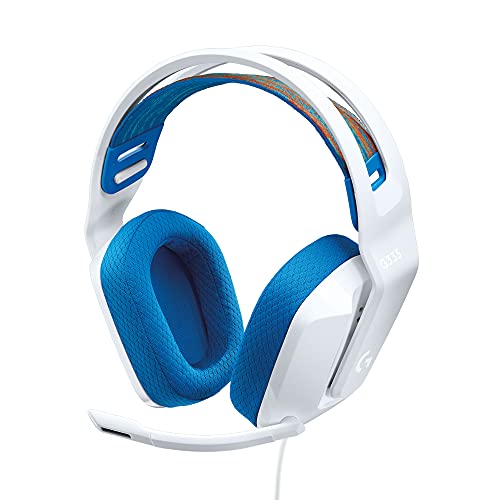
Product A · ASIN B08KKZ8S36
Logitech G335 Wired Gaming Headset, White
Last observed offer
$39.99
Per listed package.
Offer eligibility must be confirmed on Amazon.
Checked 2026-10-19 15:44 UTC. Price and availability may change.

Product B · ASIN B0C3BSZ56D
HyperX Cloud III Wired Gaming Headset, Black
Last observed offer
$69.99 List Price: $99.99
Per listed package.
Offer eligibility must be confirmed on Amazon.
Checked 2026-10-19 16:38 UTC. Price and availability may change.
Pickoryx may earn a commission from qualifying purchases through the paid Amazon links on this page, at no added cost to you.
The buying question
Does a 3.5 mm connection and flip-up mute cover your needs, or will you use USB audio and an earcup mute button?
G335 centers on an analog jack and boom-up mute. Cloud III adds a USB connection option and a detachable microphone with an earcup mute button.
Quick verdict
Choose Logitech G335 Wired Gaming Headset, White if
- You use an analog headset jack or separate PC audio jacks with the supplied splitter.
- Raising the boom is your preferred way to mute.
Choose HyperX Cloud III Wired Gaming Headset, Black if
- You want the included USB audio connection for a compatible PC.
- You want to mute by button without moving the boom.
When the recommendation changes
- Your device lacks the required headset jack or needs a different adapter.
- You only use Xbox, where the Cloud III USB adapter does not function.
- You prefer leaving the boom positioned while muting, or removing it entirely.
The differences that matter
Audio Connection And Device Setup
What this changes: G335 fits an analog headset-jack setup. Cloud III gives a PC user a USB option alongside 3.5 mm, with extra adapter parts to keep track of. Match the connection to the actual device; a console name on a compatibility list does not mean every supplied connector works there.[1, 2, 3, 5]
Microphone Attachment And Mute Controls
What this changes: Choose G335 if raising the boom is the mute action you prefer. Choose Cloud III if you prefer muting with a button while leaving the microphone positioned; its detachable boom can also be removed for listening. Both put volume control on the headset.[1, 2, 3, 4]
Best for your routine
Analog-jack use with flip-up muting
Best fit: Logitech G335 Wired Gaming Headset, White
Based on listed features, not comparative testing.
G335 combines that connection with the boom-up mute action and an earcup volume roller.
A PC setup that needs a supplied USB audio option
Best fit: HyperX Cloud III Wired Gaming Headset, Black
Based on listed features, not comparative testing.
Cloud III includes the USB audio dongle and USB-C-to-USB-A adapter as well as its 3.5 mm connection.
Using a physical mute button without moving the boom
Best fit: HyperX Cloud III Wired Gaming Headset, Black
Based on listed features, not comparative testing.
Cloud III’s earcup button toggles microphone mute while the boom stays in position.
Value and trade-offs
One or both observed offers have eligibility conditions, so no unrestricted price difference is shown.
If Cloud III costs more, justify the difference with a USB setup you will use or a preference for its earcup mute button. Xbox-only buyers should not treat the included USB adapter as an extra console connection.
There is not enough price history here to recommend buying now or waiting.
Limitations
- This comparison uses manufacturer documentation, not Pickoryx listening or wear testing. It does not establish a sound-quality, microphone-clarity, isolation, comfort or durability winner.
- Compatibility depends on the device and connection used. For voice chat through 3.5 mm, check the device’s headset-input requirements.
- These are the wired G335 and wired Cloud III. Cloud III Wireless and Cloud III S Wireless have different connection and control instructions.
Questions shoppers ask
Does Cloud III’s USB adapter work on Xbox?
No. HyperX explicitly says the included USB adapter does not function on Xbox, and its supplied DTS license is PC-only. Use the 3.5 mm route with a compatible controller headset jack. G335’s guide also shows the controller’s 3.5 mm connection.
Methodology and sources
Compared the included connection accessories, Xbox USB limitation and physical microphone and mute routines for White G335 and Black wired Cloud III.
AI assisted with source comparison and drafting.
View 5 sources
- 1.Logitech G335 Wired Gaming Headset, WhiteLogitech G US · Official specifications · Source checked 2026-10-05 14:43 UTC
Evidence used on this page
- White ProductModel 981-001017; Plug and Play; Built-in Controls; packageContents in page data: The exact White SKU uses a 3.5mm audio connection, an earcup volume roller and a flip-up mute microphone. Its package data lists a PC Y-splitter for separate microphone and headphone jacks.
- 2.G335 Wired Gaming Headset: Setup GuideLogitech G · Official specifications · Source checked 2026-10-05 14:43 UTC
Evidence used on this page
- English printed/PDF page3: PC/controller 3.5mm setup and boom-up mute; page5: on-ear volume control: Original guide shows the 3.5mm plug connected to a PC or Xbox/PlayStation controller and raising the microphone boom to mute. The feature diagram locates the earcup volume control.
- 3.HyperX Cloud III Wired Gaming HeadsetHyperX US · Official specifications · Source checked 2026-10-05 14:43 UTC
Evidence used on this page
- Black variant data SKU727A8AA; Quick Convenient Audio and Mic Controls; connections; What’s in the Box: Black wired variant is727A8AA. The model supports 3.5mm and USB connections, with a detachable microphone, USB dongle and USB-C-to-USB-A adapter listed in the box. Mute and volume controls are on the earcup.
- 4.Cloud III Mic Mute Button and Volume WheelHyperX Support · Official specifications · Source checked 2026-10-05 14:43 UTC
Evidence used on this page
- Mic Mute Button; Volume Wheel: Exact Cloud III wired support explains pressing the mute button to toggle microphone mute and using the wheel to adjust volume. Wireless mic-monitoring instructions are not substituted.
- 5.Cloud III DTS Not Available on XboxHyperX Support · Official specifications · Source checked 2026-10-05 14:43 UTC
Evidence used on this page
- Included USB adapter and platform limitation paragraphs: The included USB adapter is used on PC and does not function on Xbox. The supplied DTS license is for PC, not Xbox. This limits how the product page’s general console compatibility should be read.