
Logitech MX Brio vs Insta360 Link 2C Pro: Show Mode or Auto-Framing?
Choose by workflow: MX Brio physically tilts down for Show Mode desk sharing; Link 2C Pro can digitally crop to keep a subject centered and offers software-based DeskView. If using Link 2C Pro portrait 4K or 1080p/60, plan on MJPEG rather than H.264; its Controller defaults to MJPEG and does not switch formats in-app.
Published by Pickoryx · Published 2026-10-07
Source checked 2026-10-07 10:20 UTC
Products compared

Product A · ASIN B0BFJ4CRKD
Logitech MX Brio 4K Webcam (960-001545)
Last observed offer
$169.99 List Price: $199.99
Per listed package.
Offer eligibility must be confirmed on Amazon.
Checked 2026-10-19 14:08 UTC. Price and availability may change.
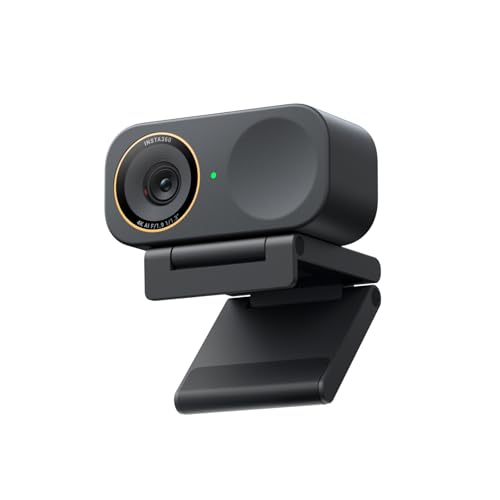
Product B · ASIN B0G3SSQMJQ
Insta360 Link 2C Pro (CINSABPB-S-B)
Last observed offer
$199.99
Per listed package.
Offer eligibility must be confirmed on Amazon.
Checked 2026-10-19 19:06 UTC. Price and availability may change.
Pickoryx may earn a commission from qualifying purchases through the paid Amazon links on this page, at no added cost to you.
The buying question
Which webcam's presentation workflow, capture modes and host-software requirements fit the buyer's setup?
MX Brio has tilt-down Show Mode and Logitech fine controls; Link 2C Pro adds fixed-camera digital auto-framing, portrait capture modes and DeskView, but portrait 4K/1080p60 cannot use H.264 and advanced software effects have host and frame-rate limits.
Quick verdict
Choose Logitech MX Brio 4K Webcam (960-001545) if
- You regularly present notes or objects on your desk and prefer MX Brio's tilt-down Show Mode.
- You want basic UVC camera use on ChromeOS or Linux, or Logitech Options+ / G HUB controls on a supported Windows or Mac host.
Choose Insta360 Link 2C Pro (CINSABPB-S-B) if
- You want Link 2C Pro digital framing or portrait capture, and MJPEG is acceptable for portrait 4K/1080p60.
- You will use DeskView for temporary top-down desk sharing and your computer meets Link Controller requirements.
When the recommendation changes
- If you use Windows on ARM or Linux and need Link Controller features, check the documented support limits first; those hosts do not support the Controller as described.
- If you need portrait output or a specific frame rate inside Insta360 Virtual Camera effects, check the format limit: that virtual stream does not support 50/60fps.
- If your choice depends on image quality, microphone quality or low-light performance, this feature-based comparison cannot establish a winner; no controlled test of these exact webcams was used.
- Link 2C Pro portrait 4K and portrait 1080p/60 do not support H.264. Link Controller defaults to MJPEG and does not switch formats in-app; check your selected source app and capture mode if codec compatibility matters.
The differences that matter
Presentation And Auto Framing Workflow
Logitech MX Brio 4K Webcam (960-001545)
MX Brio has Show Mode: tilt the webcam down to share notes or sketches on the desk during a call.[1]
What this changes: Choose MX Brio when tilting the camera to present desk material is the workflow you want; choose Link 2C Pro when software-assisted framing or its corrected temporary DeskView view matters. Its fixed-camera cropping is not a moving gimbal, and these features do not establish better image quality.[1, 4, 6]
Capture Modes And Host Software Fit
Logitech MX Brio 4K Webcam (960-001545)
MX Brio lists 4K at 30fps or 1080p at 60fps. Basic UVC support is listed for Windows 10+, macOS 10.15+, ChromeOS and Linux; Logi Options+ and G HUB are listed for Windows 10+ and macOS 12+.[1, 2]
Insta360 Link 2C Pro (CINSABPB-S-B)
Link 2C Pro lists landscape and portrait 4K up to 30fps and 1080p up to 60fps. Its table lists H.264 and MJPEG but excludes H.264 for portrait 4K and portrait 1080p/60. Link Controller defaults to MJPEG and cannot switch format in-app; Insta360 says to configure a different format through third-party software. Its Virtual Camera effects do not support 50/60fps; Link Controller is unsupported on Windows ARM and has no Linux version, while basic Linux UVC/UAC use is supported.[3, 5]
What this changes: The usable choice depends on output format as well as camera modes and host: Link 2C Pro portrait 4K and 1080p/60 cannot use H.264, and Link Controller defaults to MJPEG without an in-app format switch. If those portrait modes are required, plan for MJPEG; if changing encoding elsewhere, verify the chosen third-party app and mode. Insta360 Virtual Camera effects also have frame-rate and host limits. Logitech lists control apps for Windows/macOS and basic camera support for ChromeOS/Linux.[2, 3, 5]
Best for your routine
A buyer who presents notes or objects on the desk during calls and prefers tilting the camera down
Best fit: Logitech MX Brio 4K Webcam (960-001545)
Based on listed features, not comparative testing.
MX Brio's product page documents Show Mode by tilting the camera down to share desk material; this is a workflow-fit recommendation, not a comparative image-quality result.
A buyer who wants software-assisted subject framing and portrait capture modes
Best fit: Insta360 Link 2C Pro (CINSABPB-S-B)
Based on listed features, not comparative testing.
Link 2C Pro documentation describes digital zoom/crop framing and landscape/portrait output options. For portrait 4K or 1080p/60, H.264 is unavailable, so this is a fit only if MJPEG works for your workflow; confirm host and virtual-camera limits.
Value and trade-offs
One or both observed offers have eligibility conditions, so no unrestricted price difference is shown.
If one live offer costs more, that premium only makes sense when its presentation workflow or host-compatible controls are features you will use; no fixed dollar premium is built into this comparison.
There is not enough price history to assess timing; compare live exact-variant offers when ready to purchase.
Limitations
- No hands-on webcam testing or controlled head-to-head image, audio, framing or low-light test was used; published features do not establish comparative performance.
- Insta360 Link 2C Pro help pages cover that model and sometimes other Link models; claims here use only model-specific text or the Link 2C Pro column in the manufacturer table. Link 2C Pro uses fixed-camera digital framing, not Link 2 Pro gimbal movement.
- No adequate price-history window supports Buy Now/Wait timing.
- For Windows ARM, Link Controller is listed as unsupported; for Linux, Insta360 documents basic UVC/UAC camera operation but no Linux Link Controller.
- Before ordering, check the listing's model code and included items so it matches the webcam described here.
- Link 2C Pro portrait 4K and portrait 1080p/60 do not support H.264; Link Controller defaults to MJPEG and does not provide an in-app format switch.
Questions shoppers ask
Does the Link 2C Pro physically move to follow someone?
No. Insta360 says the Link 2C Pro uses digital zoom and cropping to keep a subject centered. The Link 2 Pro uses gimbal movement; that is a different model.
Can Insta360's advanced virtual-camera effects run at 60fps?
No. Insta360 lists Virtual Camera effects for the Link 2C Pro but says the virtual stream does not support 50fps or 60fps. Check the mode and host you plan to use before purchase.
Can Link 2C Pro use H.264 for portrait 4K or portrait 1080p/60?
No. Insta360 says those two portrait modes do not support H.264. The table lists MJPEG as an encoding option; Link Controller defaults to MJPEG and cannot switch format in-app. If codec selection matters, confirm the selected third-party source app and mode before purchase.
Methodology and sources
Compared documented desk-presentation and framing workflows with supported capture formats, software modes and host limits. Feature fit is separated from measured outcomes.
The comparison is based on published manufacturer information; neither webcam was hands-on tested.
View 6 sources
- 1.MX Brio 4K Ultra HD Collaboration and Streaming WebcamLogitech US · Official specifications · Source checked 2026-10-07 10:14 UTC
Evidence used on this page
- Exact US product URL suffix 960-001545; sections “Our most advanced webcam yet” (4K/30 or 1080p/60), “Show Mode”, and “Customize with advanced controls”.: Logitech exact US page identifies the MX Brio 960-001545 and documents Show Mode, video modes and fine controls in Logi Options+ and G HUB. Image-quality language is manufacturer marketing, not head-to-head evidence.
- 2.Do I need a driver to use MX Brio?Logitech Support · Official support · Source checked 2026-10-07 10:14 UTC
Evidence used on this page
- Operating-system lists and notes, lines 48-63: Windows 10+, macOS 10.15+, ChromeOS/Linux basic UVC; Logi Options+ and G HUB Windows 10+ or macOS 12+.: MX Brio basic UVC support is listed for Windows, macOS, ChromeOS and Linux; Logitech software support is Windows/macOS with stated minimum versions.
- 3.Link Series: Photo & Video SpecificationsInsta360 Link 2C Pro Support · Official support · Source checked 2026-10-07 10:20 UTC
Evidence used on this page
- Applicable Models list includes Link 2C Pro; table lines 35-37 identify its own column and list landscape/portrait modes, encoding, and the explicit H.264 restriction for portrait 4K and portrait 1080p/60. Lines 53-58 state Link Controller defaults to MJPEG, cannot switch format in-app, and require third-party software to change format.: The Link 2C Pro column lists landscape and portrait 4K/30, 1080p/60 and other modes, with H.264 and MJPEG; portrait 4K and portrait 1080p/60 do not support H.264. Insta360 says Link Controller defaults to MJPEG and cannot change format in-app; configure a different format through third-party software.
- 4.Basic Use (No Client Required)Insta360 Link 2C Pro Support · Official support · Source checked 2026-10-07 10:14 UTC
Evidence used on this page
- Link 2C Pro-specific touch-key / gesture default at lines 25-32; AI Tracking / Auto Framing at lines 56-58; privacy switch at lines 73-75.: Link 2C Pro gesture control is off by default; a palm gesture starts AI framing, which centers a subject through digital zoom/cropping. Double-tap switches 1x/1.5x zoom. This differs from Link 2 Pro gimbal movement.
- 5.Link Series: CompatibilityInsta360 Link 2C Pro Support · Official support · Source checked 2026-10-07 10:14 UTC
Evidence used on this page
- Applicable Models lines 22-28 include Link 2C Pro. Lines 48-60: direct use, Virtual Camera, 50/60fps, Windows ARM limitation; lines 71-73: Linux UVC/UAC and no Linux Controller.: Link 2C Pro supports direct third-party camera use; advanced effects require Virtual Camera and it does not support 50/60fps. Link Controller is unsupported on Windows ARM and unavailable on Linux, although basic Linux UVC/UAC use is supported.
- 6.Link Series: DeskView ModeInsta360 Link 2C Pro Support · Official support · Source checked 2026-10-07 10:14 UTC
Evidence used on this page
- Applicable Models lines 22-29 includes Link 2C Pro; lines 32-49 describe Controller activation, monitor placement, keystone correction and temporary overhead use.: Link 2C Pro DeskView is enabled in Link Controller, needs no dedicated overhead mount and corrects a temporary top-down view when placed on a laptop or monitor.