
Olight Oclip Pro vs Oclip Pro S: Which Clip-On Light Fits Your Tasks?
Pick the Oclip Pro if you want a manual-confirmed selector for spotlight, floodlight and red light. Pick the Oclip Pro S if its listed RGB and UV channels matter more to your tasks. Olight's comparison does not clarify whether Pro S also has a dedicated spotlight, so confirm that before choosing it for focused white-beam work.
Published by Pickoryx · Published 2026-10-18
Source checked 2026-10-18 00:33 UTC
Products compared

Product A · ASIN B0DDC4MH84
Olight Oclip Pro (Black)
Last observed offer
$39.99
Per listed package.
Offer eligibility must be confirmed on Amazon.
Checked 2026-10-19 19:11 UTC. Price and availability may change.
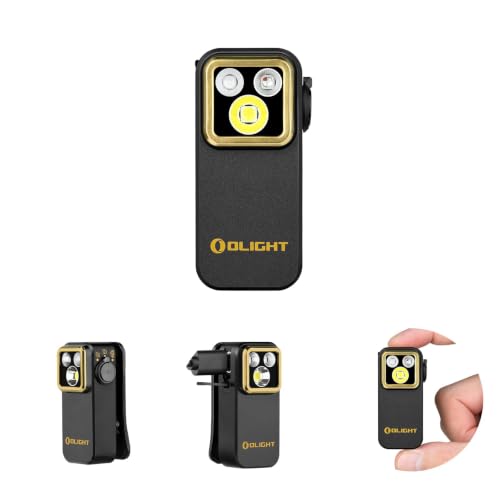
Product B · ASIN B0GJ688L2V
Olight Oclip Pro S (Black)
Last observed offer
$39.99
Per listed package.
Offer eligibility must be confirmed on Amazon.
Checked 2026-10-19 19:11 UTC. Price and availability may change.
Pickoryx may earn a commission from qualifying purchases through the paid Amazon links on this page, at no added cost to you.
The buying question
Do you need a dedicated white spotlight that the Oclip Pro manual explicitly documents, or do the RGB and UV channels listed for the Oclip Pro S better match your tasks?
The Oclip Pro manual confirms separate floodlight, spotlight and red-light selector positions. Olight's comparison lists the Pro S with flood, RGB and UV; it does not settle whether Pro S also has a dedicated spotlight, so verify that point if it is essential.
Quick verdict
Choose Olight Oclip Pro (Black) if
- A dedicated white spotlight, separately selected from the floodlight, is a requirement you want confirmed in the manual.
- A red-light setting fits your needs without needing the Pro S's listed RGB and UV channels.
Choose Olight Oclip Pro S (Black) if
- You want the RGB channels (red, green and blue) and UV channel listed by Olight for the Pro S.
- You are willing to confirm the Pro S's exact white-beam configuration if a separate spotlight matters to you.
When the recommendation changes
- If Olight confirms that the exact Oclip Pro S version includes a dedicated spotlight, the white-beam distinction may no longer separate these models; choose based on the auxiliary channels you will use.
- If you need only a red channel and have no use for green, blue or UV, the Pro's documented red setting may be sufficient; neither source supports a claim about real-world detection results.
The differences that matter
White Beam Task Fit And Dedicated Spotlight Workflow
Olight Oclip Pro (Black)
The Oclip Pro manual describes a selector with separate spotlight, floodlight and red-light positions.[1]
Olight Oclip Pro S (Black)
Olight's comparison table lists flood, RGB and UV for Oclip Pro S but does not clarify whether it also has a separately selectable spotlight.[2]
What this changes: For buyers who require a dedicated focused white-beam setting, the Pro has direct manual confirmation. The Pro S status remains unresolved; the table's omission is not proof that the feature is absent, so confirm with Olight before selecting Pro S for that need.[1, 2]
Auxiliary Red Rgb Uv Channel Needs
Olight Oclip Pro (Black)
The Oclip Pro manual describes a selectable red-light setting in addition to white floodlight and spotlight.[1]
Olight Oclip Pro S (Black)
Olight's comparison lists RGB and UV for Oclip Pro S; accompanying text describes red, green and blue channels plus UV.[2]
What this changes: If a simple red-light option is enough, the Pro's documented mode is relevant. If green, blue and UV channels are useful, Olight lists those additional channel choices for Pro S. This describes modes, not what they can detect, identify or make safer in practice.[1, 2]
Best for your routine
A buyer who requires a separately selectable white spotlight documented in the manual
Best fit: Olight Oclip Pro (Black)
Based on listed features, not comparative testing.
The Oclip Pro manual explicitly describes spotlight selection. Olight's comparison table does not resolve that feature for Pro S, so choose the Pro when manual confirmation is the deciding requirement or verify Pro S with Olight first.
A buyer who wants the RGB and UV channel options listed for Pro S
Best fit: Olight Oclip Pro S (Black)
Based on listed features, not comparative testing.
Olight lists RGB and UV for Pro S, while the Pro manual confirms a red-light setting. This is a mode-configuration fit, not evidence of detection accuracy or a better lighting result.
Value and trade-offs
One or both observed offers have eligibility conditions, so no unrestricted price difference is shown.
Any price difference should be weighed against the documented selector and light-channel configuration that matches your tasks. No stable price threshold is supported.
Price timing cannot be assessed without current exact-offer prices and a matched history window; compare current delivered offers and included items before deciding.
Limitations
- No hands-on or controlled beam comparison was performed. This article compares documented light-mode configurations, not brightness, beam distance, runtime or field performance.
- The Oclip Pro manual explicitly documents a spotlight selector. Olight's Oclip Pro S comparison does not resolve whether Pro S also has a dedicated spotlight; omission from that table is not proof that it lacks one.
- UV and RGB are mode descriptions only. No claim is made about counterfeit detection, cleanliness checks, medical use, authenticity, safety or real-world identification results.
- Current retailer listings and package contents have not been verified; confirm the listing matches the named model and check what is included before purchase.
Questions shoppers ask
Does the Oclip Pro S have a dedicated spotlight?
Olight's comparison lists flood, RGB and UV for Pro S but does not answer whether a separate spotlight is also present. The Oclip Pro manual documents a dedicated selector position for spotlight. If that matters, confirm the exact Pro S configuration with Olight before purchase.
What is the practical difference between the listed auxiliary light modes?
The Oclip Pro manual describes a red-light setting. Olight lists RGB and UV for Pro S and describes red, green and blue channels plus UV. These are mode options; they do not establish detection or safety outcomes.
Methodology and sources
Compared selector and light-mode options stated in Olight's Oclip Pro manual and Olight's named Pro/Pro S comparison. No beams, brightness, runtime or detection results were tested.
AI assisted source review and writing; no hands-on product testing was conducted.
View 2 sources
- 1.Manual_Oclip Pro (Version B)Olight · Official specifications · Source checked 2026-10-18 00:32 UTC
Evidence used on this page
- English section, §5–§7 and Figures 4, 11–13 (PDF page 1, opened text lines 321–356); manual dated B.08.15.2024.: For Oclip Pro, the manual describes rotating the selector to choose spotlight, floodlight or red light, then explains the separate white-beam and red-light controls. It supports mode selection only, not comparative beam performance.
- 2.Olight Oclip Pro vs Pro S vs Ultra: Which EDC Clip Light?Olight · Official specifications · Source checked 2026-10-18 00:32 UTC
Evidence used on this page
- Sections “What the S Stands For” and “Quick Specs Comparison,” especially the Oclip Pro / Oclip Pro S table (web text lines 7–14 and 25–32).: Olight's comparison names both models. Its table lists Pro as flood/spot/red and Pro S as flood/RGB/UV; accompanying text describes red, green and blue plus UV for Pro S. The page does not clarify whether Pro S also has a separate spotlight, so no absence claim is made. Broader promotional and scenario claims are not used.