
Oclip Pro vs MicroStream USB: Placement and Light Selection
Choose Oclip Pro for magnetic-clip positioning and separate flood, spot and red sources. Choose MicroStream USB Coyote for its documented hat-brim clip when high/low lighting is enough. Attachment fit comes first; neither arrangement guarantees the beam will point where your task needs it.
Published by Pickoryx · Published 2026-10-14
Source checked 2026-10-14 11:14 UTC
Products compared

Product A · ASIN B0DDC4MH84
Olight Oclip Pro (original, Black)
Last observed offer
$39.99
Per listed package.
Offer eligibility must be confirmed on Amazon.
Checked 2026-10-19 19:11 UTC. Price and availability may change.
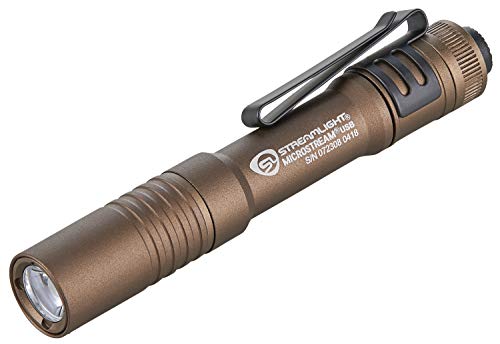
Product B · ASIN B07DLZXZV1
Streamlight MicroStream USB (Coyote 66608)
Last observed offer
$36.10 List Price: $66.07
Per listed package.
Offer eligibility must be confirmed on Amazon.
Checked 2026-10-19 18:45 UTC. Price and availability may change.
Pickoryx may earn a commission from qualifying purchases through the paid Amazon links on this page, at no added cost to you.
The buying question
Which attachment arrangement and light-source selection fit your use?
Magnetic-clip positioning with separate source choices versus a hat-brim clip with high/low selection.
Quick verdict
Choose Olight Oclip Pro (original, Black) if
- You want its magnetic clip or selectable light sources and have a suitable attachment point.
Choose Streamlight MicroStream USB (Coyote 66608) if
- You plan to clip the light to a hat brim and do not need separate source selection.
When the recommendation changes
- If either placement works, let your need for separate light sources decide.
- If one attachment point cannot put the light where you need it, resolve that fit before choosing by modes.
The differences that matter
Hands Free Placement Workflow
Olight Oclip Pro (original, Black)
Clip with magnetic attachment hardware and a lanyard hole.[1]
What this changes: Start with the support you intend to use: Oclip Pro offers magnetic-clip positioning; MicroStream USB offers an expressly documented hat-brim arrangement. Check the actual attachment point and beam direction before relying on either. These are affirmative options, not exclusive capabilities.[1, 2, 3]
Light Source Selection Workflow
Olight Oclip Pro (original, Black)
Selector chooses floodlight, spotlight or red light.[1]
What this changes: Choose Oclip Pro when changing the light source matters; choose MicroStream USB when high/low selection covers your needs and its placement suits you. More source choices do not establish better illumination.[1, 2, 3]
Best for your routine
Positioning with magnetic attachment hardware
Best fit: Olight Oclip Pro (original, Black)
Based on listed features, not comparative testing.
Oclip Pro supplies that hardware; confirm the intended surface and orientation.
Using a hat brim with high/low lighting
Best fit: Streamlight MicroStream USB (Coyote 66608)
Based on listed features, not comparative testing.
MicroStream USB documents this arrangement. Check your brim and desired beam direction; this is not a comfort ranking.
Value and trade-offs
One or both observed offers have eligibility conditions, so no unrestricted price difference is shown.
Pay extra only for a placement or light-selection preference you will use. First confirm fit; an unused feature is a weak reason to spend more.
Verified price history is unavailable; purchase timing cannot be assessed.
Limitations
- This comparison covers original Black Oclip Pro and Coyote MicroStream USB 66608, not Oclip Pro S or Ultra.
- No hands-on comparison establishes attachment stability, comfort, coverage, brightness, runtime, safety or reliability superiority. Other mounting arrangements and aftermarket accessories are not assessed.
- The shipped MicroStream USB charging-connector revision is unresolved. Verify the actual connector if existing-cable compatibility matters; charging is not a decision difference here.
Questions shoppers ask
What if my preferred placement and light modes point to different choices?
Check placement first: can the light attach where needed and point at the task? If both arrangements work, choose by source selection. If neither does, a mode preference alone does not solve the placement problem.
Methodology and sources
Compared documented attachment hardware and light selection, keeping fit and measured performance separate.
AI-assisted research organization and writing.
View 3 sources
- 1.Oclip Pro user manual, Version D (February 15, 2025)Olight · Official specifications · Source checked 2026-10-14 11:14 UTC
Evidence used on this page
- Figure 1; English section 5 and Figure 4; magnetic-clip caution: Identifies clip and lanyard hole, describes the clip as magnetic, and specifies floodlight, spotlight and red-light selection.
- 2.MicroStream USB Pocket LightStreamlight · Official specifications · Source checked 2026-10-14 11:14 UTC
Evidence used on this page
- Features: High and Low Modes; removable pocket clip: High/low output selection and removable pocket clip expressly usable on a hat brim.
- 3.MicroStream USB info sheet with part numbers (January 2025)Streamlight · Official specifications · Source checked 2026-10-14 11:14 UTC
Evidence used on this page
- Page 1: key features and Coyote 66608 item row: Documents the hat-brim clip, high/low options and Coyote clam-pack item 66608, UPC 080926666085. Connector revision is excluded.