Skip to content

Best picks for your needs

Product comparisons to help you choose.

Showing 289–312 of 978 · Page 13 of 41

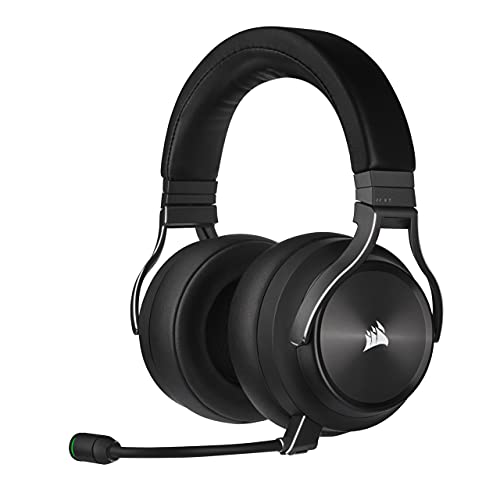
Corsair Virtuoso XT

ASIN B09BXZKNDB

HS80 MAX

ASIN B0D5Z1C5TB

Electronics & accessories

Corsair Virtuoso XT vs HS80 MAX: Which Fits Your Game and Phone Setup?

Choose Virtuoso XT for Bluetooth music alongside wireless game audio, a wired fallback or a removable microphone. Choose the original HS80 MAX if you prefer an attached flip-to-mute boom and switching between game and phone media; it still accepts phone calls in RF mode.

Read comparison

CORSAIR VOID WIRELESS v2 Gaming Headset (Black, CA-9011379-WW)

ASIN B0DYVD72P2

Razer BlackShark V3 Pro Wireless ANC Gaming Headset (Black, PC version, RZ04-05400100-R3U1)

ASIN B0F3QDLZKG

Electronics & accessories

Corsair Void v2 or Razer BlackShark V3 Pro? Match the Headset to Your Setup

The Corsair is the simpler documented choice when button-switched 2.4GHz/Bluetooth and its fixed mic workflow fit. The PC BlackShark V3 Pro is the more configurable documented fit when you need simultaneous wireless audio, wired options, a detachable mic, or on-ear chat/ANC controls.

Read comparison

CyberPower CP1500PFCLCD

ASIN B00429N19W

CP1500AVRLCD3

ASIN B0BCMLLSHL

Electronics & accessories

CyberPower CP1500PFCLCD vs CP1500AVRLCD3: Choose by Power Supply and Load

Both are 1500VA tower UPS models, but their documented choices differ: CP1500PFCLCD is rated at 1000W and explicitly lists pure sine wave output and Active PFC compatibility; CP1500AVRLCD3 is rated at 900W and its manual specifies simulated sine wave output.

Read comparison

CyberPower ST425

ASIN B07GZR981Y

CP1500AVRLCD3

ASIN B0BCMLLSHL

Electronics & accessories

CyberPower ST425 vs CP1500AVRLCD3: Which Requirements Matter?

Choose CP1500AVRLCD3 if you need USB computer-status communication or a manufacturer-designated user-replaceable battery. ST425 is a reasonable lower-cost option only if the current offer is lower, neither feature is required, and your equipment fits its limits.

Read comparison

Deco X15

ASIN B0D7MKJ56S

Deco BE25

ASIN B0DKVDZXSN

Electronics & accessories

Deco X15 vs Deco BE25: Choose for Your Devices and Wired Network

These three-node kits answer different upgrade needs, not a proven speed contest. Pick the X15 for a Wi-Fi 6 household with gigabit wired links; pick the BE25 if compatible Wi-Fi 7 clients or 2.5GbE connections make its added features usable.

Read comparison

Deco XE75

ASIN B0B88T5RDY

Archer AX55

ASIN B09G5W9R6R

Electronics & accessories

Deco XE75 vs Archer AX55: Which Network Setup Fits Your Home?

Choose by the setup you want to buy and wire. The Deco XE75 page describes a three-unit mesh pack with optional Ethernet backhaul; the Archer AX55 is one router with four LAN ports and USB 3.0, and TP-Link lists compatible OneMesh/EasyMesh expansion.

Read comparison

Deco XE75

ASIN B0B88T5RDY

Deco X15 3-Pack

ASIN B0D7MKJ56S

Electronics & accessories

Deco XE75 vs Deco X15 3-Pack: Which Mesh System Fits Your Home?

Choose the XE75 if its 6 GHz band and third Gigabit port per node solve a need in your setup. Choose the X15 if dual-band Wi-Fi 6 and two Gigabit ports per node are sufficient and its live offer is more attractive.

Read comparison

Dell S2725HSM

ASIN B0G4MVZMT6

ASUS VA279HG

ASIN B0DM6SNBGM

Electronics & accessories

Dell S2725HSM vs ASUS VA279HG: Which Fits Your Desk?

Both are 27-inch Full HD monitors, so choose by the connections and stand movement your desk needs. Dell lists two HDMI inputs and height, swivel, and pivot adjustment; ASUS lists HDMI plus VGA and tilt adjustment with 100 x 100 mm VESA mounting.

Read comparison

Dell S2725HSM

ASIN B0G4MVZMT6

ASUS XG27ACS

ASIN B0CV24GQ9W

Electronics & accessories

Dell S2725HSM vs ASUS XG27ACS: Which 27-Inch Monitor Fits Your Setup?

Choose Dell for a 27-inch FHD/144Hz setup with confirmed dual speakers and HDMI inputs. Choose ASUS if the QHD/180Hz specifications and DisplayPort or USB-C video path fit your computer; its USB-C power delivery is 7.5W, so keep a separate laptop charger in the plan.

Read comparison

Dell S2725QS

ASIN B0F1GF1KFC

ASUS PA278QV

ASIN B088BC5HMM

Electronics & accessories

Dell S2725QS vs ASUS PA278QV: Which Display Fits Your Setup?

These are two 27-inch monitors with different published specifications. The Dell lists 4K at up to 120Hz, while the ASUS lists QHD at up to 75Hz and a wider named input mix including four USB 3.0 ports.

Read comparison