
Creative Pebble V3 vs Logitech Z150: Which Setup Fits Your Desk?
Choose Creative Pebble V3 if you want to switch between computer USB audio, Bluetooth and an analog source. Choose Logitech Z150 if analog audio and an included AC adapter suit your desk. Before choosing Pebble V3 for its High-gain rating, check the USB supply: a connector that fits is not enough to establish the required power.
Published by Pickoryx · Published 2026-10-10
Source checked 2026-10-10 19:33 UTC
Products compared
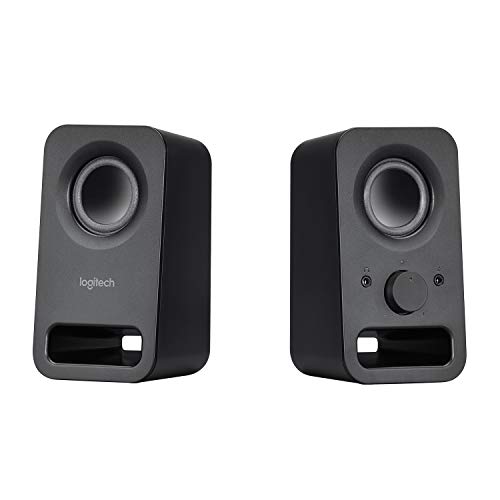
Product A · ASIN B00EZ9XLEY
Logitech Z150 (Black, 980-000802)
Last observed offer
$31.76
Per listed package.
Offer eligibility must be confirmed on Amazon.
Checked 2026-10-19 16:49 UTC. Price and availability may change.

Product B · ASIN B08F57GSJ7
Creative Pebble V3 (Black, MF1700)
Last observed offer
$42.74 List Price: $44.99
Per listed package.
Offer eligibility must be confirmed on Amazon.
Checked 2026-10-19 07:38 UTC. Price and availability may change.
Pickoryx may earn a commission from qualifying purchases through the paid Amazon links on this page, at no added cost to you.
The buying question
Do you need switchable USB, Bluetooth and analog listening, and can your desk supply the required power?
Pebble V3 offers three selectable audio modes but needs an appropriate USB power plan; Z150 pairs analog audio with its included AC adapter.
Quick verdict
Choose Logitech Z150 (Black, 980-000802) if
- You already have a 3.5 mm analog audio output and can use an AC outlet.
- You want the documented front headphone jack within reach on the right speaker.
Choose Creative Pebble V3 (Black, MF1700) if
- You expect to switch between USB audio and Bluetooth rather than use only an analog source.
- You can provide USB power in your chosen listening mode and verify the supply if High gain matters.
When the recommendation changes
- Your source has no analog output, making Z150 dependent on a separate suitable audio interface.
- You expect Pebble V3’s rated High-gain output but cannot confirm the specified power supply.
The differences that matter
Source Connection Modes
Logitech Z150 (Black, 980-000802)
Analog stereo audio through 3.5 mm input.[2]
Creative Pebble V3 (Black, MF1700)
USB digital audio, Bluetooth 5.0 or 3.5 mm analog stereo input. Press the source button to cycle USB Audio → Bluetooth → AUX-in; AUX joins the cycle when its cable is connected.[3]
What this changes: Choose Pebble V3 for a desk that alternates between computer USB audio and a Bluetooth source, with analog available too. Choose Z150 when your intended source already has an analog output and that wired setup covers your needs.[2, 3]
Power Gain Workflow
Logitech Z150 (Black, 980-000802)
Powered by an external AC adapter; Logitech lists the adapter in the package. Audio uses the separate analog connection.[2]
Creative Pebble V3 (Black, MF1700)
USB power is required in the documented USB, Bluetooth and AUX setups. Up to 8 W RMS requires High gain and a 10 W USB-C port, a 10 W USB-C power adapter, or a 5 V/2 A USB-A power adapter. The external power adapter is not included.[3]
What this changes: Plan Pebble V3 audio and power separately: a compatible computer USB connection can carry both, but Bluetooth or analog listening still needs USB power. Check the supply before counting on High gain. Z150 fits a desk with an AC outlet and an analog source without relying on the computer’s USB power budget.[2, 3]
Best for your routine
A computer on USB audio, with a phone used over Bluetooth
Best fit: Creative Pebble V3 (Black, MF1700)
Based on listed features, not comparative testing.
Pebble V3’s source button selects the listening mode. Keep its USB power connected when using Bluetooth; this is source flexibility, not battery-powered use.
An analog desktop source with power from a wall outlet
Best fit: Logitech Z150 (Black, 980-000802)
Based on listed features, not comparative testing.
Z150’s documented setup pairs its analog input with the included AC adapter. It avoids making the speaker power supply depend on the computer’s USB port.
Value and trade-offs
One or both observed offers have eligibility conditions, so no unrestricted price difference is shown.
If Pebble V3 costs more, pay for audio modes you will actually use. Include a suitable external power adapter in your budget if your intended supply does not meet the manual’s requirements; a higher wattage rating alone does not establish better sound.
There is not enough verified price history here to recommend buying now or waiting.
Limitations
- This comparison supports a connection-and-power choice, not a sound-quality, maximum-volume, latency or reliability ranking. Rated electrical output is not a listening test.
- Check the actual computer, hub, adapter and audio-output support before purchase. USB power availability does not by itself establish USB audio compatibility.
- The Pebble V3 guide identifies MF1700; it does not independently verify every region or package suffix of the selected black retail listing. Confirm the seller’s exact package and included accessories.
Questions shoppers ask
Is Pebble V3’s USB converter the same as a power adapter?
No. The guide shows a USB-C-to-A converter for the USB connection and separately says the external power adapter is not included. Changing connector shape does not establish that a port supplies the required power. The analog AUX cable is also listed as not included.
Does a USB wall charger provide Pebble V3’s audio as well as power?
The guide distinguishes a PC/Mac USB-audio connection from a power-only source. On the first connection, a PC/Mac starts in USB Audio mode; a source that does not support USB audio starts in Bluetooth pairing mode. With a suitable power-only supply, use Bluetooth or the analog input for the audio.
Does the 8 W rating mean Pebble V3 will sound better?
No. It is a conditional manufacturer power rating: High gain with the specified USB supply. It does not establish comparative sound quality or measured loudness against Z150.
Methodology and sources
Compared documented audio modes, source selection, USB gain requirements and AC-powered desk setup for the selected models.
AI assisted source research, drafting and editing. Pickoryx did not perform hands-on testing.
View 3 sources
- 1.Logitech Z150 Stereo Speakers, Black, 980-000802Logitech · Official specifications · Source checked 2026-10-10 19:20 UTC
Evidence used on this page
- Headphone Jack; Easy Controls; exact-part page: Front right-speaker headphone and auxiliary jacks, power and volume controls; selected black part.
- 2.Logitech Multimedia Speakers Z150 Technical SpecificationsLogitech · Official specifications · Source checked 2026-10-10 19:22 UTC
Evidence used on this page
- Speaker Specifications; Package Contents: Analog stereo 3.5 mm input, headphone output, external power adapter; package lists AC adapter.
- 3.Creative Pebble V3 Quick Start Guide, MF1700, Rev BCreative · Official specifications · Source checked 2026-10-10 19:20 UTC
Evidence used on this page
- Page 1 English: Overview; Setting Up; Technical Specification and gain footnote: USB audio, Bluetooth 5.0 and analog stereo input, source-button sequence, USB supply and high-gain output conditions.