
Logitech S150 vs Z150: Which Connection Fits Your Desk?
Choose S150 for a computer-centered USB setup and push-button muting. Choose Z150 for a 3.5 mm source, rotary speaker control and a front headphone connection, provided you can accommodate its AC adapter.
Published by Pickoryx · Published 2026-10-10
Source checked 2026-10-10 15:15 UTC
Products compared

Product A · ASIN B000ZH98LU
Logitech S150 USB Speakers with Digital Sound
Last observed offer
$15.99 List Price: $19.99
Per listed package.
Offer eligibility must be confirmed on Amazon.
Checked 2026-10-19 15:47 UTC. Price and availability may change.
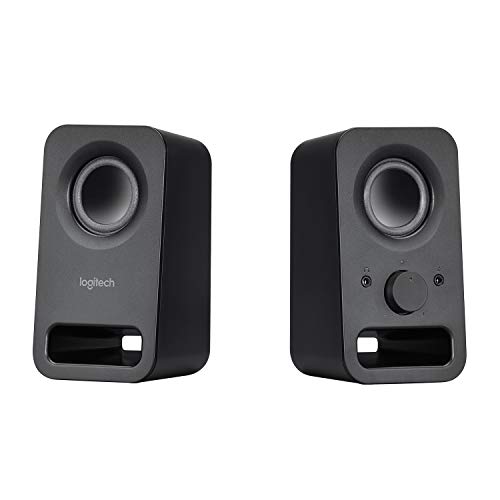
Product B · ASIN B00EZ9XLEY
Logitech Multimedia Speakers Z150 with Stereo Sound for Multiple Devices, Black
Last observed offer
$31.76
Per listed package.
Offer eligibility must be confirmed on Amazon.
Checked 2026-10-19 16:49 UTC. Price and availability may change.
Pickoryx may earn a commission from qualifying purchases through the paid Amazon links on this page, at no added cost to you.
The buying question
Should you choose computer USB audio and button controls, or analog audio with a powered desktop control and headphone connection?
S150 combines its computer connection and power in USB-A; Z150 needs a separate outlet and analog source but offers a front headphone jack and rotary speaker control.
Quick verdict
Choose Logitech S150 USB Speakers with Digital Sound if
- You want USB-A to handle audio and power at the computer.
- You prefer a dedicated mute button for interruptions.
Choose Logitech Multimedia Speakers Z150 with Stereo Sound for Multiple Devices, Black if
- You want to use a source with a 3.5 mm audio output.
- You want the documented front headphone connection and have an outlet nearby.
When the recommendation changes
- Check the actual ports before ordering, especially on a USB-C-only computer or a display whose USB port may not provide computer audio.
- If listening quality is the deciding factor, this connection-focused comparison does not establish a sound-quality winner.
The differences that matter
Audio Connection And Power
What this changes: Start with the source: an available computer USB-A port favors S150; a 3.5 mm audio output and nearby outlet suit Z150. A USB charging socket alone is not the documented S150 computer-audio setup.[1, 3, 4, 5]
Volume Mute And Private Listening
What this changes: For frequent interruptions, S150 offers a dedicated mute action. For a desk arranged around a rotary speaker control and front headphone connection, Z150 supplies that workflow. This does not establish whether S150 has a headphone output.[3, 6, 4, 2]
Best for your routine
Computer desk without a spare speaker-power outlet
Best fit: Logitech S150 USB Speakers with Digital Sound
Based on listed features, not comparative testing.
S150 uses the computer USB-A connection for power as well as audio; reserve that port for the speakers.
Analog source and headphones within reach
Best fit: Logitech Multimedia Speakers Z150 with Stereo Sound for Multiple Devices, Black
Based on listed features, not comparative testing.
Z150 puts a headphone connection on the right speaker and accepts analog audio; allow space for its power adapter and wiring.
Value and trade-offs
One or both observed offers have eligibility conditions, so no unrestricted price difference is shown.
Pay more only if the connection and control layout solve a need at your desk. A higher price does not establish better sound.
There is insufficient verified price history here for a buy-now or wait recommendation.
Limitations
- This comparison covers the black US S150 980-000028 and Z150 980-000802.
- No comparable listening tests or long-term reliability evidence were used; wattage is not a sound-quality or loudness verdict.
- Headphone amplification, headphone-volume behavior and automatic speaker muting on insertion were not verified for Z150. S150 headphone-output availability remains unverified.
Questions shoppers ask
Does a USB port on a TV or monitor make S150 the right choice?
Not by itself. Logitech documents a computer USB-A audio-and-power connection. Verify that the intended host supports that audio path; for Z150, check for a usable 3.5 mm audio output and access to an outlet.
What should I check if S150 is connected but silent?
Logitech’s installation guide says to check power, computer recognition, the selected USB audio device and mute state. Its older operating-system menu names are not a current setup guide for every computer.
Methodology and sources
Compared host connections, power requirements and documented everyday controls. No listening-quality ranking was inferred from specifications.
AI assisted the source research and organization of this comparison; Pickoryx did not test these speakers hands-on.
View 6 sources
- 1.Logitech S150 USB Stereo Speakers, US black 980-000028Logitech · Official specifications · Source checked 2026-10-10 15:15 UTC
Evidence used on this page
- USB AUDIO AND POWER; EASY CONTROLS: USB-A carries audio and power; unplug to power off; front right volume and mute controls.
- 2.Logitech Z150 Stereo Speakers, US black 980-000802Logitech · Official specifications · Source checked 2026-10-10 15:15 UTC
Evidence used on this page
- HEADPHONE JACK; EASY CONTROLS: Front right headphone jack; right-speaker power, volume and auxiliary connections.
- 3.Logitech S150 Complete Setup GuideLogitech · Official specifications · Source checked 2026-10-10 15:15 UTC
Evidence used on this page
- English pages 3–5: USB-A cable provides audio and power; plus/minus buttons adjust volume and middle button mutes.
- 4.Logitech Z150 Complete Setup GuideLogitech · Official specifications · Source checked 2026-10-10 15:15 UTC
Evidence used on this page
- English pages 3–5: Connect AC adapter and source; attached 3.5 mm input or front auxiliary jack; optional headphones; power/volume knob.
- 5.Logitech Z150 Technical SpecificationsLogitech · Official specifications · Source checked 2026-10-10 15:15 UTC
Evidence used on this page
- Speaker Specifications; Package Contents: Analog stereo 3.5 mm input, headphone output, volume and power controls; AC adapter included.
- 6.Logitech S-150 Digital USB Speakers InstallationLogitech · Official specifications · Source checked 2026-10-10 15:15 UTC
Evidence used on this page
- Page 1, sections 2–4: Mute again releases mute; troubleshooting checks recognition and USB Audio Device selection. Older guide used only for stable control procedure, not old operating-system paths or numeric specifications.