
Logitech Z150 vs Marshall Acton III: Which Fits Your Listening Routine?
Choose Z150 for an analog desk setup with headphones plugged into the right speaker. Choose Acton III for Bluetooth/AUX selection and top-panel tone controls; its AUX socket is an input, so plan a separate private-listening connection.
Published by Pickoryx · Published 2026-10-12
Source checked 2026-10-12 17:11 UTC
Products compared
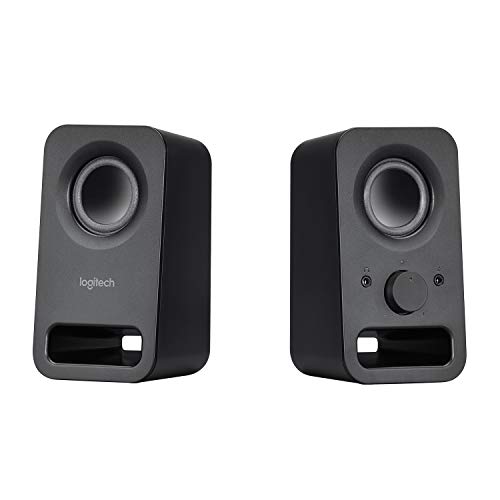
Product A · ASIN B00EZ9XLEY
Logitech Z150 (Black, 980-000802)
Last observed offer
$31.76
Per listed package.
Offer eligibility must be confirmed on Amazon.
Checked 2026-10-19 16:49 UTC. Price and availability may change.

Product B · ASIN B0BC27MM5Z
Marshall Acton III (Black, 1006008)
Last observed offer
$298.99
Per listed package.
Offer eligibility must be confirmed on Amazon.
Checked 2026-10-19 07:07 UTC. Price and availability may change.
Pickoryx may earn a commission from qualifying purchases through the paid Amazon links on this page, at no added cost to you.
The buying question
Which fits your audio source, and do you need a speaker headphone outlet or tone and playback controls?
An analog setup with a convenient headphone outlet versus Bluetooth/AUX selection and speaker-side tone adjustment.
Quick verdict
Choose Logitech Z150 (Black, 980-000802) if
- You have analog audio and want an accessible headphone outlet beside the volume control.
Choose Marshall Acton III (Black, 1006008) if
- You will use wireless playback or adjust bass and treble at the speaker.
When the recommendation changes
- If your source cannot supply analog audio, resolve that connection before choosing Z150.
- If both accept your source, decide where headphones will connect before paying for tone or playback controls.
The differences that matter
Source Connection And Selection
Logitech Z150 (Black, 980-000802)
Analog stereo audio through 3.5 mm input.[2]
Marshall Acton III (Black, 1006008)
Bluetooth and 3.5 mm AUX, selected with the source button or app.[4]
What this changes: Check the source first: Z150 suits an analog output; Acton III accommodates wireless phone playback as well as a wired source. Select the intended Acton input rather than assuming both play together.[2, 4]
Private Listening And Speaker Controls
What this changes: Even when either accepts your wired source, choose Z150 for headphones plugged into the speaker. Choose Acton III for speaker-side tone adjustment; arrange private listening at your source separately, not through its AUX input.[2, 1, 4, 3]
Best for your routine
A wired computer setup where private listening matters
Best fit: Logitech Z150 (Black, 980-000802)
Based on listed features, not comparative testing.
Z150 provides a headphone outlet at the speaker. Its simple controls suit this routine if the analog source connection works for you.
A phone listener who wants to adjust tone without returning to the phone
Best fit: Marshall Acton III (Black, 1006008)
Based on listed features, not comparative testing.
Acton III combines Bluetooth with bass and treble knobs. Its media controls apply to Bluetooth playback; headphone listening needs a separate route.
Value and trade-offs
One or both observed offers have eligibility conditions, so no unrestricted price difference is shown.
If Acton III costs more, judge the premium by Bluetooth and tone controls you will actually use. They do not replace the Z150 headphone outlet or prove better sound.
There is insufficient verified price history for a purchase-timing recommendation.
Limitations
- This comparison uses manufacturer documentation, not a comparative listening test. Sound quality, loudness, latency and long-term reliability are not ranked.
- Z150 headphone volume behavior and automatic speaker muting were not verified. Do not assume its speaker knob controls headphone level.
- Only the specified Black Z150 and Acton III models are covered. Source-device outputs and any adapters still need to match your setup.
Questions shoppers ask
Can the Acton III buttons change tracks from an AUX-connected computer?
Marshall documents the media controls for Bluetooth playback. For AUX, keep playback controls available on the computer; tone and volume controls are a separate function.
Does wireless audio remove the need for a power cable?
No. Acton III still connects to a wall socket, and Z150 uses its AC adapter. Choose a position with power access.
Methodology and sources
We checked audio-input requirements first, then headphone access and speaker controls as a separate buying decision. Previously retrieved source material was rechecked; this was not a fresh test of devices or current offers.
AI assisted source research, drafting and editing. Pickoryx did not conduct hands-on testing.
View 4 sources
- 1.Logitech Z150 Stereo Speakers, Black, 980-000802Logitech · Official specifications · Source checked 2026-10-10 20:50 UTC
Evidence used on this page
- Exact US Black 980-000802 page; Headphone Jack; Easy Controls: Right-speaker headphone socket, power, volume and auxiliary jack.
- 2.Logitech Multimedia Speakers Z150 Technical SpecificationsLogitech · Official specifications · Source checked 2026-10-10 19:22 UTC
Evidence used on this page
- Speaker Specifications: Audio Input, Audio Output, Audio Controls (Speaker), Power Adapter; Package Contents: Analog stereo 3.5 mm input; headphone output; volume and power controls; external AC adapter.
- 3.Acton III BlackMarshall · Official specifications · Source checked 2026-10-12 14:50 UTC
Evidence used on this page
- US Black pid1006008; Controls and Connectivity; Top panel controls; Box Contents: Exact Black model; Bluetooth and 3.5 mm input; tone and media controls; included mains lead.
- 4.Acton III Full Online ManualMarshall · Official specifications · Source checked 2026-10-12 14:51 UTC
Evidence used on this page
- English printed pages 3–5, device layout items 1–6; printed page 4 source selection, audio controls and media control: Complete layout labels the 3.5 mm socket as input and documents source, tone, Bluetooth media and mains controls.