
Google Fitbit Air vs Charge 6: Which Fits Your Routine?
Pick Fitbit Air for a deliberately screenless band and app-first check-ins, provided your phone can supply GPS when you track an outdoor route. Pick Charge 6 if you want live workout stats on the wrist or built-in GPS for phone-free route recording. Both require a compatible phone and Google Health for setup and syncing; this is a feature-fit comparison, not a finding about health accuracy or workout results.
Published by Pickoryx · Published 2026-10-16
Source checked 2026-10-16 05:04 UTC
Products compared

Product A · ASIN B0GTMTZF3V
Google Fitbit Air
Last observed offer
$99.99
Per listed package.
Offer eligibility must be confirmed on Amazon.
Checked 2026-10-19 10:44 UTC. Price and availability may change.
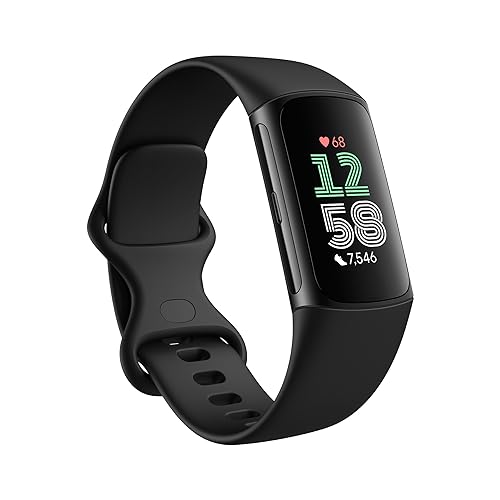
Product B · ASIN B0CC62ZG1M
Google Fitbit Charge 6
Last observed offer
$132.00 List Price: $159.95
Per listed package.
Offer eligibility must be confirmed on Amazon.
Checked 2026-10-19 10:44 UTC. Price and availability may change.
Pickoryx may earn a commission from qualifying purchases through the paid Amazon links on this page, at no added cost to you.
The buying question
Do you want a screen-free band whose workout and health details are reviewed in the phone app, or a tracker that shows exercise stats on your wrist and can record route GPS without your phone?
Fitbit Air is a small screenless tracker that depends on phone-connected GPS; Charge 6 adds a color touchscreen, on-wrist workout stats and built-in GPS, while both still use Google Health and a compatible phone for setup and syncing.
Quick verdict
Choose Google Fitbit Air if
- You prefer a screenless tracker and will check activity details in Google Health on your phone.
- You carry your phone for GPS workouts and are comfortable with connected GPS.
Choose Google Fitbit Charge 6 if
- You want exercise stats on a color touchscreen while you work out.
- You want built-in GPS available for a route when you leave your phone behind.
When the recommendation changes
- If you do not want to carry your phone during outdoor workouts, Charge 6 has built-in GPS; Air uses phone-connected GPS.
- If a display on your wrist is distracting, Air removes the screen, but its detailed activity and health views are in the phone app.
The differences that matter
Display And On Wrist Controls
What this changes: Display preference and whether the reader wants workout information on the wrist determine the better feature fit.[1, 3, 4, 6]
Phone Dependency And Gps Workflow
What this changes: Charge 6 accommodates phone-free GPS route recording; Air fits a phone-carried workout. Both remain phone/app-connected trackers overall.[5, 2, 3, 4, 6]
Best for your routine
You want a screenless tracker and prefer to review metrics later in the phone app.
Best fit: Google Fitbit Air
Based on listed features, not comparative testing.
Google describes Air as screenless and its support guide says to review activity and health metrics in the Google Health app on the phone.
You want live exercise stats on your wrist during a workout.
Best fit: Google Fitbit Charge 6
Based on listed features, not comparative testing.
Google lists Charge 6 exercise modes with live stats on the wrist; Air has no display and directs metric review to the app.
You want to record an outdoor GPS route without carrying your phone.
Best fit: Google Fitbit Charge 6
Based on listed features, not comparative testing.
Google documents Charge 6 built-in GPS; its GPS help says Air uses the phone’s GPS and requires the phone nearby for a GPS workout.
Value and trade-offs
One or both observed offers have eligibility conditions, so no unrestricted price difference is shown.
A price premium only makes sense if you will use Charge 6’s wrist display or built-in GPS; check the current price for the exact listing you are considering.
Price timing cannot be assessed because comparable current offers and sufficient price history have not been verified.
Limitations
- This comparison covers documented design, app workflow and GPS options. It does not compare heart-rate accuracy, health outcomes, workout performance, comfort in use, reliability or battery life through testing.
- Both trackers require a compatible phone and Google Health app for setup and syncing. Charge 6 built-in GPS supports phone-free route recording, not phone-free initial setup, data syncing or all connected app features.
- Some Google Health features have separate Premium, age, country or device availability conditions; confirm the current terms for any feature you plan to use.
- This article does not assess current offers or price history. If you compare dated prices shown in product cards, availability and totals can change.
Questions shoppers ask
Can Fitbit Air record an outdoor route without my phone?
No. Google lists Fitbit Air as using phone-connected GPS, so keep the phone nearby during GPS exercise.
Does Charge 6 work entirely without a phone?
Not entirely. It has built-in GPS for route recording and can show exercise stats on the wrist, but Google Health app setup and syncing still use a compatible phone.
Methodology and sources
Compared official feature descriptions and setup/GPS documentation for screen and wrist controls, phone requirements and GPS modes. No accuracy or performance winner is inferred.
Automation located and organized source pages; all published product statements are limited to the opened exact-model official sources.
View 6 sources
- 1.Introducing the all-new Fitbit AirGoogle · Official specifications · Source checked 2026-10-16 05:02 UTC
Evidence used on this page
- May 7, 2026 announcement; screenless design and activity tracking sections: Google identifies Fitbit Air as a screenless wearable and says app-started workouts, automatic activity recognition and workout recap are part of its Google Health workflow.
- 2.Tech Specs & Battery Life of Google Fitbit AirGoogle Store US · Official specifications · Source checked 2026-10-16 05:02 UTC
Evidence used on this page
- Compatibility; dimensions and weight: US specification page lists Google Health app/account requirements, supported phone OS versions, Bluetooth LE/internet/location requirements for syncing, and the Obsidian band color; model-specific device weights and dimensions are also shown.
- 3.Get started with Google Fitbit AirGoogle Health Help Center · Official support · Source checked 2026-10-16 05:02 UTC
Evidence used on this page
- Set up; device status; track activity and health metrics, lines 34–50, 148–205: Exact Air support article requires Google Health on a phone for setup; explains status LED instead of a screen; metrics and exercise review are in the phone app; some advanced features require Premium or are region-limited.
- 4.Fitbit Charge 6 Premium Fitness TrackerGoogle Store US · Official specifications · Source checked 2026-10-16 05:02 UTC
Evidence used on this page
- 40+ exercise modes, built-in GPS, color touchscreen and phone/app compatibility: US Charge 6 product page lists a color touchscreen, 40+ exercise modes with live wrist stats, built-in GPS with pace/distance on wrist without a phone, compatible phone/app requirements and Google Health Premium membership features.
- 5.Use GPS on your Fitbit device or Pixel WatchGoogle Health Help Center · Official support · Source checked 2026-10-16 05:02 UTC
Evidence used on this page
- GPS types table and explanations; phone-connected GPS requirements; Charge 6 GPS mode settings: Google’s official device table names Air as Phone (connected) GPS and Charge 6 as Dynamic, built-in and phone-connected GPS. It says connected GPS uses phone sensors and requires phone proximity, and explains Charge 6 Dynamic and built-in modes.
- 6.Get started with the Fitbit Charge 6Google Health Help Center · Official support · Source checked 2026-10-16 05:04 UTC
Evidence used on this page
- Setup and sync; Charge 6 screen navigation, live exercise stats and GPS; account, phone, Premium caveats: Exact Charge 6 support page says setup uses the Google Health mobile app and phone connection for syncing; documents screen navigation, real-time exercise stats and GPS data, and notes phone/Google Account/internet and some paid-subscription requirements.