
Fitbit Charge 6 vs Inspire 3: Which Tracker Fits Your Routine?
Choose Charge 6 if you want its built-in GPS option for route recording without carrying your phone, or you will use its supported Google Maps or Wallet features. Choose Inspire 3 if connected phone GPS suits your workouts and you prefer its narrower, lighter published form factor. Neither device is established here as more accurate, more comfortable, or longer-lasting in real use.
Published by Pickoryx · Published 2026-10-03
Source checked 2026-10-03 14:40 UTC
Products compared
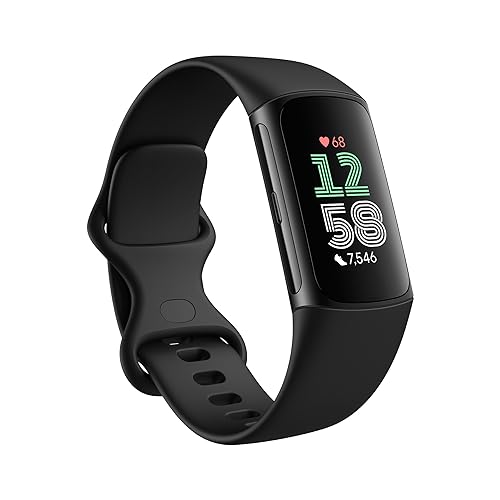
Product A · ASIN B0CC62ZG1M
Fitbit Charge 6 (Obsidian/Black)
Last observed offer
$132.00 List Price: $159.95
Per listed package.
Offer eligibility must be confirmed on Amazon.
Checked 2026-10-19 10:44 UTC. Price and availability may change.

Product B · ASIN B0B6WRFY5S
Fitbit Inspire 3 (Midnight Zen/Black)
Last observed offer
$88.00
Per listed package.
Offer eligibility must be confirmed on Amazon.
Checked 2026-10-19 10:44 UTC. Price and availability may change.
Pickoryx may earn a commission from qualifying purchases through the paid Amazon links on this page, at no added cost to you.
The buying question
Do you need outdoor workout GPS that can work without a phone and Charge 6's documented wrist apps, or is phone-connected GPS plus Inspire 3's narrower, lighter body a better fit?
Charge 6 adds a built-in GPS option and Google Maps and Wallet support. Compared with Inspire 3, it is wider and heavier but also shorter and slightly lower. Inspire 3 uses connected GPS and is narrower and lighter; it still offers phone notifications and Find My Phone.
Quick verdict
Choose Fitbit Charge 6 (Obsidian/Black) if
- You want to select built-in GPS on Charge 6 for an outdoor workout when you do not take the phone.
- You specifically want Google Maps directions or contactless Wallet payments on your Fitbit and can meet the listed app, phone, country, and bank requirements.
Choose Fitbit Inspire 3 (Midnight Zen/Black) if
- You are comfortable keeping the phone nearby for GPS route capture and want the narrower and lighter tracker listed in Google's specs.
- Call, text, and app notifications plus Find My Phone cover the wrist functions you use most.
When the recommendation changes
- You need a route recording option with the phone left behind; that favors Charge 6's built-in GPS mode.
- Your bank/card or country is not supported for Fitbit Wallet, or your phone cannot remain in Bluetooth range for Maps; those conditions change the value of Charge 6's wrist-app features.
- Actual comfort, GPS accuracy, or battery life under your settings is decisive; this comparison uses published specifications and support instructions, not matched hands-on tests.
The differences that matter
Outdoor Workout Gps And Phone Dependency
What this changes: This changes what you carry for an outdoor route. Charge 6 can record with built-in GPS when the phone stays home; Inspire 3's listed route method depends on a nearby phone. Charge 6 can also use phone GPS, so carrying the phone remains an option for either device.[3, 4, 7]
Wrist Display And Everyday Tracker Workflow
Fitbit Charge 6 (Obsidian/Black)
Charge 6 is listed by Google as supporting Google Maps on-device and Fitbit contactless payments with Google Wallet. Maps requires the phone to remain in Bluetooth range and navigation to be started in Google Maps on the phone. After Wallet setup, payment can be made from the tracker without the phone nearby; supported countries, banks, and cards still apply. YouTube Music controls also require a nearby phone and a paid YouTube Music Premium subscription. Google lists it at 30 g and 23.09 mm wide (36.73 mm long, 11.20 mm high), with an AMOLED display.[5, 6, 1, 7]
Fitbit Inspire 3 (Midnight Zen/Black)
Inspire 3's official product page lists call, text, and app notifications when the phone is nearby, plus Find My Phone. Google’s device-compatibility lists name Charge 6 for Maps and contactless payments but do not list Inspire 3; check the current compatibility list if either on-wrist app is essential. Google lists it at 17.69 g and 18.6 mm wide (39.32 mm long, 11.75 mm high), with a color AMOLED touchscreen.[2, 5, 6, 8]
What this changes: Treat this as a choice about which wrist tasks you will actually use, not as a general smartwatch ranking. The cited Google lists make Maps and Wallet a documented Charge 6 option; Inspire 3's page positively describes notifications and Find My Phone. Maps still depends on the nearby phone, while Wallet setup depends on supported payment methods and region. On physical size, Inspire 3 is narrower and lighter by the listed specifications, while Charge 6 is shorter and slightly lower in height. Those measurements can narrow a try-on choice but do not predict comfort.[5, 6, 1, 2, 7, 8]
Best for your routine
Outdoor walker or runner who wants a built-in-GPS mode and may leave the phone at home
Best fit: Fitbit Charge 6 (Obsidian/Black)
Based on listed features, not comparative testing.
Google documents built-in GPS for Charge 6 and phone-connected GPS for Inspire 3. Select Charge 6's Built-in GPS mode for this phone-free route-recording workflow; this is a feature-fit recommendation, not a claim about route accuracy.
Buyer prioritizing a narrower and lighter published tracker footprint for everyday wear
Best fit: Fitbit Inspire 3 (Midnight Zen/Black)
Based on listed features, not comparative testing.
Google lists Inspire 3 at 18.6 mm wide and 17.69 g, compared with Charge 6 at 23.09 mm wide and 30 g. This supports a size-based preference, not a promise that Inspire 3 will feel more comfortable on every wrist.
Value and trade-offs
One or both observed offers have eligibility conditions, so no unrestricted price difference is shown.
Compare current exact-variant offers against the features that matter to you; no price threshold or premium payoff is established in this comparison.
Price observations were not assessed for this comparison; check both exact-variant checkout offers before deciding when to buy.
Limitations
- This comparison covers manufacturer specifications and documented app workflows, not matched tests of GPS accuracy, heart-rate accuracy, comfort, battery life, or long-term reliability.
- Connected GPS requires compatible phone setup and permissions. Google’s current support instructions say to keep a connected-GPS phone within 30 feet; connection and route capture can still depend on location settings and surroundings.
- Google Maps on Charge 6 requires the phone to remain in Bluetooth range. Fitbit contactless payment setup depends on the country, participating bank, supported card, and device setup; verify these before purchase.
- The current price and offer terms were not checked. Compare the exact black variants at checkout.
Questions shoppers ask
Can Charge 6 record a route if I leave my phone at home?
Charge 6 includes built-in GPS. In its GPS settings, select Built-in GPS; Google notes that using built-in GPS can reduce tracker battery life. Inspire 3 is listed with connected GPS, which uses the phone's GPS and requires the phone nearby.
Does Google Maps on Charge 6 work without a phone?
No. Google says the phone must remain in Bluetooth range for Maps on a Fitbit device, and navigation is started in the Google Maps app on the phone. Wallet is different: after setup, Google says the phone does not need to be nearby for contactless payment, but supported banks, cards, and regions still apply.
Which tracker is smaller on paper?
Google lists Inspire 3 as 18.6 mm wide and 17.69 g; Charge 6 is 23.09 mm wide and 30 g. Those specifications can help you decide which to try on, but they do not predict individual comfort.
Methodology and sources
Compared the Obsidian/Black Fitbit Charge 6 and Midnight Zen/Black Fitbit Inspire 3 against current Google Store specifications and Google Health support documents. The comparison focuses on GPS source, named on-wrist app compatibility, and published tracker dimensions and weight; it does not rank measured accuracy, comfort, or battery life.
AI assisted with organizing the research and drafting this comparison. The cited official specifications and support instructions were checked; neither tracker was physically tested.
View 8 sources
- 1.Fitbit Charge 6 Premium Fitness TrackerGoogle Store · Official specifications · Source checked 2026-10-03 14:37 UTC
Evidence used on this page
- Features: built-in GPS; Google Maps, Google Wallet, call/text/app notifications; YouTube Music controls; compatible phone requirements: Google's US product page identifies the Charge 6 tracker and describes built-in GPS; Google Maps, Google Wallet and YouTube Music controls on the wrist; call, text and app notifications when a phone is nearby; and Android 11+/iOS 16.4+ with Google Account and internet requirements. The page notes that YouTube Music controls require a nearby compatible phone and paid YouTube Music Premium.
- 2.Fitbit Inspire 3 Health & fitness trackerGoogle Store · Official specifications · Source checked 2026-10-03 14:37 UTC
Evidence used on this page
- Midnight Zen/Black selection; Smarts and more: phone notifications, Find My Phone, phone compatibility requirements: Google's US product page shows the Inspire 3 in Midnight Zen/Black and lists call, text and smartphone app notifications when a phone is nearby, Find My Phone, and compatibility with most Android 11+ or iOS 16.4+ phones plus a Google Account and internet access.
- 3.Use GPS on your Fitbit device or Pixel WatchGoogle Health Help Center · Official support · Source checked 2026-10-03 14:36 UTC
Evidence used on this page
- Check if your Fitbit or Pixel Watch has GPS; Phone (connected) GPS requirements; Charge 5 and Charge 6 GPS mode table: Google's device table lists Charge 6 with Dynamic, built-in and phone-connected GPS; connected GPS uses the phone's GPS and the phone should stay near the tracker. Its instructions require location/background permissions for connected GPS and say to keep the phone within 30 feet. The settings table describes Charge 6 Dynamic, Built-in GPS and Phone GPS modes, and warns built-in GPS can reduce tracker battery life. Inspire 3 is included in the connected-GPS exercise instructions.
- 4.Find out what data Fitbit and Google Pixel Watch collect for Google Account usersGoogle Help · Official support · Source checked 2026-10-03 14:38 UTC
Evidence used on this page
- Trackers: Charge 6 and Inspire 3, Location rows: The current Google Account device-data list explicitly identifies Charge 6 location data as Connected GPS and On Device GPS, and Inspire 3 location data as Connected GPS.
- 5.How do I use Google Maps on my Fitbit device?Google Health Help Center · Official support · Source checked 2026-10-03 14:37 UTC
Evidence used on this page
- Opening paragraph and supported device list; setup steps; phone range; Charge 6 navigation steps: Google lists Charge 6, Sense 2 and Versa 4 as Fitbit devices with wrist Google Maps. It says setup uses the Google Health app, navigation starts in Google Maps on the phone, and the phone must remain in Bluetooth range; it describes Charge 6's pause, resume and finish controls. Inspire 3 is not on the listed supported-device set, so this draft does not assume Maps support for that model.
- 6.What should I know about using my Fitbit device to make contactless payments?Google Health Help Center · Official support · Source checked 2026-10-03 14:40 UTC
Evidence used on this page
- Supported Fitbit device list; country/card requirements; setup and making payments; phone-nearby question: Google's supported-device list includes Charge 6 and does not list Inspire 3. The help page says supported countries, banks and cards apply; setup uses the Google Health app, and a nearby phone is not needed to pay after setup. This is a device compatibility statement, not a claim about payment availability for every user.
- 7.Fitbit Charge 6 Technical SpecsGoogle Store · Official specifications · Source checked 2026-10-03 14:39 UTC
Evidence used on this page
- Colors; dimensions and weight; display; sensors and components: Google lists Obsidian/Black Aluminum among Charge 6 colors, 36.73 × 23.09 × 11.20 mm dimensions, 30 g weight, an AMOLED display, built-in GPS + GLONASS, and NFC.
- 8.Fitbit Inspire 3 Technical SpecsGoogle Store · Official specifications · Source checked 2026-10-03 14:39 UTC
Evidence used on this page
- Colors; dimensions and weight; display; band sizes and setup requirements: Google lists Midnight Zen as an Inspire 3 color, dimensions of 39.32 × 18.6 × 11.75 mm, weight 17.69 g, and a color AMOLED touchscreen. Its technical page also lists the small and large band sizes and Google Health phone setup requirements.