
Kasa KP303 vs Kasa HS300
Which strip fits the number and rated input of your USB accessories, and do you need documented energy readings for individual AC outlets?
Products compared
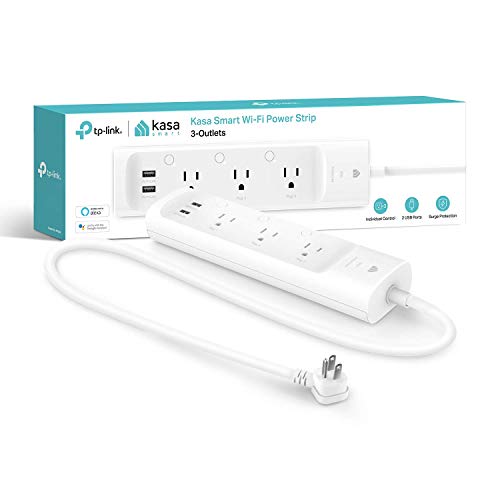
ASIN B083JKSSR5
Kasa KP303
Your setup has up to two USB devices drawing at most 2.4 A combined and 2.4 A per port, and you do not need documented individual AC energy readings.
Last observed offer
$23.01
List Price: $29.99
Size: 3 AC Outlets + 2 USB Ports
Price checked
Observed offer ends
Observed condition: new. Coupon and subscription requirements unverified.
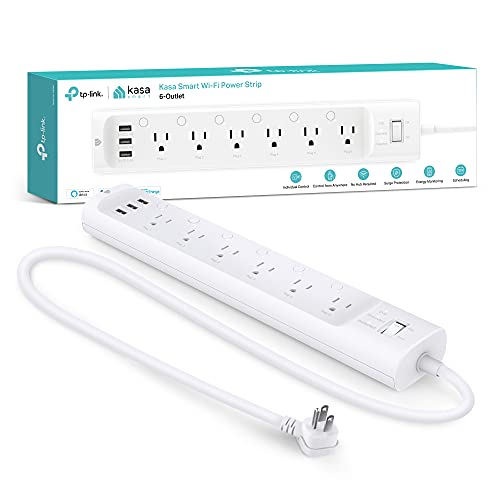
ASIN B07G95FFN3
Kasa HS300
Your setup has up to three USB devices drawing at most 4 A combined and 2.4 A per port and needs more capacity or positions than the KP303 provides.
Last observed offer
$37.99
List Price: $49.99
Size: 6 AC Outlets + 3 USB Ports
Price checked
Observed offer ends
Observed condition: new. Coupon and subscription requirements unverified.
Prices are per listed package. Pickoryx may earn a commission from qualifying purchases through the paid Amazon links on this page, at no added cost to you.
Published by Pickoryx · Published 2026-11-16 · Source checked 2026-11-16 06:22 UTC
The main trade-off
The KP303 covers two USB positions at 2.4 A shared. The HS300 adds one position, raises the shared rating to 4 A and has documented individual AC-outlet energy readings.
Quick verdict
Choose the KP303 for up to two USB devices drawing at most 2.4 A combined and 2.4 A per port. Choose the HS300 when its bigger USB budget fits: up to three USB devices drawing at most 4 A combined and 2.4 A per port. If you only need documented per-AC-outlet energy readings, choose the HS300 regardless of USB use.
Choose Kasa KP303 if
- Your setup has up to two USB devices drawing at most 2.4 A combined and 2.4 A per port, and you do not need documented individual AC energy readings.
Choose Kasa HS300 if
- Your setup has up to three USB devices drawing at most 4 A combined and 2.4 A per port and needs more capacity or positions than the KP303 provides.
- You need documented individual energy readings for AC loads; USB is not part of that decision.
When the recommendation changes
- If your accessories need a higher rating at a single USB port, neither has a published per-port advantage.
- If you need individual energy readings, rely on the HS300’s documented AC-outlet feature rather than assuming the KP303 can show the same view.
The differences that matter
| Decision point | Kasa KP303 | Kasa HS300 |
|---|---|---|
| Shared Usb A Output | Kasa lists two always-on USB charging ports. Its comparison table specifies 5 V and 2.4 A total shared output, with up to 2.4 A on an individual port.[1, 3] | Kasa lists three USB charging ports, described as always-on in its catalog. The table specifies 5 V and 4 A total shared output, with up to 2.4 A on an individual port.[2, 3] |
What this changes: The KP303 fits up to two USB devices drawing at most 2.4 A combined and 2.4 A per port; the HS300 fits up to three USB devices drawing at most 4 A combined and 2.4 A per port. A configuration above a strip’s position count, total rating or individual rating is not a documented fit. Neither is a documented fit above three devices, 4 A combined or 2.4 A on any single port. These are published ratings at 5 V, not measured draw or a fast-charge guarantee.[1, 3, 2] The better fit depends on your priorities | ||
| Documented Per Ac Outlet Energy View | Kasa documents separate control for its three AC outlets. The KP303 sources used here do not establish individual AC-outlet energy readings.[1, 3] | Kasa documents six independently controlled AC outlets and states that the Kasa Smart app can show energy use for each connected device on those outlets.[2, 3] |
What this changes: For a desk where you want separate energy readings for AC loads such as a monitor and a lamp, choose the HS300 for the documented Kasa app feature. If independent switching is enough, make the decision on the number of AC loads and shared USB requirements. Do not assume USB accessories are individually metered.[1, 3, 2] The better fit depends on your priorities | ||
Best for your routine
Two USB accessories at a small switching desk
Best fit: Kasa KP303
Based on listed features, not comparative testing.
The KP303 is the fit for up to two USB devices drawing at most 2.4 A combined and 2.4 A per port, provided three AC outlets suffice.
Three USB accessories on one strip
Best fit: Kasa HS300
Based on listed features, not comparative testing.
The HS300 is the fit for up to three USB devices drawing at most 4 A combined and 2.4 A per port; three devices alone do not establish fit if either electrical limit is exceeded.
Check a monitor and lamp separately in the Kasa app
Best fit: Kasa HS300
Based on listed features, not comparative testing.
The HS300 documents individual energy readings on the independently controlled AC outlets.
Value and trade-offs
The offers shown are per listed package; check the quantities and current terms on Amazon before comparing totals.
Consider the HS300 for up to three USB devices drawing at most 4 A combined and 2.4 A per port if the extra capacity solves your need, or independently for its documented AC energy readings.
No price history or buy-timing conclusion is used here.
Limitations
- US Kasa KP303 and HS300 are covered. The catalog listings do not establish hardware revisions; verify the label or version-specific documentation when a rating is critical.
- Published USB totals are shared ratings at 5 V, not measured current, negotiated charging speed or a promise that every port simultaneously supplies its individual maximum.
- KP303 metering was not established by the sources used. HS300 energy readings are discussed only for AC loads, not USB charging ports.
Questions shoppers ask
Does the HS300 deliver a higher rating for one USB accessory?
No. The catalog table lists up to 2.4 A at 5 V on one port for either strip. The HS300 lists more ports and a higher shared total across them.
Can I use the HS300 to check two AC devices separately?
Kasa documents individual energy readings for devices on the smart AC outlets. This does not establish energy readings for accessories attached to USB.
Methodology and sources
Separated shared USB output from a single-port rating and separated energy readings from separately controlled AC outlets.
Assisted source matching and editorial organization.
View 3 sources
- 1.Kasa Smart Wi-Fi Power Strip, 3-Outlets (KP303)Kasa Smart US · Official specifications · Source checked 2026-11-16 06:22 UTC
Evidence used on this page
- Features and Technical Specifications: Three individually controlled AC outlets and two always-on USB ports.
- 2.Kasa Smart Wi-Fi Power Strip, 6-Outlets (HS300)Kasa Smart US · Official specifications · Source checked 2026-11-16 06:22 UTC
Evidence used on this page
- Features and Energy Monitoring: Six individually controlled AC outlets, three USB charging ports and app energy information for each connected AC load.
- 3.TP-Link Kasa product catalogueTP-Link · Official specifications · Source checked 2026-11-16 06:22 UTC
Evidence used on this page
- Smart Plugs model cards and model-number/USB Charging Ports technical table (PDF indices 7–8): HS300: three USB ports, 5 V and 4 A total, 2.4 A each maximum. KP303: two USB ports, 5 V and 2.4 A total and per-port maximum. The model cards describe the USB charging ports as always-on.