
Nikon D7500 vs D780: Which Lens and Card Workflow Fits?
Decide first by lens format and then by card workflow. D7500 records in DX and offers a 1.3x crop; D780 offers an FX area and can use compatible DX lenses with its DX crop selected. The D7500 has one SD slot; D780 has two, configurable for overflow, duplicate recording, or RAW/JPEG split. Check the exact lens compatibility table and your required backup routine.
Published by Pickoryx · Published 2026-10-02
Source checked 2026-10-02 02:52 UTC
Products compared
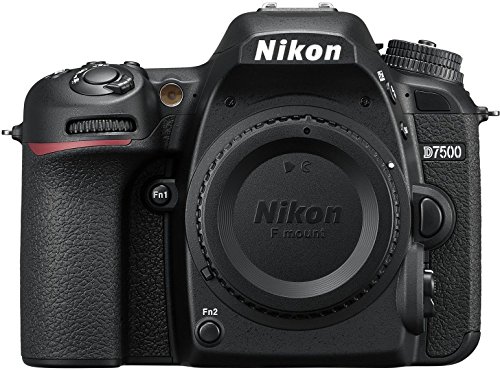
Product A · ASIN B06Y5ZCFHX
Nikon D7500 DX-Format Digital SLR Body (1581)
Last observed offer
$696.95 List Price: $999.95
Per listed package.
Offer eligibility must be confirmed on Amazon.
Checked 2026-10-19 17:39 UTC. Price and availability may change.
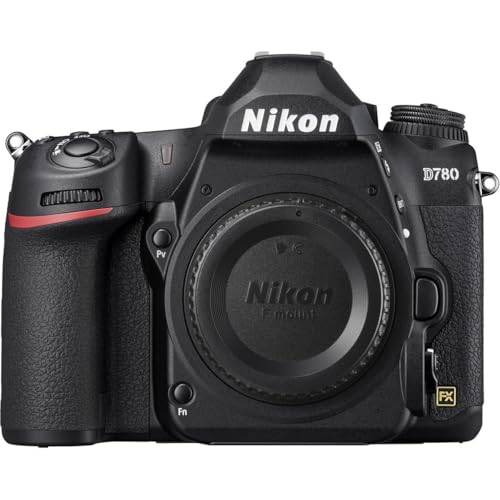
Product B · ASIN B083K41K2S
Nikon D780 FX-Format DSLR Body (1618)
Last observed offer
$1,546.95
Per listed package.
Offer eligibility must be confirmed on Amazon.
Checked 2026-10-19 16:41 UTC. Price and availability may change.
Pickoryx may earn a commission from qualifying purchases through the paid Amazon links on this page, at no added cost to you.
The buying question
Will your current DX or FX lenses give the framing and functions you need on each body, and do you need a second card for overflow, duplicate still-photo recording, or RAW/JPEG separation?
D7500 is a DX body with DX and 1.3x image-area choices and one SD slot. D780 is an FX body that can use DX lenses in DX image area, but that crops the frame; with two SD cards installed it can be configured for overflow, duplicate recording, or RAW/JPEG split. Lens functions depend on the exact lens.
Quick verdict
Choose Nikon D7500 DX-Format Digital SLR Body (1581) if
- Your kit and framing are centered on DX lenses and native DX capture, and one card slot fits your workflow.
- You want the D7500's documented DX/1.3x image-area choices and are not relying on an in-camera second-card copy.
Choose Nikon D780 FX-Format DSLR Body (1618) if
- You want the D780's FX image area with compatible FX lenses, while understanding that DX lenses use the DX crop.
- You need D780's documented two-card overflow, duplicate-photo, or RAW/JPEG split configuration.
When the recommendation changes
- If your kit is mostly DX lenses, the D780 can use DX lenses only with its DX 24x16 image area; compare the resulting crop and captured image size with the D7500's native DX area before changing bodies. A shared F mount does not guarantee identical autofocus, metering, or feature support for every lens.
- If your photography requires duplicate in-camera still-photo recording or RAW/JPEG separation, D780 documents these two-slot options; D7500 lists one SD slot. This is a card workflow distinction, not a guarantee against camera loss or file corruption. No image-quality, autofocus, low-light, or reliability winner was tested.
The differences that matter
Lens Format Compatibility
Nikon D7500 DX-Format Digital SLR Body (1581)
D7500 is a DX body with a Nikon F mount. Its manual offers DX (24x16) and 1.3x (18x12) image areas; Nikon says DX framing gives an angle of view about 1.5x narrower than the corresponding 35 mm-format angle of view. Check the D7500 lens table for exact autofocus, metering and other feature support.[1, 2, 3]
Nikon D780 FX-Format DSLR Body (1618)
D780 is an FX body with a Nikon F bayonet mount and FX and DX image areas. Nikon lists DX lenses for use with the DX (24x16) image area; selecting DX crop records a smaller area than the FX frame. Check the D780 compatibility table for exact lens-class behavior.[4, 5]
What this changes: Before switching bodies, inventory lens model numbers and whether they are DX or FX. A DX lens can remain usable on D780 in DX mode, but does not give the full FX frame; an FX lens on D7500 frames for DX. Confirm each lens's autofocus/metering support in that body's compatibility table. Choose based on desired framing and the lenses you already own, not a presumed image-quality winner.[1, 3, 4, 5]
Card Backup Workflow
Nikon D7500 DX-Format Digital SLR Body (1581)
Nikon lists one SD card slot for D7500. Its published body specifications do not provide a second in-camera card slot for overflow, duplicate recording, or a RAW/JPEG split.[1]
What this changes: Choose D780 if an in-camera duplicate still-image copy, overflow card, or separate RAW/JPEG destinations fit your shoot. D7500's single slot means planning a separate transfer/backup process. On D780, the two cards must be inserted and Slot 2 role selected; the duplicate-copy option is a workflow feature, not a guarantee of data safety. Consider capacity of the smaller card when using duplicate or RAW/JPEG mode.[1, 4, 6]
Best for your routine
Keep using a DX-centered lens kit with native DX framing
Best fit: Nikon D7500 DX-Format Digital SLR Body (1581)
Based on listed features, not comparative testing.
D7500's image area is DX. D780 can use DX lenses but the manufacturer specifies the DX image area for them, so a DX lens does not supply the D780's FX frame.
Record still photos to two cards in-camera
Best fit: Nikon D780 FX-Format DSLR Body (1618)
Based on listed features, not comparative testing.
D780 manual documents Backup mode, which writes each picture to both cards. D7500's specification lists one SD slot.
Choose Slot 2 as overflow or separate RAW and JPEG files
Best fit: Nikon D780 FX-Format DSLR Body (1618)
Based on listed features, not comparative testing.
D780 manual describes both configurations. D7500 has one listed SD slot.
Value and trade-offs
One or both observed offers have eligibility conditions, so no unrestricted price difference is shown.
Compare the current exact body offers together with the lenses and cards needed for your intended image area and recording workflow; this comparison does not establish a price premium or savings.
Compare current body-only offers and include the cost of any lenses or SD cards your intended workflow requires.
Limitations
- No hands-on image-quality, autofocus, low-light, reliability, or card-failure tests were performed; this is a documentation-based workflow comparison.
- F-mount compatibility is lens-specific. Check the exact lens against both bodies' compatibility tables, especially for autofocus, metering, aperture control, and other features.
- D780's DX-lens use requires its DX image area; its recorded frame is smaller than FX. Check crop and file-size needs before reusing a DX kit on that body.
- D780's in-camera duplicate-card option depends on two cards being installed and Backup selected; it is not a substitute for a separate backup plan.
- Current prices and price history were not compared; no price or value winner is claimed.
Questions shoppers ask
Can I use DX lenses on the D780?
Nikon lists DX lenses as compatible with the D780 when its DX (24x16) image area is selected. That crop records less than the D780's FX area. Check the D780 lens table for your lens's precise autofocus and metering support.
Can FX lenses be used on the D7500?
D7500 has a Nikon F mount and DX image area, and Nikon describes its DX field of view as about 1.5x narrower than the same 35 mm-format lens view. Compatibility and functions vary by lens; use Nikon's D7500 lens table for the exact lens rather than assuming all F-mount features work.
Does the D7500 make a second in-camera copy to another card?
Nikon lists one SD card slot for the D7500. The D780 has two slots and a Backup option that records each picture to both cards, plus overflow and RAW/JPEG split options.
Does D780 Backup protect every kind of camera data?
The manual says Backup records each picture to both cards. That is a duplicate still-photo recording mode; it is not a guarantee against camera loss, accidental deletion affecting both copies, or other failure, so keep a separate backup routine.
Methodology and sources
Compared each body's DX/FX image areas and the stated DX-lens conditions, while directing readers to model-specific lens compatibility tables. Separately compared the D7500's single SD slot with the D780's documented Slot 2 overflow, Backup and RAW/JPEG split settings. No image quality, autofocus, low-light, reliability or card-failure winner was measured.
Automation assisted with organizing research and drafting; product facts are based on the cited Nikon documentation. No hands-on testing was performed.
View 6 sources
- 1.Nikon D7500 DSLR | 20.9 MP DX Format Digital SLR CameraNikon USA · Official specifications · Source checked 2026-10-02 02:52 UTC
Evidence used on this page
- U.S. Nikon product/specification page; exact D7500 body identity cross-checked to Pickoryx product 15149, ASIN B06Y5ZCFHX, model 1581. Tech Specs: image format DX, F mount with AF coupling/contacts, angle of view approximately 1.5x FX-format angle of view; Storage Media and Card Slot sections.: Nikon identifies D7500 as DX format, gives the F mount with AF coupling/contacts, describes DX framing relative to FX-format lenses, and lists one SD card slot. This is model/spec evidence, not a claim that every F-mount lens has identical autofocus, metering or other functions.
- 2.D7500 Online Manual: Image AreaNikon · Official specifications · Source checked 2026-10-02 02:52 UTC
Evidence used on this page
- Image Area section lines 231-238, 271-300: still-image area can be set to DX (24x16; 23.5 x 15.7 mm) or 1.3x (18x12; 18.0 x 12.0 mm); selected crop can be selected from menu or assigned control.: The D7500 manual explains that the image area can be selected as DX or 1.3x; changing the area changes the recorded capture area/image size, rather than changing the lens itself.
- 3.D7500 Online Manual: Compatible LensesNikon · Official specifications · Source checked 2026-10-02 02:52 UTC
Evidence used on this page
- Compatible CPU Lenses and Compatible Non-CPU Lenses; recommends CPU lenses, especially G/E/D, notes IX-NIKKOR cannot be used; non-CPU lenses only in M with manual aperture/metering limits; Calculating Angle of View explains DX framing for 35 mm format lenses and 1.3x crop.: The lens guide shows compatibility and feature behavior depends on the specific lens class. D7500’s DX image area records a narrower field of view than 35 mm format; users should check the compatibility table for their exact lens rather than assume all F-mount features carry over.
- 4.Nikon D780 | 24.5 MP Full Frame DSLR CameraNikon USA · Official specifications · Source checked 2026-10-02 02:52 UTC
Evidence used on this page
- Nikon USA D780 body specification page. Exact product identity cross-checked to catalog 15195/ASIN B083K41K2S/model 1618; official D780 specs identify F bayonet mount, FX sensor, selectable FX/DX image areas, DX lens use with DX 24x16 image area, and two SD slots.: The Nikon USA D780 page documents an FX-format body that supports DX lenses when the DX (24x16) image area is selected, as well as FX and DX image dimensions. It lists two SD slots. The catalog’s exact body/ASIN is the selected US body; page supplies model-family technical facts.
- 5.D780 Online Manual: Compatible F Mount LensesNikon · Official specifications · Source checked 2026-10-02 02:52 UTC
Evidence used on this page
- Compatible F Mount Lenses and Calculating Angle of View sections; Nikon explains 35mm format lenses use FX angle of view by default, DX image area reduces angle of view, and DX crop is about 1.5x narrower; compatibility table and notes identify lens-class limitations.: The D780 lens manual supports the practical migration question: FX lenses can use the FX frame; selecting DX crop narrows the image area, and the D780’s DX lens operation is bounded by its DX 24x16 mode. Exact autofocus/metering behavior depends on lens type and the compatibility table.
- 6.D780 Online Manual: Using Two Memory CardsNikon · Official specifications · Source checked 2026-10-02 02:52 UTC
Evidence used on this page
- Using Two Memory Cards section: G button > Photo Shooting Menu > Role played by card in Slot 2; Overflow, Backup, and RAW Slot 1 - JPEG Slot 2 options; notes explain capacity/shutter behavior when cards fill.: The D780 manual describes setting Slot 2 to overflow, backup (each picture recorded twice, once to each card), or RAW/JPEG separation. If backup or RAW/JPEG split is used, remaining exposures reflect the card with less space and the shutter is disabled when either card is full.