
Nikon D7500 vs Nikon Z5 II: Which Body Fits Your Lens System?
Choose the D7500 to retain its DX F-mount DSLR setup and optical viewfinder. Choose the Z5 II if your goal is a move to the FX Z-mount system and you are ready to plan lenses: F-mount NIKKOR lenses need an FTZ II or FTZ adapter, compatibility varies by lens, and a DX lens keeps the camera in DX image area. These are body-only listings; no lens is included.
Published by Pickoryx · Published 2026-10-15
Source checked 2026-10-15 04:14 UTC
Products compared
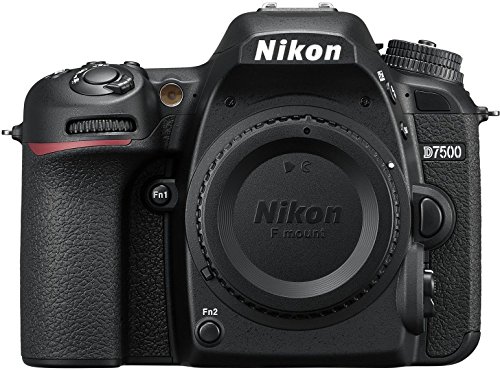
Product A · ASIN B06Y5ZCFHX
Nikon D7500 (model 1581, body only)
Last observed offer
$696.95 List Price: $999.95
Per listed package.
Offer eligibility must be confirmed on Amazon.
Checked 2026-10-19 17:39 UTC. Price and availability may change.
Product B · ASIN B0F3HJD64Y
Nikon Z5 II (model 1680, body only)
Check Amazon for the current price and availability.
Pickoryx may earn a commission from qualifying purchases through the paid Amazon links on this page, at no added cost to you.
The buying question
Will a Z5 II body make sense with the lenses you already own, or does staying with the D7500 better fit your current kit and optical-viewfinder preference?
The D7500 keeps Nikon F-mount DX capture and an optical pentaprism finder; the Z5 II changes to a full-frame FX sensor, Z mount and electronic finder, while F-mount reuse requires an adapter and a lens-by-lens compatibility check.
Quick verdict
Choose Nikon D7500 (model 1581, body only) if
- Your current F-mount lens works on your D7500, you want to keep that native setup, and the D7500's DX image area suits your photography.
- You specifically prefer looking through an optical pentaprism viewfinder.
Choose Nikon Z5 II (model 1680, body only) if
- You want to build toward Nikon Z lenses and use the Z5 II's FX image area with an FX lens.
- You prefer an electronic viewfinder and accept that each legacy F-mount lens needs a compatibility check and the separately purchased FTZ II/FTZ adapter.
When the recommendation changes
- If your current lens is DX-format, the Z5 II fixes image area to DX with that lens; if it is an F-mount lens, verify the exact lens and wanted functions in Nikon's compatibility information before counting on reuse.
The differences that matter
Dx Fx Sensor And Lens System Transition
Nikon D7500 (model 1581, body only)
DX-format, 23.5 × 15.6 mm sensor; Nikon F mount; DX Large image size 5,568 × 3,712 pixels.[1]
What this changes: The Z5 II is a system transition: F-mount reuse needs an adapter and lens-specific check, while DX glass keeps the camera in DX image area. An FX lens is needed to use the FX image area.[1, 2, 3, 5, 4]
Optical Vs Electronic Viewfinder
Nikon D7500 (model 1581, body only)
Eye-level pentaprism single-lens reflex viewfinder.[1]
Nikon Z5 II (model 1680, body only)
0.5-inch, approximately 3.69-million-dot OLED electronic viewfinder with color balance and automatic or 18-step manual brightness controls.[2]
What this changes: The finder technology is a meaningful operating preference, but the specifications do not establish that one body produces better pictures or autofocus results.[1, 2]
Best for your routine
Keep a working D7500 F-mount DX kit and use an optical viewfinder
Best fit: Nikon D7500 (model 1581, body only)
Based on listed features, not comparative testing.
The D7500 is itself an F-mount DX DSLR with a pentaprism finder, so it preserves the current system without an FTZ adapter transition.
Move to Nikon Z and FX image area with a compatible FX lens, and use an electronic viewfinder
Best fit: Nikon Z5 II (model 1680, body only)
Based on listed features, not comparative testing.
The Z5 II provides the FX-format sensor and Z mount for that system plan, but the lens and adapter cost and exact-lens compatibility must be included in the decision.
Value and trade-offs
One or both observed offers have eligibility conditions, so no unrestricted price difference is shown.
Compare the live body offers alongside the cost of the lens system you need. A Z5 II body does not by itself complete an FX lens setup, and reusing an F-mount lens calls for an adapter and model-specific compatibility check.
Use live product-card prices when comparing; current-only price information does not support a purchase-timing recommendation.
Limitations
- These selected US product entries are body-only listings; neither includes a lens. Check the current listing contents before ordering.
- Nikon says F-mount lenses need the FTZ II or FTZ adapter on the Z5 II and that some features can vary by lens. The exact function set for an existing lens cannot be resolved without its model number; consult Nikon's compatible F-mount lens information before relying on autofocus or other functions.
- Nikon specifies that attaching a DX lens fixes the Z5 II to DX image area. Its listed Large DX size is 3,984 × 2,656 pixels; this is a file-size distinction, not a measured image-quality comparison.
- No hands-on testing or independent comparative testing was performed. This comparison makes no image-quality, autofocus, low-light, battery-life or overall-performance winner claim.
- Price information is dynamic; no historical-low, savings or buy-now/wait claim is made.
Questions shoppers ask
Can I use my D7500 F-mount lens on the Z5 II?
Nikon requires an FTZ II or FTZ mount adapter for F-mount NIKKOR lenses on the Z5 II and warns that some features vary by lens. Check your exact lens model in Nikon's compatibility information before assuming autofocus or other functions will work.
What happens if I put a DX lens on the Z5 II?
Nikon says the image area is fixed to DX (24 × 16) with a DX lens attached. The listed Large image size is 3,984 × 2,656 pixels; an FX-area Large image is 6,048 × 4,032 pixels.
Methodology and sources
Compared the assigned US body listings through Nikon's exact-model DX/FX sensor, lens-mount, adapter-compatibility, image-area and viewfinder specifications. Recommendations are feature-fit only; no performance winner is claimed.
AI-assisted research and writing based on Nikon's published specifications; Pickoryx did not conduct hands-on testing.
View 5 sources
- 1.Nikon D7500 DSLR | 20.9 MP DX Format Digital SLR CameraNikon USA · Official specifications · Source checked 2026-10-15 04:14 UTC
Evidence used on this page
- Tech Specs: Type, Lens Mount, Image Sensor Format and Viewfinder: Nikon identifies the D7500 as an F-mount single-lens reflex camera with a DX-format 23.5 × 15.6 mm sensor, 20.9 million effective pixels, 5,568 × 3,712 DX Large image size, and an eye-level pentaprism viewfinder. Its lens compatibility statement contains restrictions, so this draft does not claim every F-mount lens works.
- 2.Specifications: Nikon Z5II Digital CameraNikon Corporation · Official specifications · Source checked 2026-10-15 04:14 UTC
Evidence used on this page
- Specifications: lens mount, compatible lenses, image sensor, image size, viewfinder: Nikon specifies a 35.9 × 23.9 mm full-frame/FX sensor, Nikon Z mount, 24.5 million effective pixels and a 3.69-million-dot OLED electronic viewfinder. It says F-mount NIKKOR lenses require an adapter and restrictions may apply. The Large image sizes are 6,048 × 4,032 in FX area and 3,984 × 2,656 in DX area.
- 3.Compatible Lenses and AccessoriesNikon Corporation · Official specifications · Source checked 2026-10-15 04:14 UTC
Evidence used on this page
- Compatible F Mount Lenses: Nikon says F-mount lenses can be mounted to Z-mount cameras using an FTZ II/FTZ adapter, that some features may be unavailable depending on the lens, and directs users to its compatible F-mount lens table for lens-specific restrictions.
- 4.Attaching a LensNikon Corporation · Official specifications · Source checked 2026-10-15 04:14 UTC
Evidence used on this page
- F Mount Lenses: Nikon directs users to attach an FTZ II or FTZ mount adapter (available separately) before using F-mount lenses on the Z5 II and says they cannot be attached directly.
- 5.Image Recording Options (Image Area, Quality, and Size)Nikon Corporation · Official specifications · Source checked 2026-10-15 04:14 UTC
Evidence used on this page
- Adjusting Image Area Settings; Choosing an Image Size: Nikon says a DX lens fixes the Z5 II image area to DX. At Large, the listed dimensions are 3,984 × 2,656 in DX area and 6,048 × 4,032 in FX area.