
Nikon Z5 II vs Fujifilm X-E5: Which Sensor Format and Lens System Fits?
These cameras use different sensor formats and native lens mounts: Nikon lists the Z5 II as FX format with Nikon Z mount, while Fujifilm lists the X-E5 as APS-C with Fujifilm X mount. After considering your lens-system plan, compare the Nikon’s U1/U2/U3 saved-setting workflow with the Fujifilm’s three-position Film Simulation recipe dial. This is a format and control-fit answer, not a camera-performance ranking.
Published by Pickoryx · Published 2026-10-03
Source checked 2026-10-03 17:06 UTC
Products compared
Product A · ASIN B0F3HJD64Y
Nikon Z5 II
Check Amazon for the current price and availability.
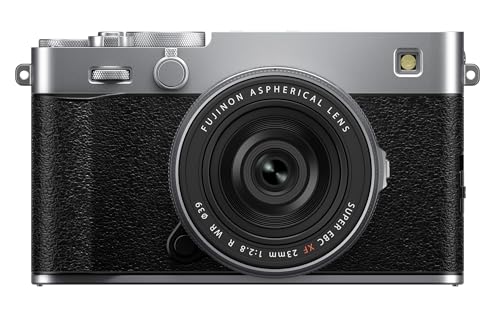
Product B · ASIN B0FBZ4G9G3
Fujifilm X-E5
Last observed offer
$1,899.00
Per listed package.
Offer eligibility must be confirmed on Amazon.
Checked 2026-10-19 16:57 UTC. Price and availability may change.
Pickoryx may earn a commission from qualifying purchases through the paid Amazon links on this page, at no added cost to you.
The buying question
Do you want the Z5 II’s FX-format sensor and Nikon Z mount or the X-E5’s APS-C sensor and Fujifilm X mount, and which camera’s documented controls match the settings you want to recall?
The Z5 II pairs an FX-format sensor with Nikon Z mount and documents U1/U2/U3 saved shooting setups; the X-E5 pairs an APS-C sensor with Fujifilm X mount and documents a dedicated three-position Film Simulation recipe dial.
Quick verdict
Choose Nikon Z5 II if
- You want a full-frame/FX camera on Nikon Z mount and want to save broader photo/video shooting setups to U1, U2, and U3 on the mode dial.
- You want a separate Picture Control button that opens its options in the shooting display.
Choose Fujifilm X-E5 if
- You want an APS-C camera on Fujifilm X mount and want three FS1/FS2/FS3 positions on a dedicated Film Simulation dial for recalling your own recipes.
- You commonly save JPEG/HEIF stills or compressed video when using Film Simulation; Fujifilm says a RAW-only still file does not receive it.
When the recommendation changes
- If you shoot RAW-only stills and do not also save JPEG or HEIF, Fujifilm says Film Simulations are not applied to the RAW-only file, which reduces the relevance of its recipe-dial workflow.
The differences that matter
Sensor Format And Native Lens Mount
Nikon Z5 II
The Nikon Z5 II uses Nikon Z mount and a 35.9 × 23.9 mm FX-format sensor.[1]
Fujifilm X-E5
The Fujifilm X-E5 uses Fujifilm X mount and a 23.5 × 15.7 mm APS-C sensor.[4]
What this changes: If you already own lenses or are planning a lens collection, compare the native mount and sensor format each camera documents, then confirm that the specific lenses and framing you want fit your plan. These specifications do not establish image-quality superiority or cross-brand lens compatibility.[1, 4]
Camera Control And Shooting Workflow
Nikon Z5 II
On the Z5 II, U1/U2/U3 save frequently used photo/video menu options, custom settings, and shooting-mode settings for recall by rotating the mode dial; the h button opens Picture Control options in the shooting display.[2, 3]
Fujifilm X-E5
The X-E5 has a Film Simulation dial with three customizable FS1/FS2/FS3 recipe positions. Fujifilm documents setting a recipe through the Image Quality Setting menu and recalling it at the corresponding dial position; still Film Simulations apply to JPEG/HEIF, not a RAW-only file.[5]
What this changes: The control question is what you want to recall directly: Nikon documents broader saved shooting setups on its mode dial and a separate Picture Control button, while Fujifilm documents three dial positions dedicated to image recipes. Choose by the setup you expect to change; neither feature establishes better image quality or faster operation.[2, 3, 5]
Best for your routine
You want three named film-recipe slots on a dedicated dial and commonly save JPEG or HEIF stills.
Best fit: Fujifilm X-E5
Based on listed features, not comparative testing.
Fujifilm documents three customizable FS dial positions and states that Film Simulations apply to JPEG/HEIF still files. This is a control/output fit, not a claim that the resulting images are better.
You want to recall saved photo/video shooting and custom settings from user positions on a mode dial.
Best fit: Nikon Z5 II
Based on listed features, not comparative testing.
Nikon documents U1/U2/U3 recall for saved shooting-menu options, custom settings, and shooting-mode settings. This recommendation concerns that documented workflow only.
Value and trade-offs
One or both observed offers have eligibility conditions, so no unrestricted price difference is shown.
Judge any price difference against the sensor format, lens mount, and documented control workflow that fit your use; this comparison does not calculate a complete lens-system cost.
There is insufficient price history to recommend buying now or waiting. Compare the current complete configurations at checkout.
Limitations
- Sensor format and lens mount are system-planning facts, not evidence that one camera produces better images. Confirm exact-lens compatibility and framing for your intended setup.
- No matched hands-on or controlled test was used to rank autofocus, image quality, stabilization, low-light results, or operating speed.
- Fujifilm states Film Simulation is applied to JPEG/HEIF stills and compressed video; a RAW-only still file does not receive the Film Simulation.
Questions shoppers ask
Can I use the same native lenses on both cameras?
The Z5 II uses Nikon Z mount; the X-E5 uses Fujifilm X mount. Check the exact lens mount and camera compatibility for the lenses you plan to use. This comparison does not establish cross-brand lens compatibility.
Will Fujifilm Film Simulation recipes appear in RAW-only still files?
Fujifilm says Film Simulations are applied to JPEG or HEIF still files, not to a RAW-only still file. If you save JPEG/HEIF plus RAW, the compressed image can carry the Film Simulation while the RAW remains available as a separate file.
Methodology and sources
Compared the Z5 II FX-format sensor and Nikon Z mount with the X-E5 APS-C sensor and Fujifilm X mount, then checked each manufacturer’s documented settings-recall controls and their output conditions. No image-quality, autofocus, stabilization, or speed testing was performed.
Automation assisted source organization and drafting; product facts are attributed to the cited manufacturers and no hands-on testing was performed.
View 5 sources
- 1.Nikon Z5II | Award Winning Full-Frame Mirrorless CameraNikon USA · Official specifications · Source checked 2026-10-03 17:06 UTC
Evidence used on this page
- Tech Specs, Type and Lens Mount (Nikon Z mount), Image Sensor Format (FX), and Sensor Size (35.9 × 23.9 mm).: Nikon USA identifies the exact Z5II camera model as a full-frame/FX body using Nikon Z mount and lists its sensor dimensions. The page does not identify a retailer-specific offer or package.
- 2.Z5II Online Manual: ExposureNikon · Official support · Source checked 2026-10-03 16:48 UTC
Evidence used on this page
- Choosing a Shooting Mode and U1, U2, and U3 (User Setting Mode): U1/U2/U3 recall saved positions by turning the mode dial; Saving User Settings lists photo/video menu options, Custom Settings, and shooting-mode settings.: The exact Z5II manual describes user mode positions U1–U3, the settings that can be saved, and recall by rotating the mode dial.
- 3.Z5II Online Manual: The h (Picture Control) ButtonNikon · Official support · Source checked 2026-10-03 16:48 UTC
Evidence used on this page
- The h (Picture Control) Button, section opening: pressing h displays Picture Control options in the shooting display, including selection, limiting, and modification.: The exact Z5II manual identifies a dedicated h Picture Control button and the options accessible from the shooting display.
- 4.FUJIFILM X-E5 SpecificationsFUJIFILM Corporation · Official support · Source checked 2026-10-03 17:05 UTC
Evidence used on this page
- Model Name, Lens Mount, and Image Sensor: FUJIFILM X-E5; FUJIFILM X mount; 23.5 × 15.7 mm (APS-C) X-Trans CMOS 5 HR sensor.: Fujifilm’s global exact-model specification page identifies X-E5 and lists its X mount and APS-C sensor dimensions. This is model-level camera specification, not a U.S. retailer package record.
- 5.Selecting and Customizing Film Simulations on FUJIFILM X-E5Fujifilm US Shop · Official specifications · Source checked 2026-10-03 16:48 UTC
Evidence used on this page
- Sections ‘What Image Types Have Film Simulations Applied?’ and ‘FUJIFILM X-E5’s Film Simulation Dial’ and ‘Customizing FUJIFILM X-E5’s Film Simulation Dial’, including menu steps and FS1/FS2/FS3 positions.: Fujifilm's US X-E5 instructions describe the physical Film Simulation dial, three configurable FS recipe slots, their menu setup and recall, and file types to which Film Simulation applies.