
Nikon Z5 II vs Nikon D780: Which Camera Fits Your Lenses and Video Workflow?
The D780 is the simpler fit for many F-mount owners who want compatible lenses to remain on a native F-mount body. The Z5 II is the fit for Z-mount users and for buyers who want its in-camera 12-bit N-RAW or 4K60/50 options, provided they accept the DX crop at 60/50p and the required card and editing workflow. Neither option is a measured image-quality winner in this comparison.
Published by Pickoryx · Published 2026-10-02
Source checked 2026-10-02 04:06 UTC
Products compared
Product A · ASIN B0F3HJD64Y
Nikon Z5 II Full-Frame Mirrorless Camera Body
Check Amazon for the current price and availability.
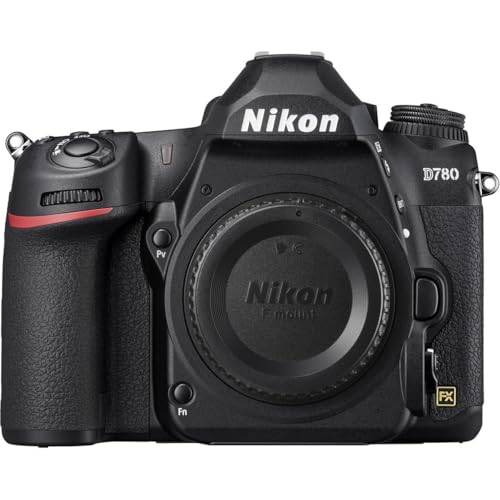
Product B · ASIN B083K41K2S
Nikon D780 DSLR Body
Last observed offer
$1,546.95
Per listed package.
Offer eligibility must be confirmed on Amazon.
Checked 2026-10-19 16:41 UTC. Price and availability may change.
Pickoryx may earn a commission from qualifying purchases through the paid Amazon links on this page, at no added cost to you.
The buying question
Will your current NIKKOR lenses keep the autofocus workflow you need, and do the cameras’ internal or HDMI video formats fit your recording setup?
The D780 keeps compatible F-mount lenses on their native mount and records internal 4K up to 30p; the Z5 II is native for Z lenses, adapts selected F-lens functions, and adds in-camera 12-bit N-RAW up to 4K30 plus 4K60/50 with a DX crop. A D780 10-bit HDMI workflow needs an external recorder.
Quick verdict
Choose Nikon Z5 II Full-Frame Mirrorless Camera Body if
- You plan to use NIKKOR Z lenses natively, or want the Z5 II’s documented in-camera N-RAW 4K up to 30p.
- You need 4K60/50 and can work with DX framing and Nikon’s card recommendations.
- Your F lens is in a class Nikon lists as autofocus-compatible through FTZ, and adapter-based use suits your setup.
Choose Nikon D780 DSLR Body if
- You already own F-mount lenses that Nikon lists as autofocus-compatible on the D780 and want to keep them on their native mount.
- Your video workflow is well served by internal 4K up to 30p in H.264 MOV/MP4.
- You need D780 10-bit HDMI output and already plan for a compatible external recorder and its 4K restrictions.
When the recommendation changes
- Check each existing lens by exact model and lens type: FTZ autofocus support differs across F-mount lens classes.
- If you need 4K60/50, the Z5 II documents those frame rates but fixes them to DX image area; the D780 specifications list internal 4K up to 30p.
- If your D780 plan depends on 4K 10-bit N-Log/HLG, budget for a compatible HDMI recorder and account for the no-stills and approximately 90% angle-of-view restrictions.
The differences that matter
Lens Compatibility Workflow
Nikon Z5 II Full-Frame Mirrorless Camera Body
The Z5 II accepts NIKKOR Z lenses directly. F-mount lenses require an FTZ II/FTZ adapter, and Nikon cautions that available features vary by lens. Its chart lists autofocus for AF-S G/E/D, AF-P G/E, and AF-I D classes, but not for AF Type G/D or other AF lenses; verify the exact lens before relying on autofocus.[1, 2]
Nikon D780 DSLR Body
The D780 uses the F mount. Nikon lists autofocus for AF-S/AF-P/AF-I G/E/D classes and for other AF NIKKOR except F3AF lenses; IX-NIKKOR lenses cannot be used.[3]
What this changes: A buyer with a legacy F-mount lens should check its exact type: the D780 keeps supported F lenses on their native mount, while a Z5 II transition adds the FTZ adapter and may remove autofocus for some older AF classes. A buyer already invested in Z lenses has the opposite native-mount fit. This is a compatibility-workflow recommendation, not an autofocus-performance comparison.[1, 2, 3]
Video Recording Workflow
Nikon Z5 II Full-Frame Mirrorless Camera Body
The Z5 II offers 12-bit N-RAW at 4K up to 30p (FX or DX) and 4K 60p/50p in H.265 10-bit or 8-bit. N-RAW is a NEV workflow intended for later computer editing; Nikon recommends V90 SD cards for N-RAW. 4K60p/50p is fixed to the smaller DX area, and DX lenses select DX automatically.[4, 5, 6, 7]
Nikon D780 DSLR Body
The D780 records internal 4K UHD up to 30p in H.264 MOV/MP4. For a 10-bit HDMI N-Log/HLG workflow, Nikon requires a compatible external recorder; footage is saved to that device rather than the camera cards. In 4K 10-bit mode still photos are unavailable and the angle of view is about 90%.[8, 9]
What this changes: Choose the recording path before the body: the Z5 II documents in-camera N-RAW and 4K60/50, but the latter uses DX framing and high-end formats bring card and post-production requirements. The D780 keeps internal 4K to 30p; its documented 10-bit log/HDR path adds an HDMI recorder and, in 4K, tighter still-photo and framing constraints. These are format and workflow facts, not a measured image-quality verdict.[4, 5, 6, 7, 8, 9]
Best for your routine
Keeping supported F-mount autofocus lenses on a native F-mount body
Best fit: Nikon D780 DSLR Body
Based on listed features, not comparative testing.
Nikon documents compatible F-mount autofocus lens classes on the D780; on the Z5 II, F lenses require an FTZ adapter and autofocus availability varies by exact lens class.
Using in-camera 12-bit N-RAW 4K or 4K60/50 capture
Best fit: Nikon Z5 II Full-Frame Mirrorless Camera Body
Based on listed features, not comparative testing.
Nikon documents these Z5 II file-size and frame-rate options, with N-RAW card requirements and a DX image area at 4K60/50. This does not establish better image quality.
Value and trade-offs
One or both observed offers have eligibility conditions, so no unrestricted price difference is shown.
Evaluate current offers dynamically against lens compatibility and the recording setup you need; this article does not assign either body a price premium.
Historical price analysis is unavailable, so timing guidance cannot be determined from this record.
Limitations
- This is a feature and compatibility comparison based on Nikon documentation, not hands-on or controlled image-quality testing.
- FTZ lens support varies by exact F-mount lens. Confirm the lens model in Nikon’s current compatibility chart before expecting autofocus or other functions.
- Video file type, frame rate, image area and card requirements must be read together. Z5 II 4K60/50 uses DX image area; N-RAW requires a suitable editing workflow and Nikon recommends V90 SD cards.
- D780 4K 10-bit over HDMI requires a compatible external recorder. Nikon states that 4K 10-bit footage is not saved to camera cards, still photos cannot be taken in 10-bit mode, and angle of view is about 90%.
- Prices and availability change; current catalog observations do not establish a historical low or a buy-now/wait recommendation.
Questions shoppers ask
Will my F-mount lens autofocus on the Z5 II?
It depends on the exact lens type. Nikon requires the FTZ II/FTZ adapter for F lenses and lists autofocus support for AF-S G/E/D, AF-P G/E and AF-I D classes; the chart marks autofocus unavailable for AF Type G/D and other AF lenses. Check the exact lens in Nikon’s compatibility chart.
Can the Z5 II record 4K60 without changing the crop?
No. Nikon says 4K60p and 4K50p are fixed to the DX image area. A DX lens also selects DX automatically.
Does the D780 need an external recorder for 10-bit video?
For the documented 10-bit N-Log/HLG HDMI path, yes: Nikon says a compatible recorder is required and that footage is recorded to the external device, not camera cards. In 4K 10-bit mode, still photos are unavailable and angle of view is about 90%.
Methodology and sources
Compared Nikon’s Z5 II lens compatibility and video reference-guide sections with the D780 F-mount lens table and movie/HDMI specifications. Recommendations are conditional on exact lens type, frame rate, image area, card and external recorder workflow. No comparative image-quality, autofocus-performance, or reliability measurements were conducted. AI assisted with organizing the research and drafting; factual statements were checked against the Nikon documents cited here.
Automation assisted with organizing Nikon documentation and drafting. The comparison is limited to documented lens compatibility and recording workflows; it does not claim hands-on product testing.
View 9 sources
- 1.Compatible Lenses and AccessoriesNikon · Official specifications · Source checked 2026-10-02 04:06 UTC
Evidence used on this page
- Compatible Lenses and Accessories, lines 968–984: Z-mount lenses can be used directly; F-mount lenses can be mounted on Z cameras with an FTZ II/FTZ adapter, and some features may be unavailable depending on the lens. Nikon points readers to its F-mount compatibility chart for restrictions.
- 2.Compatible F Mount LensesNikon · Official specifications · Source checked 2026-10-02 04:06 UTC
Evidence used on this page
- Supported Features, PDF pp. 1–2, lines 16–57: With FTZ II/FTZ, Nikon marks AF available for AF-S G/E/D, AF-P G/E, and AF-I D classes; the chart marks AF unavailable for AF Type G/D and other AF lenses, although manual focus remains available. Exact lens class matters.
- 3.Compatible F Mount LensesNikon · Official specifications · Source checked 2026-10-02 04:06 UTC
Evidence used on this page
- Compatible F Mount Lenses, lines 218–244: The D780 uses compatible F-mount lenses; its table lists autofocus for Type G/E/D AF-S/AF-P/AF-I classes and for other AF NIKKOR except F3AF lenses. IX-NIKKOR lenses cannot be used.
- 4.Video Frame Size and Rate OptionsNikon · Official specifications · Source checked 2026-10-02 04:06 UTC
Evidence used on this page
- Frame Size and Rate Options, lines 968–1006: The Z5II offers 12-bit N-RAW at 4K up to 30p (FX or DX) and 4K 60p/50p in H.265 10-bit or 8-bit. DX lenses automatically select DX-based video; an FX option cannot be selected with a DX lens.
- 5.Video Image Area OptionsNikon · Official specifications · Source checked 2026-10-02 04:06 UTC
Evidence used on this page
- Video Image Area Options, lines 968–994: For 4K 60p or 50p, the Z5II fixes the video image area to DX (about 23.7 × 13.3 mm); the manual gives the FX video image area as about 35.9 × 20.2 mm. Attaching a DX lens also selects DX automatically.
- 6.Approved Memory CardsNikon · Official specifications · Source checked 2026-10-02 04:06 UTC
Evidence used on this page
- Approved Memory Cards, lines 968–978: The Z5II supports SD, SDHC, and SDXC cards. Nikon recommends V90 SD cards for N-RAW 12-bit; for videos with high frame size or rate it recommends UHS Speed Class 3 cards rated at least 250 MB/s, warning that slower cards may interrupt recording or playback.
- 7.Video File TypesNikon · Official specifications · Source checked 2026-10-02 04:06 UTC
Evidence used on this page
- Video File Types, lines 968–1002: N-RAW is 12-bit NEV for later RAW processing and editing on a suitable computer; the camera also records an H.264 8-bit proxy. H.265 10-bit MOV offers SDR, HLG, or N-Log modes.
- 8.SpecificationsNikon · Official specifications · Source checked 2026-10-02 04:06 UTC
Evidence used on this page
- Movie specifications, lines 378–395: The D780 records internal 4K UHD 3840 × 2160 at 30p, 25p, or 24p; MOV/MP4 and H.264/MPEG-4 AVC are listed. N-Log and HLG are listed as movie output options.
- 9.Connecting to HDMI DevicesNikon · Official specifications · Source checked 2026-10-02 04:06 UTC
Evidence used on this page
- Connecting to HDMI Recorders and 10-bit restrictions, lines 236–269: D780 8/10-bit HDMI output supports an external recording workflow; N-Log is intended for post-production color grading and HLG for HDR workflows. 10-bit requires a compatible recorder and output is recorded directly to the external device, not camera cards. For 4K 10-bit no still photos can be taken and angle of view is about 90%.