
Insta360 Link 2 Pro vs Insta360 Link 2C Pro
Do you need a physical pan-and-tilt camera, or is fixed Auto Framing enough for calls and desk demonstrations?
Products compared

ASIN B0G3T1QKWL
Insta360 Link 2 Pro
You want the camera head itself to move as you present and will use its movement controls.
Last observed offer
$199.99
List Price: $249.99
Price checked
Observed offer ends
Observed condition: new. Coupon and subscription requirements unverified.
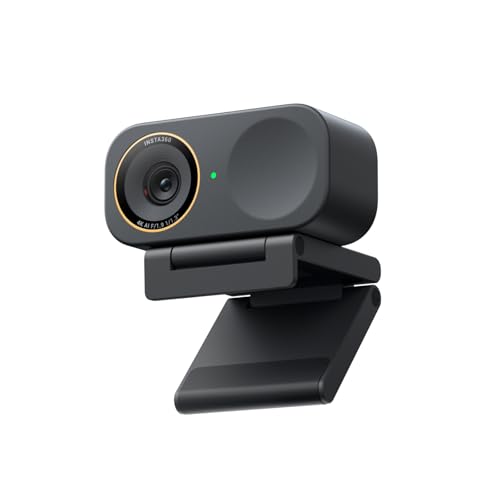
ASIN B0G3SSQMJQ
Insta360 Link 2C Pro
Your camera usually stays in one position and zoom-based Auto Framing suits your presentation style.
Last observed offer
$149.99
List Price: $199.99
Price checked
Observed offer ends
Observed condition: new. Coupon and subscription requirements unverified.
Prices are per listed package. Pickoryx may earn a commission from qualifying purchases through the paid Amazon links on this page, at no added cost to you.
Published by Pickoryx · Published 2026-11-08 · Source checked 2026-11-08 07:39 UTC
The main trade-off
Link 2 Pro moves the camera head and adds movement-zone controls; Link 2C Pro stays fixed and reframes with zoom. Privacy and DeskView also use different procedures.
Quick verdict
The main choice is movement versus a fixed camera: Link 2 Pro can physically pan and tilt, while Link 2C Pro uses Auto Framing to adjust zoom. Their privacy routines and DeskView setup also differ. Official instructions do not establish which tracks more reliably or produces better video.
Choose Insta360 Link 2 Pro if
- You want the camera head itself to move as you present and will use its movement controls.
- You prefer the documented lens-down and automatic microphone-mute routine when idle.
Choose Insta360 Link 2C Pro if
- Your camera usually stays in one position and zoom-based Auto Framing suits your presentation style.
- You prefer a physical privacy switch and are comfortable muting the microphone separately.
When the recommendation changes
- If you move beyond a fixed camera angle, Link 2 Pro's gimbal is more useful.
- If the camera stays at your desk and you prefer a tactile privacy switch, Link 2C Pro may fit better.
- Frequent desk demos make the gimbal-versus-manual-mount procedure more important.
The differences that matter
| Decision point | Insta360 Link 2 Pro | Insta360 Link 2C Pro |
|---|---|---|
| Subject Tracking And Framing | A two-axis gimbal physically pans and tilts. AI Tracking supports single/multi-person modes and configurable tracking/pause areas.[2, 1] | Auto Framing adjusts digital zoom/framing while the camera body stays fixed.[2, 1] |
What this changes: Choose whether the lens itself should move and offer movement-zone controls, or whether fixed-camera zoom framing fits. These published controls do not establish tracking accuracy.[2, 1] The better fit depends on your priorities | ||
| Privacy And Microphone Controls | When no platform uses audio or video, Link 2 Pro turns down after 10 seconds; it can also be tilted down manually. Privacy Mode automatically mutes its microphone.[3] | Link 2C Pro enters Privacy Mode with its physical switch. Mute its microphone separately in Link Controller.[3] |
What this changes: The choice is an automatic lens-down/mute routine or a physical switch with a separate mic-mute step. Neither procedure proves stronger overall privacy; check the microphone selected by the meeting app.[3] The better fit depends on your priorities | ||
| Desk Demo Setup | DeskView changes the camera angle with the gimbal; the magnetic mount can also be adjusted.[4] | DeskView requires manually adjusting the magnetic mount and fine-tuning the angle in Link Controller.[4] |
What this changes: For recurring paper or object demonstrations, choose between gimbal angle adjustment and manually repositioning the mount then refining the software angle. The documentation does not quantify setup time.[4] The better fit depends on your priorities | ||
Best for your routine
Presenter wants the lens itself to pan and tilt while they move.
Best fit: Insta360 Link 2 Pro
Based on listed features, not comparative testing.
Link 2 Pro's documented gimbal and AI Tracking controls fit this setup; that is not a tracking-accuracy finding.
Fixed desk setup where a tactile camera privacy switch matters more than automatic lens-down behavior.
Best fit: Insta360 Link 2C Pro
Based on listed features, not comparative testing.
Link 2C Pro has a physical switch; Link 2 Pro instead turns down automatically after inactivity or when manually tilted. Choose the routine you prefer.
Value and trade-offs
The offers shown are per listed package; check the quantities and current terms on Amazon before comparing totals.
If one live offer is higher, weigh it against whether its documented movement, privacy or desk-demo controls solve a recurring need. No fixed premium threshold is established.
There is not enough price history to recommend purchase timing. Check the live offer when shopping.
Limitations
- This compares documented controls and setup steps; it does not test tracking, image/audio quality or long-term reliability.
- Official feature descriptions do not establish which follows a moving subject more accurately or looks better in a real meeting.
- Check which microphone your meeting software uses; camera privacy mode does not establish that every external microphone is muted.
Methodology and sources
Compared the published steps for movement framing, privacy/microphone controls and DeskView setup. Recommendations are conditional feature-fit guidance, not measured performance conclusions.
Research assistance located manufacturer instructions; the comparison advice was checked against those pages.
View 4 sources
- 1.Insta360 Link 2 Pro & Link 2C Pro - Flagship AI-Powered 4K WebcamInsta360 · Official specifications · Source checked 2026-11-08 07:39 UTC
Evidence used on this page
- Link 2 Pro movement feature and Link 2C Pro feature (lines 282-299); advanced tracking control availability (301-313); modes and gimbal table (660-671): Manufacturer describes Link 2 Pro as physically panning/tilting and Link 2C Pro as automatically zooming/reframing; the specification table lists a 2-axis gimbal for Link 2 Pro and none for Link 2C Pro.
- 2.Link Series: AI TrackingInsta360 · Official specifications · Source checked 2026-11-08 07:31 UTC
Evidence used on this page
- Applicable models, Q1-Q4: Link 2 Pro supports AI Tracking, single/group modes and tracking/pause areas; Link 2C Pro uses Auto Framing and adjusts framing by zoom.
- 3.Link Series: Privacy ProtectionInsta360 · Official specifications · Source checked 2026-11-08 07:31 UTC
Evidence used on this page
- Applicable models, Q1-Q2: Link 2 Pro turns down after 10 seconds with no audio/video platform, can be manually tilted down, and mutes in Privacy Mode; Link 2C Pro uses its physical switch and needs mic input muted separately.
- 4.DeskView ModeInsta360 · Official specifications · Source checked 2026-11-08 07:31 UTC
Evidence used on this page
- Steps 1-2 and model distinction: Both support DeskView. Link 2 Pro adjusts the gimbal; Link 2C Pro requires manual mount adjustment and software angle fine-tuning.