
Logitech BRIO 4K vs Insta360 Link 2C Pro: Which Setup Fits Your Desk?
The BRIO is the clearer fit for a Windows Hello or Logitech Sync/Tune workflow. Link 2C Pro is the fit to consider for a magnetic fixed-position setup and Insta360 presentation controls. These are setup and feature-fit differences, not a test of image quality, tracking accuracy, or reliability.
Published by Pickoryx · Published 2026-10-19
Source checked 2026-10-19 15:33 UTC
Products compared

Product A · ASIN B01N5UOYC4
Logitech BRIO 4K
Last observed offer
$119.99
Per listed package.
Offer eligibility must be confirmed on Amazon.
Checked 2026-10-19 15:46 UTC. Price and availability may change.
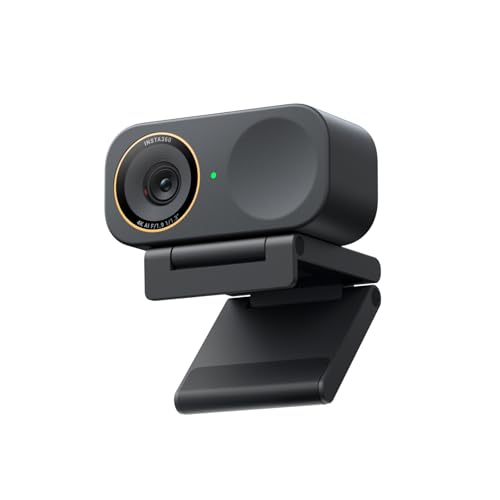
Product B · ASIN B0G3SSQMJQ
Insta360 Link 2C Pro
Last observed offer
$199.99
Per listed package.
Offer eligibility must be confirmed on Amazon.
Checked 2026-10-19 19:06 UTC. Price and availability may change.
Pickoryx may earn a commission from qualifying purchases through the paid Amazon links on this page, at no added cost to you.
The buying question
Do you need Logitech's documented Windows sign-in and device-management options, or does Insta360's Link Controller and presentation-control workflow better fit how you use a webcam?
BRIO documents Windows Hello plus Logitech Sync and Tune; Link 2C Pro pairs a magnetic fixed-position mount with Link Controller, touch or gesture controls, and presentation modes. Neither source set establishes a video-quality winner.
Quick verdict
Choose Logitech BRIO 4K if
- Windows Hello sign-in or Logitech Sync deployment is part of your setup.
- You want a monitor/laptop clip or a 1/4-inch tripod thread, and prefer selecting a field-of-view preset in Logi Tune.
Choose Insta360 Link 2C Pro if
- You want a magnetic mount that you center and angle on the display.
- Your desk demonstrations use Link Controller or Stream Deck controls, gestures, Whiteboard, or DeskView.
When the recommendation changes
- If your host, authentication, software policy, or mounting setup differs from the documented conditions, confirm compatibility and fit before buying.
The differences that matter
Host Login Device Management
Logitech BRIO 4K
Logitech documents BRIO support for Windows Hello, Logitech Sync deployment/management, and Logi Tune camera controls.[1]
What this changes: BRIO is a feature-fit choice when Windows Hello or Logitech administration matters; Link 2C Pro is a feature-fit choice when its controller workflow matters. No absence or incompatibility is inferred.[1, 3, 5]
Physical Mounting Presentation Setup
What this changes: The useful choice is which documented placement and presentation routine fits the buyer's screen and demonstrations. No setup-time, stability, framing-accuracy, or image-quality winner is claimed.[2, 1, 6, 3, 4]
Best for your routine
A Windows Hello sign-in setup where Logitech Sync or Tune is also part of the desired camera workflow
Best fit: Logitech BRIO 4K
Based on listed features, not comparative testing.
Logitech documents these BRIO workflows; the recommendation is limited to buyers who need them and does not imply Link 2C Pro lacks other authentication or management options.
A fixed webcam presentation setup using a magnetic mount and Insta360 controller or Stream Deck controls
Best fit: Insta360 Link 2C Pro
Based on listed features, not comparative testing.
Insta360 documents this Link 2C Pro setup and control route; the choice is about those steps, not measured presentation or camera performance.
Value and trade-offs
One or both observed offers have eligibility conditions, so no unrestricted price difference is shown.
A higher live offer would need to be justified by the sign-in, management, mounting, or presentation workflow that matters to the buyer; no fixed premium threshold is supported here.
There is not enough reliable price history to assess purchase timing.
Limitations
- Neither webcam was hands-on tested. The comparison uses manufacturer-published setup and feature information, not measurements of video quality, low-light output, tracking, call stability, or reliability.
- Insta360 identifies this camera as model CINSABPB; the selected retail page lists part number CINSABPB-S-B. Confirm the exact model and included accessories for the offer you choose.
- The checked Link 2C Pro sources do not establish Windows Hello or Logitech Sync support. That uncertainty should not be read as proof of incompatibility.
- Cached availability and price observations are not current purchase guarantees or a price-history assessment.
Questions shoppers ask
Does Link 2C Pro use a moving gimbal?
Insta360 describes Link 2C Pro as the fixed-position model. Its setup guide covers centering and angling the magnetic mount; this comparison does not assess moving-gimbal tracking performance.
Which one has a documented Windows Hello workflow?
Logitech lists Windows Hello support for BRIO. The Insta360 material checked here does not establish Link 2C Pro support either way, so verify if that is essential.
Can either be put on a tripod?
The BRIO datasheet lists a 1/4-inch tripod thread and says the tripod is not included. The Link 2C Pro setup guidance says a tripod is needed for vertical shooting; do not assume it is included in the selected retail package.
Methodology and sources
Compared manufacturer-documented host/software workflows and physical mounting/presentation setup. No performance measurements or quality ranking were used.
Automation helped organize manufacturer-published specifications and setup steps; neither webcam was hands-on tested.
View 7 sources
- 1.BRIO 4K HDR WebcamLogitech · Official specifications · Source checked 2026-10-19 15:33 UTC
Evidence used on this page
- Features and specifications: Windows Hello, Logitech Sync, Logi Tune/FOV presets: US manufacturer page identifies the BRIO 4K model and describes Windows Hello, Sync, Tune and selectable field-of-view presets. Feature documentation only; not a performance test.
- 2.BRIO DatasheetLogitech · Official specifications · Source checked 2026-10-19 15:33 UTC
Evidence used on this page
- Mounting section and America region part-number table: Lists a detachable universal clip for monitors/displays/laptops, a 1/4-inch tripod thread, and America part number 960-001105. States tripod is not included.
- 3.Insta360 Releases Insta360 Link 2 and 2C ProInsta360 · Official specifications · Source checked 2026-10-19 15:33 UTC
Evidence used on this page
- Link 2C Pro product description and feature sections: Distinguishes Link 2C Pro as the fixed-position model and describes magnetic mounting, Link Controller/InSight, Stream Deck integration, Auto Framing, gestures, Whiteboard and DeskView. No image-quality comparison is used.
- 4.Insta360 Link 2C Pro & Link 2 Pro User ManualInsta360 · Official specifications · Source checked 2026-10-19 15:33 UTC
Evidence used on this page
- About this manual; package contents; touch key, gesture and virtual-camera sections: Manual expressly covers both models and calls out differences; Link 2C Pro-specific setup and interface content is used only for Link 2C Pro. It describes included magnetic mount/cable items and notes advanced functions use the Insta360 virtual camera.
- 5.Which Platforms Is Link 2 Pro/Link 2C Pro Compatible With?Insta360 · Official specifications · Source checked 2026-10-19 15:33 UTC
Evidence used on this page
- Supported software/platform and OS sections: Official compatibility page applies to Link 2 Pro and Link 2C Pro and describes operating-system/platform support and Link Controller context. Does not establish Windows Hello or Logitech Sync compatibility.
- 6.Setting Up Link 2C ProInsta360 · Official specifications · Source checked 2026-10-19 15:33 UTC
Evidence used on this page
- Mount installation and first-use steps: Explains attaching and centering the magnetic mount, adjusting its angle and connecting the camera cable; vertical shooting requires a tripod.
- 7.Download and Install Link ControllerInsta360 · Official specifications · Source checked 2026-10-19 15:33 UTC
Evidence used on this page
- Download/install and virtual-camera setup steps: Explains installing Link Controller and the Insta360 virtual camera; some advanced presentation functions require selecting the virtual camera and first-time Mac use requires extension permission/restart. This is platform setup context, not generalized compatibility advice.